If you already pay for Prime and have Echo speakers, Fire TV fits and you’ll use voice more. If you want free content without hunting, and a remote your family won’t fight over, Roku fits. For remote and power quirks that matter when the TV is wall mounted, our streaming stick buying guide walks through cable length and USB power traps.
Apple TV 4K review 2026 is the price justified
Apple TV 4K is still the fastest box you can buy for pure streaming. The A15 moves between apps with no stutter. Scrubbing is precise once you get used to the touch pad. Picture is clean, Dolby Vision and HDR10+ are both supported, and Atmos plus spatial audio with AirPods works without fiddling.
The win is the home screen. No ads. Up Next actually pulls from most apps. Password entry by holding your iPhone nearby, or dictating letters, saves minutes each setup. Fitness+ shows heart rate from Watch in the corner. Arcade runs without a console.
But you pay for it. The Apple TV 4K’s technical specs show $129 for 64GB Wi-Fi only, $149 for 128GB with Ethernet and Thread. No HDMI cable in the box. And the Apple TV app pushes its own shows hard, while Siri still fumbles Netflix titles. If you live with iPhone and AirPods and watch daily, you’ll feel the speed every night. If you watch an hour of Netflix and YouTube, a $49 stick gives you the same picture for a third of the price. Your call.
Google Chromecast with Google TV is now Google TV Stream
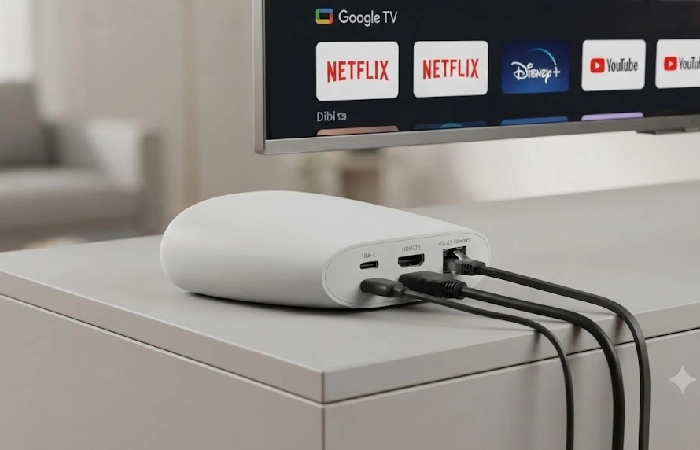
Google ended the dongle line. The Google Chromecast product line was replaced with the Google TV Streamer, which went on sale September 24, 2024, positioning it as the new default 4K box. There’s no HD model this time, only 4K, and the going price is $100, double the price of the most recent 4K Chromecast. That price jump buys you a wedge that sits on a shelf, 32GB storage, 4GB memory, and an Ethernet port.
Interface is why you’d pick it. Google TV pulls recommendations fairly across services and tracks what you watched so you can jump back in. The Home panel slides out over video so you can dim lights or check a camera without leaving the show. Program the star button to open that panel and you get one remote for TV and home.
AI plot summaries exist. You can ignore them. Buy this if you run Google Home and want the TV to double as a control surface. Our smart home controls compared breaks down how that panel differs from Alexa and HomeKit. If you want cheap and fast, Onn 4K Plus beats it on speed per dollar. If you want remote finder and backlit keys that work in a dark room, the Streamer earns its price.
Setting this up takes five minutes and kills most of your buffering problems
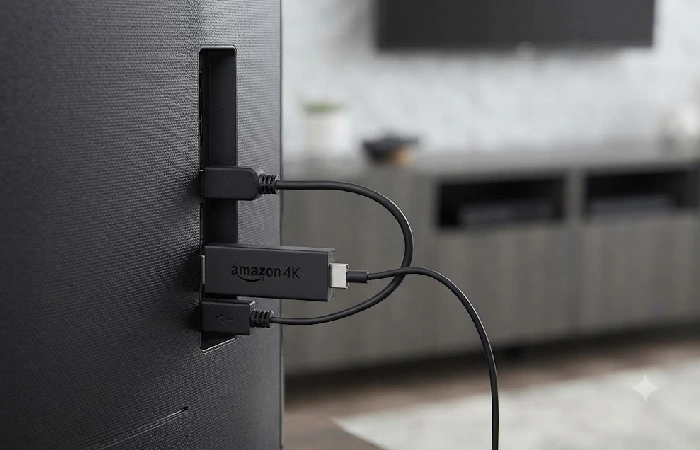
Three mistakes cause almost all 4K buffering: TV USB power, the wrong HDMI port, and 2.4GHz Wi-Fi. Fix those and everything else is fine-tuning.
- If a soundbar’s in the mix, plug into an HDMI 2.0 or 2.1 port marked eARC. Use the short extender so the stick isn’t cooking behind the TV.
- Power from the wall. TV USB sags under 4K load and causes reboots mid movie.
- Get on 5GHz or 6GHz Wi-Fi and actually test the speed on the device itself — you want 25 Mbps steady, not just a peak number.
- Update the OS. Turn on match content frame rate and range. Enable CEC so one remote handles both power and volume.
- Fire up a known Dolby Vision title, check TV info for the badge, and if the lips are off, adjust the audio delay.
One thing that’s saved a lot of hotel-room headaches: Roku, Fire TV, and Apple TV all get past captive portals on hotel Wi-Fi without a fight, so you log in once through the TV and keep using your own apps instead of whatever the hotel’s forcing on you.
What your 4k streaming devices pick decides next
Your 4k streaming devices choice sets the next buy. If you went Roku or Fire TV Stick 4K Max, your next move is a Dolby Atmos soundbar setup that passes through 4K without adding a second remote. If you went Apple TV 4K or Google TV Streamer, decide if you want a Thread and Matter hub now, because the 128GB Apple TV and the Streamer both act as hubs, and that changes which model you keep long term. For the rest of the setup, from soundbars to smart lighting, our best entertainment gadgets guide covers what pairs well with whichever streamer you land on.
FAQ
1. What’s the best 4K streaming device for most people in 2026?
Depends on what you’re optimizing for. Speed and Dolby Vision under $60? Go Fire TV Stick 4K Max. Want menus that don’t fight you and free live TV you can actually find? Roku Streaming Stick 4K is the one.
2. Roku vs Firestick 4K, which shows fewer ads?
Roku. Its grid has fewer banners. Fire TV pushes Prime Video and product tiles more often.
3. Is Apple TV 4K worth it over $50 sticks?
For heavy watchers with iPhone and AirPods, yes — apps open noticeably faster and the home screen carries no ads. For casual viewing, no.
4. Does Google TV Streamer do Dolby Vision and Atmos?
Yes. Up to 4K60 with HDR, Dolby Vision, HDR10+, and Dolby Atmos, plus spatial audio if you use Pixel Buds Pro.
5. What’s the best stick for an old 1080p TV?
Roku Streaming Stick HD or Fire TV Stick HD. Both now control TV power and volume, which the old Lite models didn’t.
6. Is Dolby Vision actually turned on?
Play a labeled title and hit Info on your TV remote. Look for the Dolby Vision badge. Then glance at your soundbar display; if it shows Atmos or Dolby Digital Plus, you’re set.
7. Best pick in India for local apps?
Fire TV Stick 4K Max and Mi Stick 4K handle most Indian apps fine, and both are easy to grab off Amazon.in or Flipkart. The imported Roku through Ubuy, around INR 5255, works too, but warranty claims drag. Buy local if after-sales support actually matters to you.
Go with the Fire TV Stick 4K Max if you want the fastest yes. It clears Dolby Vision and Atmos under sixty dollars and doesn’t ask you to buy into an ecosystem first. Roku’s the only real alternative, and only if you’d rather never see a promoted tile again.
One last thing before you buy
If you’re still stuck, ignore the spec sheet and look at what’s already plugged in around your TV. An Echo in the room makes Fire TV the obvious call. A house full of Apple gear makes the Apple TV 4K worth the extra cost, since you’re already paying for the ecosystem either way. Buying the device that matches nothing you own is how people end up with three remotes instead of two.
