Published: August 2, 2026
Last Updated: August 24, 2026
Smart home hub- all this nonsense about not needing one because bulbs and plugs now have Wi-Fi… no, not anymore, after a motion sensor and Zigbee lock, a Thread leak detector were installed only to discover they’re not all shown in the same app. Nine years on from supposed standards, in 2026! There’s finally some parity between brands but you still need a hub to pull together the variety of Matter, Zigbee, Z-Wave and Thread. This report ranks the 8 hubs most worth your consideration this year and which one best fits the gadgets you already have.
Quick answer: Echo Hub for Alexa homes, SmartThings for the broadest set of protocols, and Hubitat or Home Assistant Green for fully local.
Definition: “In 2026 the best smart home hubs are not judged by manufacturer alone, but by which confluence of Matter, Thread, Zigbee and Z-Wave compatibility works with the smart home you already have.”
Methodology: manufacturer specs, publicly available ones; that’s the baseline. Protocol support was verified using docs from the Connectivity Standards Alliance. We verified cost and feature claims by checking the current top ranking buying guides and manufacturer websites, both as of August 2026, though prices fluctuate. When you see “approx.” that’s because our sources didn’t agree at the time we checked.
Smart home hubs compared at a glance
| Hub |
Price |
Protocols supported |
Best fit |
Setup time |
Subscription required |
| Amazon Echo Hub |
$179.99, 8-inch touchscreen dashboard |
Matter, Thread, Zigbee, Bluetooth |
Homeowners interested in a wall-mounted control panel from Alexa and Ring |
Fifteen minutes of familiarity with an existing Amazon account |
No subscription for core functions |
| Samsung SmartThings Station |
$99, compact puck, no screen |
Matter, Thread, Zigbee, Z-Wave, Wi-Fi with local Edge processing |
Mixed-protocol premise utilizing equipment from different manufacturers |
Approximately 15–20 minutes using the SmartThings application |
No registration for the core functions |
| Apple HomePod (2nd Gen) |
Default HomePod price, no display |
Matter, Thread border router, HomeKit |
Households with all appliances using Apple/HomeKit |
Near-instant, automatically pairs when iPhone close by |
No subscription for the core functions |
| Aqara Hub M3 |
Approx. $120–$160, compact puck, no screen |
Matter 1.4, Thread border router, Zigbee 3.0 |
Households that want one hub to bridge Apple Home, Google Home and Alexa simultaneously |
Lightest of the eight, plug in and scan a QR code from any of their many apps |
No subscription for the core tasks |
| Hubitat Elevation C-8 Pro |
Absolutely close to 150 dollars, with no screen |
Matter 1.5, Z-Wave 800 Long Range, Zigbee 3.0, Bluetooth, Wi-Fi, Ethernet |
Privacy-aware households desiring totally local automation with no cloud reliance |
More complex and longer learning times compared to app-based hubs, a web interface with a higher learning curve |
No subscription to sustain the basic features |
| Home Assistant Green |
Approx. $200, no screen |
Zigbee, Z-Wave (via add-ons), Thread, Matter, Wi-Fi, entirely local processing |
Household that is technically savvy, will want the most extensive device library and will be unconcerned about not being connected to the cloud |
Longest of the eight, common assumption is a few days for integrations to be set up |
No fee for main features |
| Homey Pro (2026) |
Around $500, no display |
7 protocols in total: Z-Wave Plus, Zigbee, Wi-Fi, Bluetooth, Infrared, Matter, Thread |
Households with extensive, diverse device counts which require infrared/433MHz legacy support in addition to Matter |
Moderate, press and guide through app-based installation, still more complex than either Echo Hub or HomePod |
No subscription for core functions, with all features functional without any add-ons |
| Google Nest Hub Max |
Approx. $230, 10-inch touchscreen with built-in camera |
Wi-Fi, Thread border router, Matter (no native Zigbee radio) |
Google Home households offer a display with high video call potential rather than high coverage of protocols |
Approximately 20 mins through Google Home app |
There is no subscription that could be used for the core operations; the camera history of Nest Aware is a different subscription for an extra fee |
Standalone row note: Support for local-only execution trades setup time for automations that keep running even if the internet is out, which the cloud-first hubs discussed above in this table can’t match.
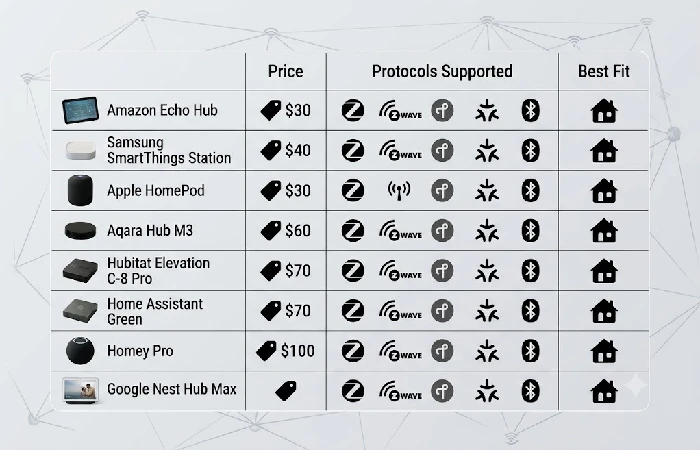
What a smart home hub actually does in 2026
A smart home hub is the layer that allows these disparate wireless protocols to communicate with a one-in-one-out user experience, instead of five in five out. Absent a hub, a Zigbee lamp, Z-Wave lock, and Thread sensor all require their own bridge, let alone automations across brands that either won’t work or are greatly delayed through clunky hacks. Furthermore, in 2026, hubs will also be Matter controllers, translating the Matter standard into commands that your existing Alexa, Google Home, or Apple Home setup will already know. For a more detailed explanation of how Matter, Thread, and Zigbee exist in relation to each other and the rest of the category, the smart home hubs and voice assistants pillar guide delves into each protocol a little more than this comparison demands.
The 8 best smart home hubs you can look for right now
Amazon Echo Hub — best for Alexa and Ring households
Echo Hub is for households already embedded in Alexa who are looking for a dedicated wall-mounted screen to manage and control things, rather than doing so through a phone. It’s an 8” monitor that costs $179.99 with native threads for Matter, Zigbee, and Thread. It is set up in about 15 mins with an existing Amazon account, with any existing Alexa devices automatically appearing on the dashboard.
A tradeoff to consider: Amazon Sidewalk is enabled by default on Echo devices, deploying a low bandwidth mesh network that can transmit some small amounts of data for nearby users’ Ring cameras or Tile trackers. Sidewalk can be deactivated in the Alexa app without disabling the main smart home features. If you want to compare hubs based on device-level security, check for the FCC’s Cyber Trust Mark, a voluntary label indicating that the products adhere to minimum cybersecurity practices prior to purchase.
Samsung SmartThings Station — best all-around protocol coverage
The $99 SmartThings Station supports Matter, Thread, Zigbee, Z-Wave, and Wi-Fi, with local Edge driver handling that allows certain automations to persist even when your internet goes down. That four-protocol mix for $99 blows both Echo Hub and HomePod out of the water for homes that already have a Z-Wave lock or some relatively dated Zigbee sensor. You can expect the setup to take around 15 to 20 minutes via the SmartThings app. It has no built-in display, so connect it to a screen device if a wall-mounted dashboard is what you’re after.
Apple HomePod — best for HomeKit-only homes
If every device in the house has an iPhone to connect through, and there are no Android devices at all, then the HomePod is the easiest home automation setup to use: just bring an iPhone near and the pairing screen comes up. It is a support Matter and it has a built in Thread border router, so Thread sensors and locks connect up without requiring a secondary bridge. The downside is that you are locked into that ecosystem – it doesn’t have the protocol breadth of SmartThings Station, and assumes that everyone in the household has already entered the Apple ecosystem.
Aqara Hub M3 — best cross-platform pick
M3 designed to work across Apple Home, Google Home and Alexa all at the same time, without requiring you to pick one. It operates on Matter 1.4, has a built in Thread border router (so you can add Thread-enabled smart home gear to Google Home), and has Zigbee 3.0 support (for older stuff). Setting up is the quickest of all eight here plug in and scan a QR code from whatever hub app and the M3 launches itself as a Matter controller to all three of them simultaneously. The downside: it is running the current Matter 1.4, not the current 1.5 firmware (on the Echo Hub, SmartThings Station and Hubitat C-8 Pro), so just a few of the newest Matter device types may not have support just yet.
Hubitat Elevation C-8 Pro — best for local-only privacy
The C-8 Pro runs all your home’s automations inside the house, not on a company’s servers, so your lights, locks, and routines stay active in the event of an internet outage. Costing around $149.95, it supports Matter 1.5, Z-Wave 800 Long Range, Zigbee 3.0, Bluetooth, Wi-Fi, and Ethernet, and hooks into Ring, Alexa, Google Home, and Apple HomeKit for voice controls on top of local computation. This keeps the automations on the device itself instead of having to come through the cloud and also limits the hub’s attack surface against network intrusion, consistent with guidelines laid out by NIST.
The honest tradeoff here is the interface. Hubitat’s web interface is serviceable but the visual quality leaves much desired compared to Alexa’s app, Apple Home, or Homey’s slick mobile app. If visually aesthetic design matters to you, this is not the choice. If the depth of operation and not relying on any company’s servers is more important to you, you can live with the aging interface.
Home Assistant Green — best for the deepest device library
Home Assistant Green built for tech-savvy homes, seeking total device interoperability without relying on cloud services by default. It has native implementations of Zigbee, Thread, and Matter, with additional support for Z-Wave through external radios, and it performs all automation in its hub without external servers. At about $200, this platform sets itself as a plug-and-play gateway into the vast, open-source environment of Home Assistant that includes thousands of integrations created by the community and not found in proprietary products.
The tradeoff is setup time. Where Echo Hub or HomePod takes 15 minutes, setting up Home Assistant Green to interface with a mish-mash of household devices can easily take a lot longer, since you’re building integrations instead of passing defaults. This is the hub for someone willing to put a weekend into it in return for having no vendor lock-in.
Homey Pro (2026) — best for large, protocol-heavy homes
Homey Pro is unique in its ability to handle seven different wireless protocols from one central device: Z-Wave Plus, Zigbee, Wi-Fi, Bluetooth, Infrared, Matter and Thread. That’s in addition to infrared and 433MHz for legacy AV equipment and garage door openers unavailable from any other hub on this list. Automations executed locally within the device and the refresh in 2026 doubled the memory to 4GB versus the preceding model, increasing the limit for practical use in large installations.
At about $500, the most costly hub on this guide, and because of that, it’s a really tough recommendation unless you’ve got a lot of different device types across lots of protocols in your house already. The price point it needs to command for a household predominantly using Matter+ Zigbee devices is considerably more protocol coverage than you’re going to use.
Google Nest Hub Max — best display for Google Home households
The Nest Hub Max is the most image-conscious of this guide’s hubs: a 10-inch screen with face-recognition ambient mode that displays your Dashboard as you enter the room, a camera good enough to lend itself to Zoom calls as well. It comes with a Thread border router, so Matter-over-Thread accessories can route through it to the wider local mesh.
The actual gap is protocol breadth given no native Zigbee radio, a purely Wi-Fi/Thread/Matter smart home works fine, but deployed Zigbee sensors or Z-Wave locks all require an additional bridge running alongside it. That’s an acceptable tradeoff in a new Google-first setup, less so in a move of an existing multi-protocol collection.
Matter compatible hubs: what the version number actually means
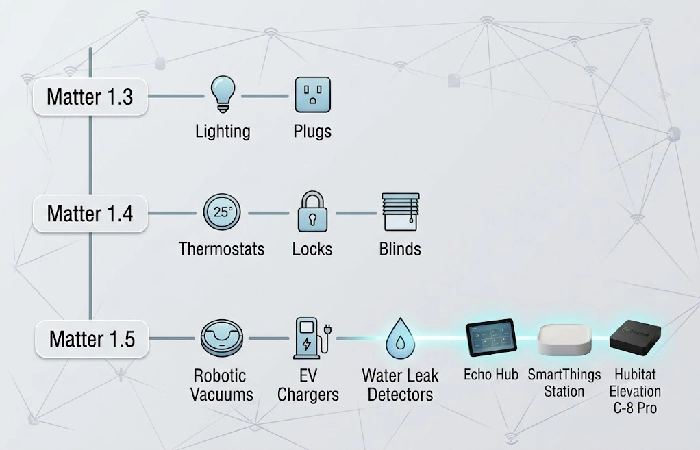
Matter release numbers, at the device category level, dictate which newer device categories a hub is actually able to control, rather than whether it’s “Matter compatible” at all. Echo Hub, SmartThings Station, and the Hubitat C-8 Pro all have the newer Matter 1.5 firmware. That means they support more device categories than the Aqara M3, which runs the older Matter 1.4 firmware.
If you’re purchasing an item from the Matter brand that’s recently on the shelves, look into which version of the specification it needs before assuming any hub on this list will do the trick immediately. Through the course of ongoing updates, these limitations will gradually be remedied. But at the buy stage, the Matter spec version number is a better indicator than simply relying on the “Matter compatible” label.
How to pick based on what you already own
Compare-shop these hubs. Like to sort your current devices by protocol first? Have mostly Zigbee/Z-Wave gear and aren’t eager to investigate the compatibility info for every single device? SmartThings Station’s four-protocol support takes the guesswork out at $99. Building from the ground up a house with no adopted ecosystem? The near-instant setup of the HomePod trumps its narrower protocol support. How about you already adore Alexa and Ring, and a touchscreen dashboard like the Echo Hub’s gives you that little bit more. Or maybe you opt for the Aqara M3 to future-proof yourself by adopting all three platforms at once.
If you prioritize privacy and local reliability above convenience, only two of these hubs are fully local by default. Hubitat is the simplest to set up, Home Assistant Green provides the largest device library should manual configuration not be an issue. Homey Pro only makes sense once the number of devices and protocols becomes a real justification, and Nest Hub Max earns its place on visual quality for Google households. For the broader category context the smart home hubs and voice assistants pillar guide covers that area in greater depth than can fit here.
FAQ
1. Do I need a smart home hub if my devices support Matter?
Yes, for most use cases. Matter is an application-layer protocol and is not a hub by itself, so you would still need a Matter controller such as Alexa, Google Home or Apple Home to do anything. Also, Thread based Matter devices would need a Thread border router.
2. Do smart home hubs require a monthly subscription?
No. None of these 8 hubs we’ve checked here require a subscription for most of the smart home activity. There are some optional cloud features (such as the additional Nest Aware camera storage on the Nest Hub Max) which require a separate fee but not the hub itself.
3. Is Amazon Echo Hub better than SmartThings Station?
It honestly depends what you’re working with. If you’re already knee-deep in the Amazon world and need a touch-screen dashboard, the Echo Hub is the way to go. However, if you have a mixture of different brands, the SmartThings Station’s greater protocol compatibility is probably worth the $99.
4. What is a Thread border router and do I need one?
A Thread border router is what connects a Thread mesh to your home internet. If you have any Thread enabled lock or sensor, a border router is essential. HomePod, Echo Hub, Aqara Hub M3, and Nest Hub Max all have one built-in.
5. What’s the difference between Zigbee, Z-Wave, Thread, and Matter?
Zigbee and Z-Wave are older standard protocols already widely adopted by most current smart plugs, sensors and locks. Thread is a relatively new low power mesh protocol that increases the longevity of sensor batteries and becomes more robust as more devices join the network. Matter built on top as an application layer standard, allowing use from different brands provided your hub supports the Matter version those devices need.
