Published: September 2, 2026
Last Updated: September 18, 2026
Running a small business means doing five jobs before lunch, and most of them don’t need a human doing them. The follow-up email, the invoice, the appointment reminder – they can go out the same way every time without anyone having to remember.
Quick Answer: Pick one task you do over and over. Automate it for free first. See how many hours it actually saves before you pay for anything.
Definition: For a small business, automation just means the software handles the repeat stuff on its own. Invoicing, chasing leads, that kind of thing. You don’t need an IT team or a big budget to set it up.
What Do Small Business Automation Tools Cost at Each Tier?
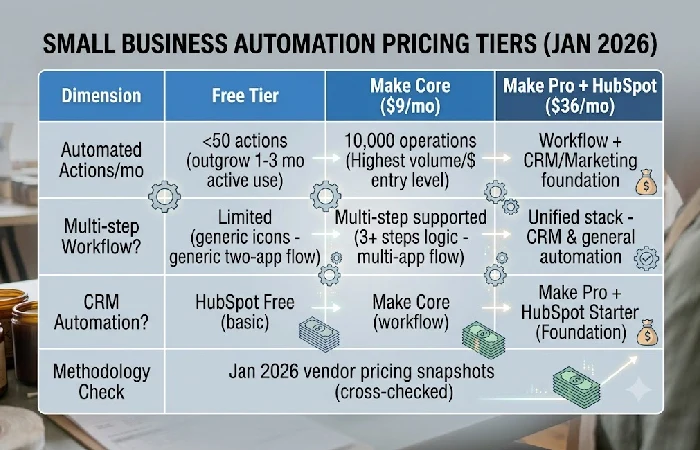
Small business automation prices for a combined stack start at $0 and go up to $36 a month, and which tier actually makes sense for you depends on how many automations you’re actually running, not how many pay features the plan seems to include. Here’s a chart showing what each price point actually gets you, based on vendor pricing in January 2026.
| Tool/tier |
Standalone verdict |
| Free tier (Zapier, Make, HubSpot Free CRM) |
Handles under 50 automated actions per month at $0, but most small businesses outgrow the free tier within 1 to 3 months of active use. |
| Make Core ($9/month, billed annually) |
Provides 10,000 operations per month, the highest volume-per-dollar of any entry-level workflow automation plan as of January 2026 pricing. |
| Zapier Professional ($19.99/month, annual billing) |
Adds multi-step workflows but costs roughly double Make Core for comparable task volume. |
| Make Pro + HubSpot Starter ($36/month combined) |
Covers workflow automation plus CRM and marketing automation in one $36/month foundation, suited to a business past its first 1–2 automations. |
Methodology: figures drawn from Automation Atlas’s January 2026 pricing snapshot, cross-checked against the vendor pricing pages cited in that guide. No figures are estimated.
Why Should a Small Business Consider Automation?
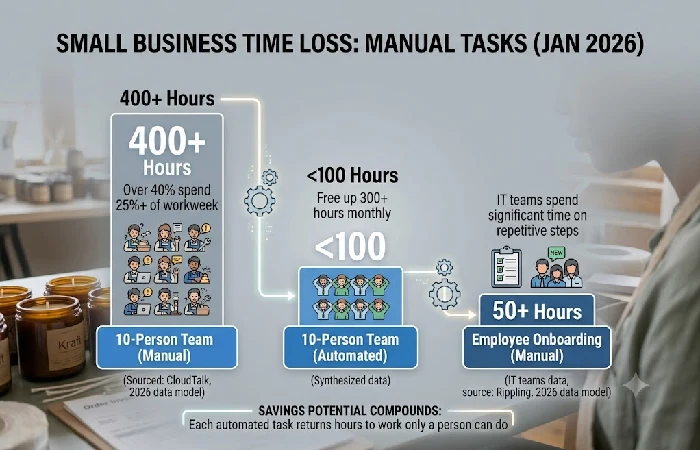
Automation gives small teams back the hours that get eaten up by repetitive admin work. And the payoff shows up fast. Firms that implement automation don’t just free up time, they grow faster than rivals that skip it. Salesforce found that small and midsize firms using automation saw 1.6 times the brand growth of those that didn’t.
The time cost of skipping automation is higher than most owners assume:
- Over 40% of surveyed workers spend at least a quarter of their workweek on manual, repetitive tasks — for a 10-person team, that adds up to more than 400 hours a month (CloudTalk, 2026).
- 51% of IT teams report spending significant time on employee onboarding and offboarding alone, tasks that follow the same steps every time (Rippling, 2026).
For businesses ready to think beyond one-off fixes and build a full business process automation strategy, the payoff compounds: each automated task frees up time that would otherwise disappear into busywork the following week too.
What Are the Best Tasks for Small Businesses to Automate First?
Automate lead follow-up before anything else — it has the clearest, fastest payoff of any task on this list. Leads contacted within 5 minutes convert up to 21 times more often than leads contacted after 30 minutes, based on research from Harvard Business Review (2011) and InsideSales.com (2021), compiled in Automation Atlas’s small business automation guide. Most small businesses lose that window simply because no one checks the inbox fast enough.
After lead response, prioritize in this order:
- Invoice creation – manual invoice creation can take between 10 and 20 minutes per invoice, automating this can save 5-15 hours a month for a business sending 30 to 100 invoices monthly.
- Appointment scheduling and reminders — automated reminders cut no-show rates by 40–60%, based on Calendly’s 2024 published data.
- Customer onboarding emails — a triggered welcome sequence saves 2–8 hours a month depending on customer volume, and removes the risk of a forgotten first-week email.
They all have three things in common worth checking before you automate anything else. They happen often, they follow the same steps every time, and they move data between two systems you’re already using.
What Are Affordable Business Automation Tools for Small Businesses?
You can build your first automation for $0 using free tiers on Zapier, Make, or HubSpot’s CRM before spending anything. Free plans cap out fast, but they’re enough to test whether an automation actually saves time before you commit budget to it.
Once you outgrow free tiers, pricing breaks into clear bands:
Avoid tools that make you sit through a multi-week onboarding call before you can even send your first automated email. That setup cost negates all your time savings for at least a quarter.
How Do You Start Automating a Small Business?
Start with a process that already runs the same way every time. Don’t start with whatever’s annoying you most, that’s a different problem. If the workflow is messy and inconsistent going in, the automation built on top of it will be too. Make the process consistent by hand first, then automate it.
Follow this sequence:
- Write down the current process exactly as it happens today, including the delays and exceptions.
- For small teams, go after the task that happens the most and varies the least. Lead capture and invoice creation, those are usually the two easiest places to start.
- Build it inside one platform, Zapier or Make work fine. Don’t split the steps across different tools. A first automation only takes 15 to 30 minutes to put together.
- Let it run on its own for a full week, don’t touch anything else, and jot down how many hours it actually saved you.
Resist the urge to automate five processes in week one. Automation Atlas’s research shows businesses that start with 3–5 simple automations on a single platform in their first three months build the habit needed to scale to 10–20 automations by month eight, without the tool sprawl that causes half-finished workflows to pile up.
How Do You Measure the ROI of Small Business Automation?
Measure ROI as hours saved per month times your hourly labor cost, minus the tool’s monthly price — if that number is positive within the first month, keep the automation. Most small businesses see 200–400% ROI in year one, based on cost and savings data compiled by Automation Atlas.
The math breaks down like this over a full year:
- Total year-one cost (platform, integrations, setup time and maintenance hours) varies from $1,868 to $8,520 based on scope.
-
Total year-one savings (labor hours, error reduction, faster payment collection) run between $8,900 and $36,600.
- The gap between those two numbers is the real argument for automating — not the software itself, but the hours it returns to work only a person can do.
Track this monthly, not annually. A tool that looked worth it in month one but stops earning its keep by month four is a signal to renegotiate, downgrade, or drop it — not a sunk cost to defend.
Frequently Asked Questions
1. Which task should a small business automate first if it can only pick one?
If there’s one task worth automating first, it’s lead follow-up, nothing else on this list comes close on payoff. The 5-minute window matters more than most people think: contact a lead that fast and conversion jumps up to 21 times compared to making them wait half an hour. None of that requires paid software either, a free Zapier or Make plan gets it running in under 30 minutes.
2. How much does business automation cost for a small business?
Pricing starts free. Add a CRM to your workflow tool and you’re at about $36 a month. That number jumps if you’re automating sales, marketing, and finance all together, budget $200 to $500 a month for that.
3. Is business automation actually worth it for a small business?
Most small businesses see 200–400% ROI in their first year once labor hours saved, error reduction, and faster payment collection are counted against tool and setup costs, based on Automation Atlas’s year-one cost and savings modeling.
4. What are the best free automation tools for a small business?
Zapier’s free plan (100 tasks/month), Make’s free plan (1,000 operations/month), and HubSpot’s Free CRM are the three most-cited starting points, sufficient for testing an automation before paying for anything.
If you’re automating your first process this month, pick lead follow-up, build it on a free plan, and check back in four weeks with your own hours-saved number before deciding what to automate next.
