Published: September 23, 2026
Last Updated: September 23, 2026
Quick Answer: tasks, milestones, deadlines – all in one live dashboard. Forget chasing updates over email. Forget spreadsheets too. It logs who owns each task. It flags what’s overdue. Raw activity turns into reports. Delays show up before they cost you a deadline.
Nobody can see the whole project at once. Deadlines slip because of it. Tasks live in one inbox. Milestones live in someone’s head. Status updates get buried in a chat thread nobody reopens. One shared view. Task status, due dates, progress, all in it. Project tracking software puts them there. A delay shows up as soon as it happens. Waiting a week to find out isn’t part of the picture anymore.
This page covers what the software actually does. How to set it up to track tasks and milestones. How dashboards turn that data into something you can report on. Why it tends to raise accountability across a team. And what to check before you commit to one.
Project tracking software is a tool. It tracks task status. Milestones too. Deadlines, in real time. Teams see a delay before it derails the project.
What Is Project Tracking Software?
It sits closer to the day-to-day than broad project management platforms. A PM tool might cover budgeting, contracts, long-range planning. Tracking software asks one question instead: is this task, milestone, or project on schedule right now?
Most tracking tools share a core set of parts. A task list with owners and due dates. A milestone or phase view. A dashboard that rolls activity into a status snapshot. Reports that show trends over weeks or months, not single tasks. Kanban boards and Gantt-style timelines are common ways to display that same data. The format changes. The underlying tracking doesn’t.
How to Track Tasks, Milestones and Deadlines

Start by breaking the project into tasks small enough that “done” is obvious. Then attach a single owner and a real due date to each one. A task with no owner rarely gets finished on time. Shared deadlines? Usually no deadline at all.
Group related tasks into milestones, like “design approved” or “beta released.” These give the team checkpoints bigger than a single task but smaller than the whole project. Set a deadline for each milestone. Check it against the task deadlines feeding into it. If the tasks add up to more time than the milestone allows, the milestone date is wrong, not the tasks.
Most tools let you connect tracking to apps your team already uses daily. Harvest’s guide to project tracking software points to integrations with tools like Asana, Trello, and Slack specifically. A disconnected system is harder to work with. Plug into daily operations instead. It beats any single feature on a spec sheet, most days.
Project Dashboards and Progress Reporting
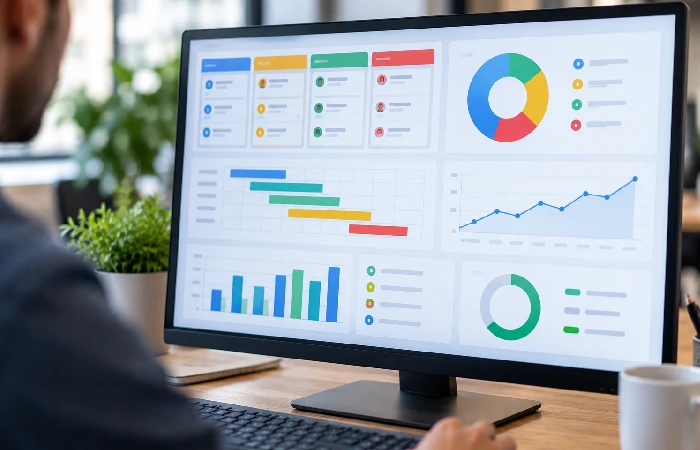
A dashboard is the fastest way to answer “where do we stand” without opening ten separate task lists. Task status, overdue items, milestone progress — all pulled into one screen, usually a chart or progress bar instead of a wall of text.
A report looks further out than a dashboard snapshot does. Which tasks consistently run late. Which team members are overloaded. Where bottlenecks keep showing up, project after project. That’s the pattern a report tracks over time, not just today’s status.
Atlassian’s overview of Jira’s tracking features covers this too. Visibility into task and issue status, that’s the mechanism behind it. Atlassian frames it as what keeps projects on schedule and within budget. Managers monitor progress with it. Allocate resources with it too.
Set up a dashboard once. Revisit it on a fixed schedule, weekly is common. Building a new report every time someone asks for an update isn’t necessary. Do it enough times and a dashboard stops being a one-off screenshot for a meeting.
How Project Tracking Improves Team Accountability
When a task has a visible owner and due date, it’s harder to let it quietly slide. Project tracking software makes ownership public. Anyone on the team, not just the manager, can see who’s behind on what.
That visibility changes behavior in two ways. First, team members tend to flag problems earlier. A task sitting untouched for days is obvious on a shared board. It’s not hidden in someone’s personal notes anymore. Second, status updates stop being a meeting agenda item. The dashboard already answers most of the “where are we” questions. Nobody has to ask.
Accountability also works upward. When a milestone slips, tracking data shows the cause. An overloaded person. A dependency that arrived late. A deadline that was unrealistic from the start. Each one needs a different fix.
How to Choose Project Tracking Software
Match the tool to how your team actually works. Not to the longest feature list. Same category of software, but a five-person team needs something different than a fifty-person team does.
If you’re picking software for a small team, it’s worth comparing options built for that scale before looking at enterprise platforms. See the guide to project management software for small business for tools sized to smaller teams and budgets.
Use this checklist before you commit:
| What to Check |
Why It Matters |
Question to Ask |
| Task and milestone views |
Shows whether you can see both day-to-day tasks and big-picture checkpoints in one place |
Does it offer list, board, and timeline views? |
| Dashboards and reporting |
Turns raw task data into a snapshot leadership can read in seconds |
Can you build a custom dashboard without help from IT? |
| Integrations |
Determines how much manual re-entry your team avoids |
Does it connect to the tools you already use, like Slack or Google Drive? |
| Pricing per seat |
Sets your real monthly cost as the team grows |
Is pricing per user, and does the price jump at a certain headcount? |
| Mobile access |
Keeps remote or field teams updating tasks in real time |
Is there a full mobile app, not just push notifications? |
Pricing is usually the deciding factor once the feature list is similar across a shortlist. Asana’s 2026 pricing breakdown is a good example of why. $10.99 per user per month for the Starter tier, billed annually. A 2-seat minimum. 5-seat increments above five users. Small print like that can move your real monthly cost well past the headline number.
Don’t budget off the headline price. Pull up the vendor’s current pricing page instead. Tiers like this change more than once a year.
FAQ
1. What is project tracking software?
A tool. It shows the real-time status of tasks, milestones, and deadlines across a project. No more manual status updates. Just a shared dashboard instead. Delays are visible as soon as they happen, not at the next check-in.
2. How is project tracking software different from project management software?
Full lifecycle. That’s project management software – budgeting, resourcing, long-term planning, all of it. Tracking software cuts that down. One question only: is the task or milestone on schedule right now?
3. Can you track projects for free?
Most major platforms offer a free tier for small teams. It usually caps the number of users or projects, though. Gantt-style timelines, advanced reporting, automation – these tend to drop off on free plans. Check whether those matter before relying on one long-term.
4. How do you track task deadlines without spreadsheets?
Move each task into a shared tool. Attach a due date and a single owner. Set the tool to flag anything overdue automatically. A spreadsheet can hold the same data. It just won’t alert anyone when a deadline passes. That’s the main gap tracking software closes.
5. What’s the difference between project tracking and time tracking?
Project tracking follows task and milestone status against a deadline. Time tracking logs the hours spent on a task, a different metric entirely; a task can be on schedule while running over its estimated hours, or behind schedule while under budget on time.
6. How often should you update a tracking dashboard?
Update task status as work happens rather than batching it into a weekly review, since same-day updates are what make the dashboard trustworthy. Set a fixed cadence, weekly is common, for reviewing trends even if daily task updates happen continuously.
A stalled task goes unnoticed. Too late by the time anyone catches it. Deadlines get missed for exactly this reason, most of the time. Project tracking software is the fix. Not another meeting.
Start with the checklist above first. From there, shortlist two or three tools worth shortlisting, picked for your team’s size. Before committing to a paid seat, run one real project through a free trial and see how it actually holds up.
For the bigger picture on choosing and setting up project management tools generally, see the pillar guide on project management software.
