Published: September 4, 2026
Last Updated: October 1, 2026
DevOps automation gets rid of the manual handoffs between writing code and running it in production, swapping them for scripted pipelines instead. Instead of someone manually testing a build, configuring a server by hand, or pushing out a release themselves, the automation just handles it – consistently, every time.
Quick answer: DevOps automation automates the manual CI, testing, and release steps using pipelines. When executed effectively, the days-long release process comes down to hours.
Definition: Automating the manual handoffs associated with code change integration, testing, and deployment through scripted pipelines, cutting release cycles from days to hours without adding staff.
What is DevOps automation?
DevOps automation refers to the automation of common tasks using scripting tools and pipelines over the entire software delivery life cycle. This spans everything from the application build to monitoring it once it’s live, without a person manually triggering each step. According to Amazon AWS, DevOps is “a combination of cultural philosophies, practices, and tools that increases an organization’s ability to deliver applications and services at high velocity”. Automation is the “how” – it’s what lets development teams actually put that philosophy into practice at scale.
The practice breaks down into four functional areas that most guides blur together:
- Build automation — compiling code and packaging it for testing
- Test automation — running unit, integration, and security scans on every change
- Deployment automation — pushing validated builds to staging and production
- Infrastructure automation — provisioning and configuring servers and environments as code
Treating these as one undifferentiated initiative is the most common mistake in early DevOps automation efforts. A team that automates the build step and stops there hasn’t automated its pipeline. It’s automated one-quarter of it.
CI/CD automation explained
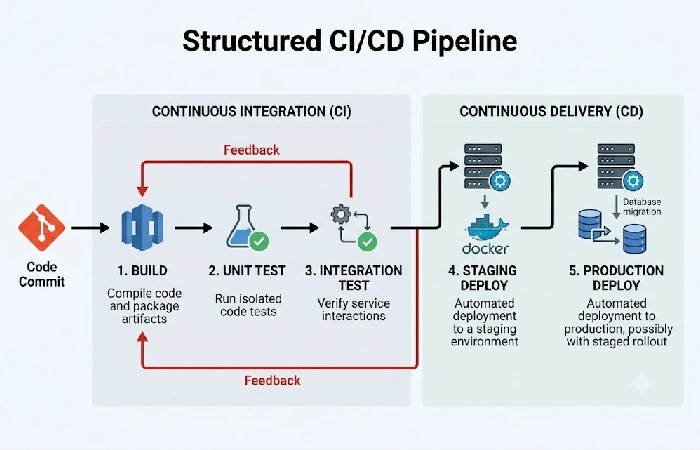
CI/CD automation is really two different processes that get mixed up in conversation, but they work independently in a pipeline. Continuous Integration, or CI, is when code gets integrated and built and tested automatically on a regular basis – so integration problems don’t sit around waiting for the next scheduled QA run, they show up within hours. Then there’s Continuous Delivery/Deployment, or CD, where that same pipeline pushes the validated code on to staging and production automatically.
- CI tools like Jenkins or GitHub Actions kick off build and test suites after every commit or pull request.
- CD tools such as GitLab CI/CD and CircleCI handle deployment once code clears CI – a lot of the time with staged rollouts, so one bad change doesn’t take down all of production at once.
For the teams that use mature CI/CD pipelines, the deployment cadence is multiple a day, versus (once a week or bi-weekly) for the manually released process.
It’s relevant to planning: if you automate CI but not CD, you just move the bottleneck further down the chain. More code gets validated faster, but it still waits on a human before getting deployed.
Automated testing and deployment
n most of the tutorials, the automated testing and automated deployment are aggregated into a single step. However, they address two different problems and demand very different set of tools. In fact, automated testing ensures that the code actually works before a human reviewer or a production server gets hold of it.
- Unit tests check individual functions in isolation, typically running in seconds per commit
- Integration tests verify that services work together correctly, catching the kind of failure that unit tests miss
- Security scans check for known vulnerabilities in dependencies before code merges, not after it ships
GitHub’s DevOps documentation notes that automated processes help teams avoid human error and free up time to focus on fixing problems rather than finding them. That’s the bottom line here; with a test suite that is run every time a commit is made, regressions that would escape detection under a human QA process are caught. At the deployment stage, automation is achieved by taking that verified build and pushing it through the stages to production through a uniform process that repeats reliably across environments, avoiding the drift that comes from someone manually copying files or running commands from memory.
Infrastructure automation in DevOps
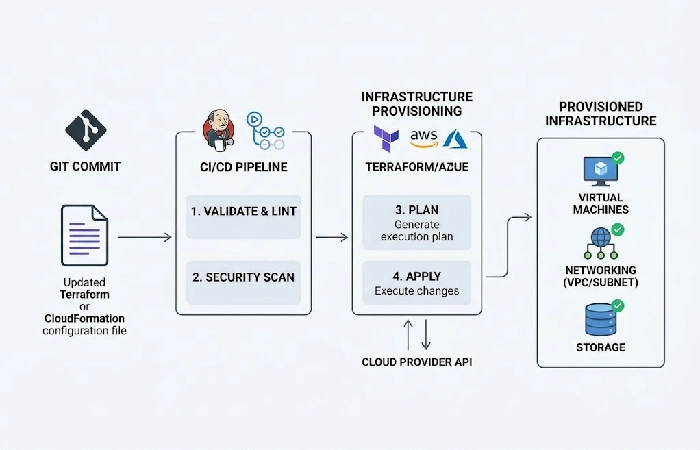
Infrastructure automation is about defining your servers, networks, and environments as code, instead of configuring them by hand one at a time, so every environment ends up matching what’s actually written in a version-controlled file. Most competing guides barely touch this part – they’ll mention Terraform by name and move right along.
- Infra as Code (IaC) tools such as Terraform, AWS CloudFormation or Azure Resource Manager let teams make infrastructure changes – spinning up a database, say, or a messaging queue – the same way they’d manage application code, going through pull requests and code review instead of someone just logging in and clicking around.
- Once servers are provisioned, tools like Ansible, Chef and Puppet take over managing their ongoing state.
- GitOps pushes the IaC idea a step further – the Git repository becomes the single source of truth for both application and infrastructure state, and automated processes keep checking the live environment against whatever’s declared there, fixing it when it drifts.
Skip the automation and you get configuration drift – production quietly drifts away from staging because someone made a manual fix under pressure and never wrote it down. That drift is often the true root cause behind “it worked in staging” problems, not a software bug.
DevOps automation best practices
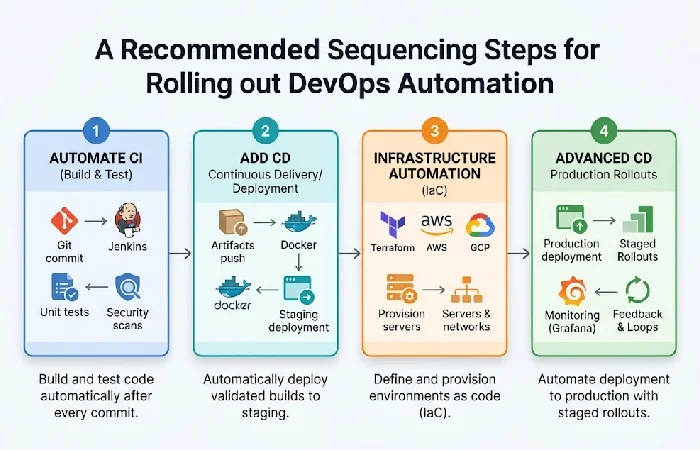
Sequencing matters more than tool choice when it comes to getting DevOps automation right. Start with whatever manual step is causing the most pain, get that automation working first, then branch out from there – don’t try to tackle everything at the same time.
- Automate CI at first. It’s the most useful and the least risky since a failed test does not impact production.
- Add CD after CI becomes reliable. Deploying automatically doesn’t really make sense until the test suite has earned that trust – where a passing build actually means it’s safe to ship, not just that it compiled.
- Infrastructure automation comes next. IaC is what stops environment drift from quietly wrecking everything built on top of it later.
- Minimize tool proliferation. Finding a common set of a small number of integrated tools reduces the coordination costs that cause automation projects to die midway.
- Quantify it. Log deployment frequency and mean time to recovery (MTTR) before and after every automation phase since those two numbers indicate if the effort is working.
For teams building out an IT automation strategy more broadly, DevOps automation is one piece of a larger picture that also includes IT service automation and infrastructure monitoring outside the software delivery pipeline specifically.
Frequently asked questions
1. What’s the difference between CI/CD automation and DevOps automation?
CI/CD automation only covers part of the picture – building, testing, and deploying code, specifically. DevOps automation goes further than that, pulling in infrastructure provisioning, configuration management, and keeping tabs on the production environment too.
2. Can DevOps be fully automated?
No. Automation takes care of the boring repetitive steps, but human judgment is still necessary for things such as determining if a release is ready to ship or what to do in the case of an abnormal incident. The idea is not full automation, but removal of manual work on steps that don’t have to be judged.
3. What’s the first thing to automate in a DevOps pipeline?
Continuous Integration. It has the lowest risk since a failed automated test doesn’t touch production, and it delivers fast, visible payoff that builds the case for automating further stages.
4. How do you measure DevOps automation success?
Deployment frequency and MTTR (mean time to recovery) are the two most apparent indicators. Successful automation is indicated by higher release rates and faster recovery times on failure, not just busier-looking dashboards.
Getting the sequencing right, starting with CI and working outward, matters more than which specific tool sits at each stage. For a closer look at how those tools stack up against each other, the IT automation tools comparison breaks down the options by function.
