Published: September 3, 2026
Last Updated: October 1, 2026
Cloud teams are spending hours on work that a script can perform more efficiently and accurately. Creating servers manually, updating systems one by one, tracking down a configuration that drifted overnight — none of that scales once you’re past a handful of environments. Cloud automation exists to take that load off your team, and put it into code that’s reliable and easy to trace.
Quick Answer: Cloud automation reduces the effort of manual provisioning, and the two most important tools are Terraform and Ansible.
Definition: Cloud automation is what happens when scripts, software, and policy take over the provisioning and config work a person used to do by hand.
What Is Cloud Automation?
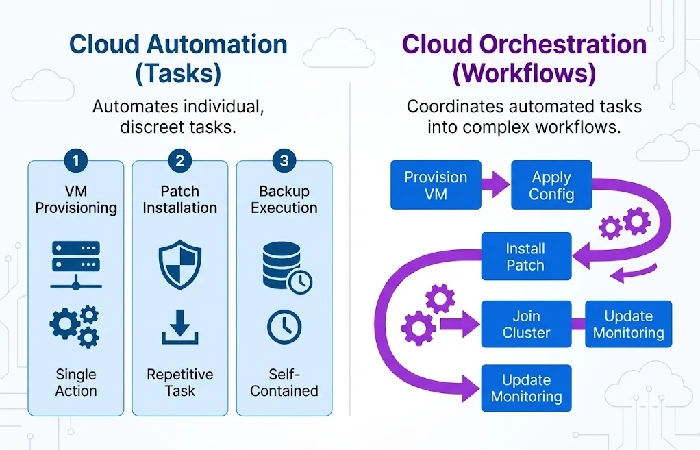
Cloud automation replaces the manual work of provisioning, configuration, and management of infrastructure through software, scripts, and policies that function autonomously. It applies across public, private, and hybrid cloud deployments and has become close to standard practice today — 85% of enterprises rely on it to automate mundane infrastructure tasks.
It’s worth separating automation from orchestration, since the two get used interchangeably and shouldn’t be. Automation handles individual tasks — spinning up a VM, applying a patch, running a backup. Orchestration sequences those automated tasks into a full workflow across your entire environment, coordinating resource, workload, and service-level actions together, a distinction IBM draws directly in its own documentation.
Automation without governance is where things go wrong. A misconfigured Terraform module can fail silently and repeatedly in multi-team or hybrid-cloud setups, requiring manual intervention to catch, per Sedai’s own field observations. Build drift detection and review gates into your automation from the start, not after the first incident.
What Cloud Tasks Can You Automate?
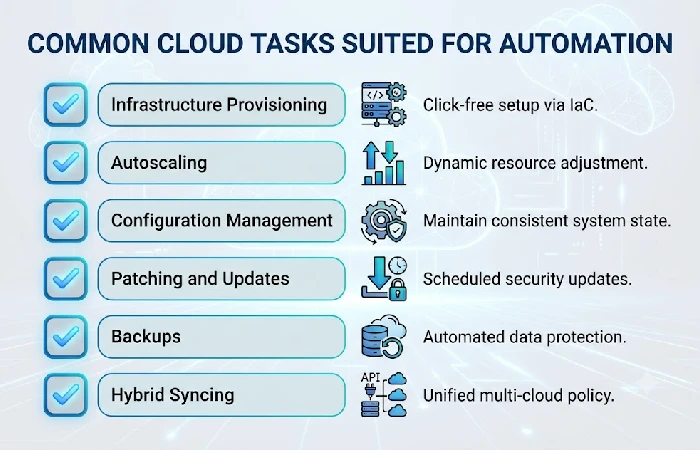
Most cloud teams begin with provisioning and scaling together, then move into monitoring, backups, and security once those foundations are steady. The tasks that pay off fastest are the repetitive, rule-based ones — the kind where doing it by hand is bound to cause errors sooner or later.
Common candidates include:
- Infrastructure provisioning — spinning up and tearing down servers, storage, and networking using Infrastructure as Code (IaC), instead of clicking through a console by hand
- Autoscaling — compute resources adjust up or down automatically, tracking traffic and demand as they shift
- Configuration management — maintaining systems in a known, consistent state and alerting to drift before it causes an outage
- Patching and updates — applying security and system patches on a schedule rather than waiting for someone to remember
- Backups — backups run on a schedule across the whole environment, so nobody has to be the one to trigger them
- Hybrid and multicloud syncing — one API layer runs the same policy code across on-prem systems and multiple clouds at once, rather than juggling a separate tool for every provider
Begin with whichever of the following items is currently responsible for the most support tickets or after-hours pages. That’s usually provisioning or patching.
What Are the Benefits of Cloud Automation?
The clearest benefit of cloud automation is faster, more predictable delivery with fewer manual errors, and the case studies back that up with real numbers rather than vague claims. Red Hat reports that telecom provider One New Zealand cut delivery times by 40% and reduced costs for deploying new workloads by 45% after centralizing its cloud operations on Ansible Automation Platform.
The UK’s Department for Work and Pensions adopted the same platform. The jump was similar. The actual time of deployment reduced from 50min to 10min and the team did not have to run different code bases in every environment, as published in a Red Hat case study.
Apart from being fast, automation also reduces human mistakes that occur while repeating monotonous manual activities, and centralizes management authority across data centers and hybrid clouds. Also mundane activities are lifted off the shoulders of the IT staff, enabling them to focus on more important work.
What Are the Best Cloud Automation Tools?
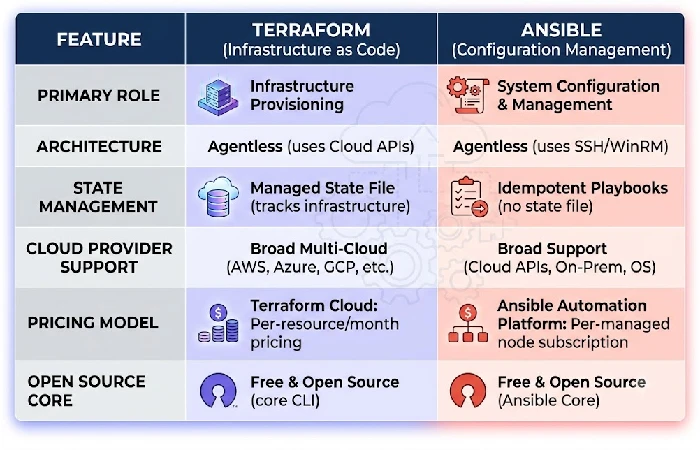
Between Terraform and Ansible, the two have most of cloud automation sorted. Now that the duo is under the same corporate umbrella, following IBM’s $6.4 billion purchase of HashiCorp, which completed in December 2024, it also means there’s a growing tendency to market and bundle the two synergistically rather than position them as competitors.
The two solve different problems:
- Terraform provisions infrastructure from code. State managed across multiple cloud providers. Pricing on Terraform Cloud runs $0.10 to $0.99 per resource per month, and its open-source core remains free.
- Using an agentless, SSH-based architecture, Ansible configures and manages systems that already exist, with no software required on target hosts. Red Hat sells Ansible Automation Platform as an annual subscription priced by the number of managed nodes, without a published list price, while Ansible Core stays free and open source.
Many teams run both: Terraform for provisioning, Ansible for configuration once resources exist. Enterprise buyers combining both platforms can often get a 20–30% discount over purchasing each tool’s enterprise tier separately, per the vendor bundling now common under IBM’s infrastructure portfolio. Kubernetes and Google Cloud’s Infrastructure Manager are worth evaluating too if your workloads are container-heavy or already sit inside Google Cloud.
For a broader rundown of automation software beyond the cloud-specific tools above, see the full IT automation tools roundup.
How Do You Build a Cloud Automation Strategy?
The main point is that you cannot automate everything immediately, but you should try to automate one high friction process at a time. In the first step, you should find out which process involves a large amount of manpower or causes a lot of incidents, then automate one single task before expanding.
A practical sequence to follow:
- Pick one repetitive task — provisioning, patching, or backups are usually the highest-friction starting points
- Choose the right tool for that task — Terraform for provisioning, Ansible for configuration
- Add drift detection and review gates before scaling the automation to more environments
- Standardize policies as code so the same rules apply across every cloud you use, not just one
- Expand gradually into orchestration, sequencing individual automated tasks into full workflows once each piece is stable on its own
This mirrors the broader approach covered in IT automation, which walks through the same principles across systems beyond just cloud infrastructure.
FAQ
1. What is an example of cloud automation?
One such case can be an automatic scaling process where servers are added or deleted according to the load at that very instant without any manual intervention. Some other daily cases include automated backups and patches.
2. What’s the difference between cloud automation and cloud orchestration?
Cloud automation deals with carrying out specific tasks like provisioning servers and installing patches. Orchestration sequences multiple automated tasks into one coordinated workflow across your infrastructure — automation is the individual building block, orchestration is what assembles them into a working process.
3. Is Terraform a cloud automation tool?
Certainly, Terraform is one of the top cloud automation tools out there, with Ansible being another. It creates and provisions infrastructure across cloud providers via code.
4. What are the benefits of cloud automation?
The three benefits that appear most consistently are faster deployment times, reduced risk of human error, and centralized governance within hybrid and multi-cloud systems, supported by evidence such as One New Zealand’s 40% improvement in delivery times after using Ansible Automation Platform.
5. How do you start automating cloud infrastructure?
Choose one manual task from a process that occurs most frequently and produces the most mistakes; automate only that part using the proper tool. After it becomes efficient, try to move into orchestration.
