Published: September 3, 2026
Last Updated: October 1, 2026
Network automation adds a software layer. That layer can provision, configure, monitor, and test devices on its own, without an engineer clicking through each one. It doesn’t need someone logging into every router and switch by hand through a CLI. One push sends the same configuration to hundreds of devices at once. The stakes are real. Cisco says up to 95 percent of network changes today still happen manually, and that’s exactly the bottleneck automation is built to remove.
Quick answer: Network automation swaps manual CLI commands for software that handles the configuring and managing. The payoff is fewer errors and more time back for engineers.
Definition: “Network automation is the use of software to configure, manage, test, and deploy physical and virtual network devices without manual, device-by-device intervention.”
What is network automation?
Network automation involves the use of software to automate mundane network management tasks that a network engineer might have previously completed manually via a CLI. These tasks include configuring, provisioning, testing, deploying and maintaining network hardware and software.
This is differentiated from older “scripted” automation, where an engineer creates an ad hoc script to do a specific task. Platform-based automation works differently — an instrument like Ansible deploys a common template to an entire fleet of devices at once. The difference is significant. Scripting still needs an operator to trigger and reprogram it each time. Platform automation doesn’t wait on a person at all — it runs on a schedule or in response to a trigger, without human initiation.
Key characteristics include:
- Device-agnostic execution — a single configuration push can be applied across routers, switches, and firewalls from different vendors
- Repeatability — run it twice and you get the same result each time, with no human variability creeping in.
- Auditability — every change is recorded, so rollback and troubleshooting are quicker than manually reviewing CLI history
How does network automation work?
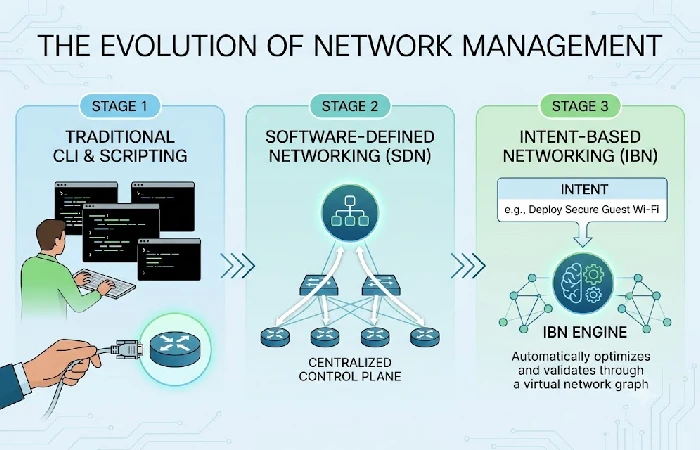
Network automation is the process of converting a desired state of the network into machine readable instructions that a controller or orchestration engine applies to the network automatically. This gets rid of the step where the administrator types in the commands manually into each device’s CLI.
The mechanism typically follows three layers:
- Scripted automation — tools run pre-written scripts, Python or Ansible playbooks, against a list of devices that’s already been defined
- Software-Defined Networking (SDN) — a centralized controller sits in the middle and splits the control plane from the data plane. That’s what lets one system manage traffic rules across the whole network
- Intent-Based Networking (IBN) — the network takes a stated business intent, say “give priority to video.” It translates that into the configurations needed to make it happen. It then keeps monitoring to confirm the end state still matches what was intended.
The cost of skipping this progression is measurable. According to TechTarget’s coverage of an ONUG panel, network architect Kevin Carney stated that more than 90% of issues are because of manual error, and it hasn’t changed in four decades. Cisco reinforces this from a cost angle: manually managed networks carry operational costs 2 to 3 times higher than the network itself.
Source stamp: Data reported by TechTarget/ONUG and Cisco, verified against current published documentation in September 2026.
What are common network automation tasks?
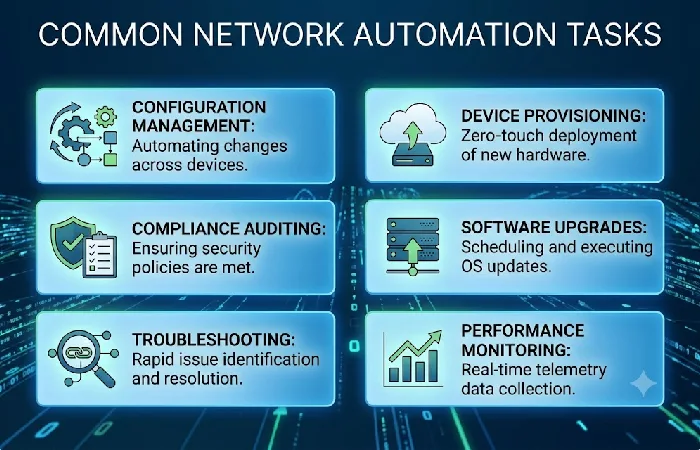
Common network automation tasks include configuration deployment, device provisioning, compliance auditing, and continuous monitoring — the four categories that account for most day-to-day automation workloads. Each replaces a manual CLI process with a repeatable, scheduled, or triggered workflow.
- Configuration management — applying uniform configurations (VLANs, ACLs, routing tables) to all of the systems at once.
- Device provisioning — automatically applying a baseline configuration to new hardware as soon as it joins the network (zero-touch provisioning).
- Compliance and configuration drift auditing — comparing live device configurations against a known “best-practice” baseline and reporting deviations
- Network monitoring and alerting — regularly checking on the health and traffic of various devices, running scripts to solve the problem when limits are reached.
- Patch and firmware updates — rolling out and certifying them across large arrays of devices (rather than taking many hours individually updating myriad pieces of hardware).
For a breakdown of which specific platforms handle each of these tasks — including Ansible-based and Python-driven network automation tools — see the dedicated tools comparison page rather than duplicating platform-by-platform detail here.
What are the benefits and challenges of network automation?
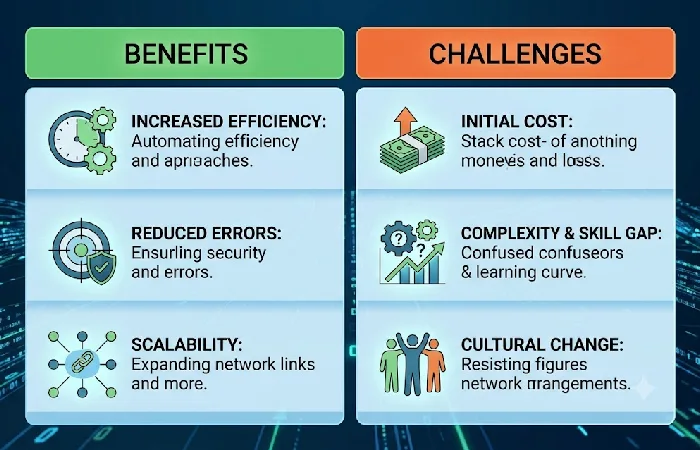
The primary benefit of network automation is a measurable drop in configuration errors and troubleshooting time; the primary challenge is the upfront skills and process investment required to deploy it safely. Both sides carry quantifiable costs.
Benefits:
- Reduces the error rate tied to manual CLI changes — HPE cites a ZK Research finding that a network engineer spends 10 hours a week on average finding and fixing Wi-Fi problems, time automation reclaims
- Standardizes configurations across large device fleets, reducing drift
- Speeds up provisioning from hours to minutes for zero-touch deployments
Challenges:
- Requires scripting or platform literacy (Python, Ansible, or vendor-specific orchestration tools) before deployment
- Poorly tested automation can propagate a single misconfiguration across an entire fleet instead of one device
- Human error remains a factor even in automated environments: Paessler reports human error causes 70–75% of all network outages, and a single hour of downtime can exceed $300,000 in cost
What are network automation best practices?
The best network automation implementations begin modestly, version-control every configuration change, and test new configurations in a lab before applying them to the production network. Missing any one of those three steps is the leading cause of outages due to automation.
- Begin with low-risk, high-repetition tasks — configuration backups or compliance checks — before automating changes that will affect live traffic.
- Version-control configurations using Git — this treats network config like Infrastructure as Code (IaC), making every change reviewable and reversible
- Test in a staging environment first — Auvik’s 2024 IT Trends Report found 64% of internal IT departments spend 10 to 20 hours per week resolving end-user issues, underscoring why untested changes carry outsized operational risk
- Document intent, not just commands — record why a configuration exists, not only what it does, so intent-based systems can validate against it later
These initiatives are just one aspect of a huge IT automation environment, one that spans networking, server management, and workflow orchestration. What we call network automation is actually one solution in an entire operational stack, not an independent one.
Frequently asked questions
1. Will network automation replace network engineers?
No, network automation doesn’t get rid of an engineer’s job. It redirects the work, away from repeating the same commands and toward validation, security policy, and exception handling. TechTarget’s reporting on this question concludes that automation changes the responsibilities rather than removing them, since someone still has to design, audit, and troubleshoot the automated systems.
2. Is network automation the same as SDN?
No, automation is a generic term that refers to using software to automate network operations, and SDN is a specific architecture that allows automating network control by separating the control plane from the data plane. Automation can take place even if a full SDN architecture does not exist, but using SDN makes fleet-wide automation more scalable.
3. What is intent-based networking?
Intent-based networking (IBN) takes network automation a step forward. Administrators specify a business intent in natural language. The network then interprets that intent and automatically implements the needed configuration. Running in the background are systems that constantly verify the actual network state still aligns with the intent, flagging or automatically correcting any drift.
4. What skills do I need to start with network automation?
All but the simplest entry points call for a light amount of Python scripting skill, plus some familiarity with a configuration management tool like Ansible. Those two abilities cover most of the current automation work. Knowledge of YANG data models and the NETCONF protocol becomes necessary once the automation moves past scripting, into more comprehensive orchestration work.
