Published: September 1, 2026
Last Updated: September 1, 2026
No-code business automation enables non-technical teams to create and operate digital workflows by visual drag-and-drop interfaces, rather than coding. A business user defines a trigger, any new form submission, a change in status, an incoming email, and links it to a series of actions within a visual builder application. The platform then carries out that workflow without touching source code.
Quick Answer: No-code business automation lets teams build workflows without a developer. That usually means faster builds and lower cost.
Definition: “No-code business automation means you build and run digital processes with visual, drag-and-drop tools. You don’t write programming code to do it.”
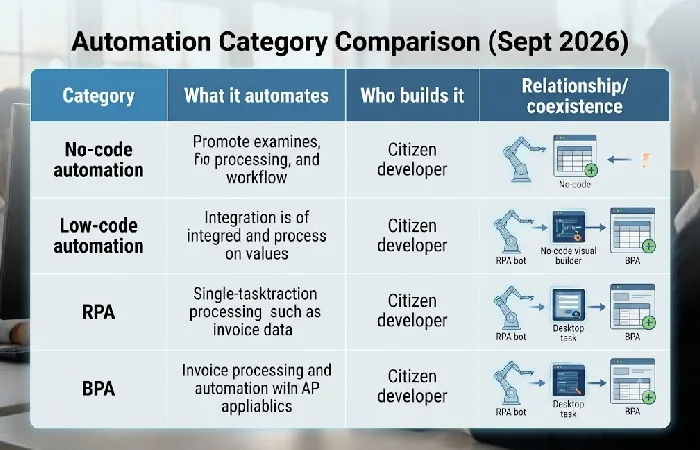
No-code vs. adjacent automation categories
| Category |
What it automates |
Who builds it |
Standalone description |
| No-code automation |
Rule-based digital workflows via visual interface |
Business users/citizen developers |
Requires zero programming; limited to platform-defined logic and connectors |
| Low-code automation |
Same as no-code, plus custom logic |
Business users with light technical support |
Allows custom code additions for edge cases the visual builder can’t handle |
| RPA |
Individual, repetitive desktop tasks |
IT or automation specialists |
Bots mimic clicks and keystrokes on existing screens without altering the underlying system |
| BPA |
Entire multi-step, cross-departmental workflows |
Process owners with IT governance |
Orchestrates approvals and handoffs across systems and teams, often incorporating RPA or no-code tools inside it |
Methodology: rows compiled from named vendor documentation (UiPath) and the RPA/BPA distinctions established on this site’s business process automation pillar page, not from unverified aggregator claims.
What is no-code automation?
No-code automation is a software class where a business user can develop flows entirely through a visual UI without any code. Tasks that would otherwise need custom code, connecting apps, transferring data, and running conditional logic, are handled by the platform instead.
The category has grown well past a niche developer-adjacent tool. The no-code AI platform market reached $4.28 billion in 2024 and is projected to climb to $44.15 billion by 2033 (Grand View Research, via this+that, 2026), and large enterprises — not just solo founders — now account for 63.10% of that platform revenue.
Three things define the category:
- Visual-first design: workflows are built by arranging blocks or nodes, not writing functions.
- Pre-built connectors: platforms ship with ready-made integrations to common business apps.
- Configuration over code: logic is set through dropdowns, conditions, and mapped fields.
How do no-code automation platforms work?
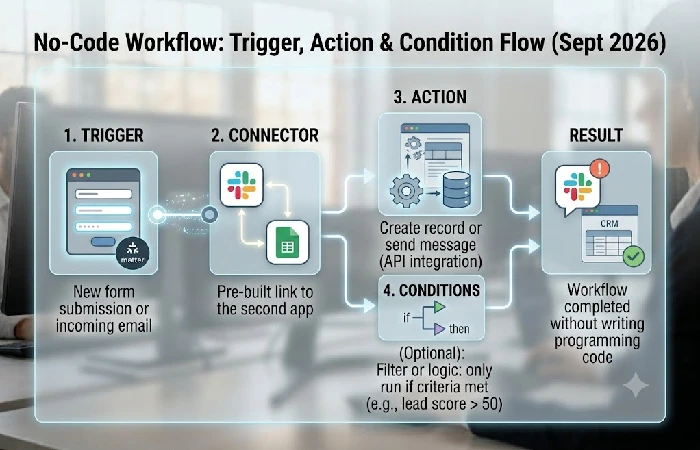
No-code automation platforms run on a trigger-and-action model: something happens in one app, and the platform automatically carries out a defined response in another. This is the same basic mechanic across nearly every tool in the category, from simple two-app connectors to more complex multi-step builders.
As UiPath’s explainer on no-code automation notes, the defining line between no-code and low-code is the amount of coding required — none in no-code, some in low-code — while both remain distinct from RPA, which mimics human clicks on existing screens rather than connecting apps through APIs.
A typical build involves:
- Trigger — an event that starts the workflow (new row, new email, form submitted).
- Connector — the pre-built link to the second app.
- Action — the task performed automatically (create a record, send a message, update a field).
- Conditions — optional filters that decide whether the action runs at all.
What processes can you automate without coding?
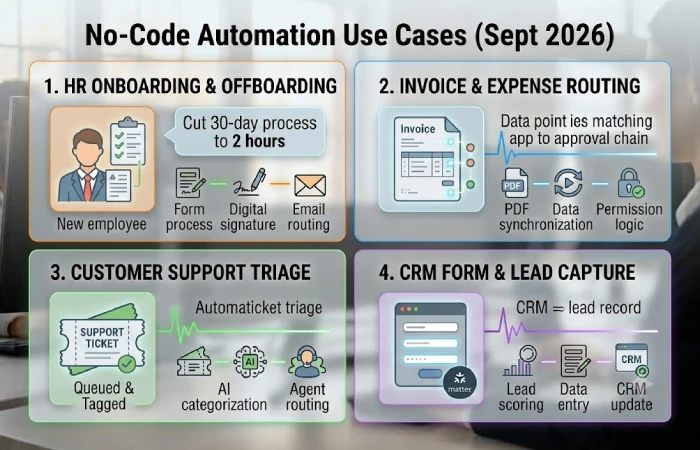
No-code automation works well on high-volume, rules-based work. If nobody has to make a judgment call partway through, a no-code workflow can usually run the whole thing on its own, start to finish.
Documented examples include:
- HR onboarding and offboarding paperwork, where one organization cut a 30-day process down to 2 hours using no-code automation (this+that, 2026)
- Invoice and expense routing, synchronizing data from accounting applications to approval chains. Customer support triage, queuing and tagging incoming tickets before they reach a human.
- Form fills processing; leads are captured and fed into CRM systems.
Processes that involve exceptions, unstructured judgment, or constantly changing rules are poor fits — those still need either a human in the loop or a low-code layer with custom logic.
What are the benefits and limitations of no-code automation?
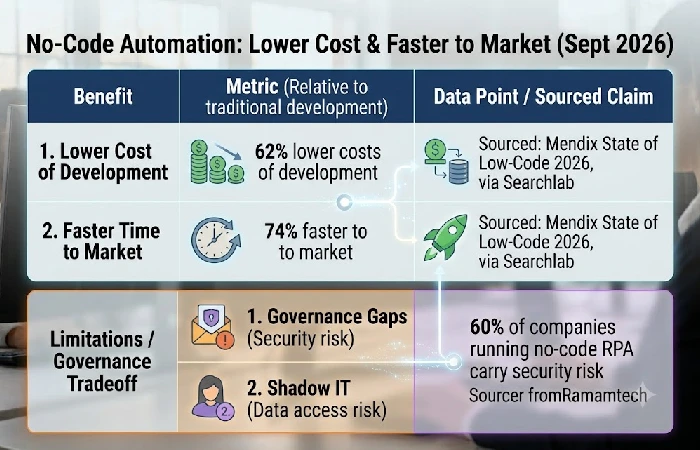
The biggest benefit of no-code automation is speed and cost but that benefit comes with a governance tradeoff that’s rarely discussed. Companies adopting no-code/low-code platforms are experiencing 62% lower costs of development and bringing their automations 74% faster to market relative to traditional development (Mendix State of Low-Code 2026, via Searchlab, 2026).
The limitation side is less about the technology and more about who’s allowed to use it unsupervised:
- Governance gaps: 60% of companies running no-code RPA carry security risk that traces back to poor management of who can build and deploy automations, not to a flaw in the software itself (Cybersecurity Ventures, via Ramamtech, 2026).
- One risk is shadow IT: automations built outside IT’s sight can introduce data access points IT doesn’t know about.
- There’s also a complexity ceiling. Processes that require custom logic or excessive exception handling become too complex for no-code tools and need low-code or full programming.
How do you build your first no-code automation?
Building a first no-code automation is a five-step process. Most people go from setup to a working automation in a few hours, not days. Keep the first one small. The point isn’t to automate something big, it’s to prove the trigger-action mechanic actually holds up before you trust it with anything business-critical.
- Choose one repetitive task, something you do the same way every time, such as moving form responses into a spreadsheet.
- Select a tool that has an existing connection to your current applications, as connector coverage differs significantly across tools.
- Map the trigger and the action in the visual builder – one event, one response, no branching yet.
- Test on sample data before switching the automation on for real records.
- Keep an eye on the first week of runs and change conditions as edge cases come along.
Once you’re comfortable with that, building more complex workflows follows the same pattern, adding a conditional branch or a second action isn’t a new skill.
Frequently asked questions about no-code automation
1. Is no-code automation the same as RPA?
No. No-code automation connects applications using either a pre-existing connector or application programming interface. RPA differs in that the bots simply replicate clicking and typing on pre-existing screens with no change to this ‘lower level’ system. The two can coexist, as each tackles a different mechanical problem.
2. What can’t you automate without code?
Processes that require judgment calls, handle constant exceptions, or need logic no connector currently supports. These typically need a low-code layer or custom development instead.
3. How secure is no-code automation for business data?
Security is a function of governance rather than just the platform. Reducing the risk involves providing automations with least-privilege access; tracking connection logs; and reducing the public exposure of any workflow that encounters sensitive information.
4. Do you need IT approval to use no-code automation tools?
Not necessarily. Straightforward, low risk workflows are frequently personally developed by business team members. Any workflow that involves customer data, financial applications, or other compliance sensitive processes should be reviewed before going live by your IT team, independent of the licensing model used.
Pick one repetitive task on your team this week and map it as a trigger and an action before choosing a platform — the mechanic matters more than the tool.
