Published: September 1, 2026
Last Updated: September 1, 2026
Robotic Process Automation (RPA) automates repetitive, rule-based digital activities through a set of software robots performing the same activities a human would do (click, type, copy and paste) without script injections into the underlying applications. Companies employ RPA when the process is rules-driven and volume-oriented and the task can be automated more efficiently and error-free with a robot than a human performing the same actions with a mouse or keyboard. We will explore the technical aspects, practical applications, and limitations of RPA in the broader context of business process automation efforts.
Quick Answer: RPA employs software bots to mimic human execution of rule-based digital activities, without impacting the applications, servers and operating systems it works in.
Definition: “RPA is software that uses rule-based bots to mimic human actions over existing digital interfaces and perform repetitive tasks automatically, without modification to the existing infrastructure.”
RPA vs Traditional Business Process Automation
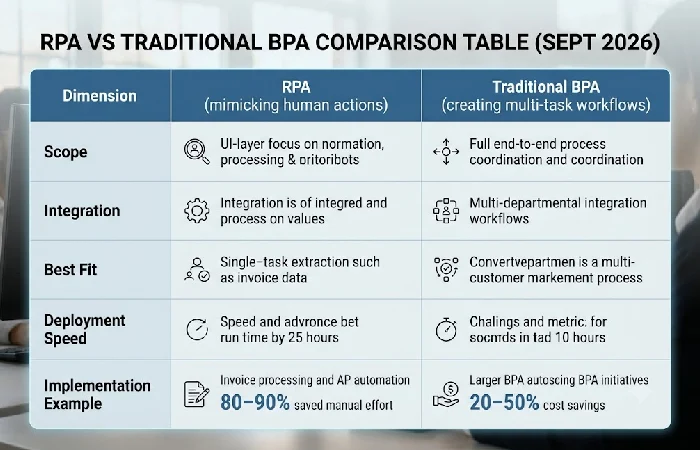
RPA and BPA, though they have a common goal, address different levels of the same problem. Working in a silo, RPA automates single or small sets of task steps, whereas BPA works across silos to create multi-task workflows.
Choose RPA if the process is stable, rule-based, and confined to a single task or a handful of steps, for example extracting invoice data, while BPA is more appropriate when an operational process requires coordination across multiple departments, systems, approvals, and so on.
| Dimension |
RPA |
Traditional BPA |
| Scope |
Single task or short task sequence |
Entire end-to-end workflow |
| Integration |
Works at the UI/presentation layer, no API needed |
Often requires deeper system integration |
| Best fit |
Stable, rules-based, few exceptions |
Complex, cross-functional processes |
| Deployment speed |
Days to weeks for a single task |
Longer cycles involving process redesign |
The decision rule: if the work happens at one person’s desk in a repeatable sequence, start with RPA. If it crosses departments and needs orchestration, plan for business process automation instead — the two are frequently combined rather than treated as substitutes.
What Is Robotic Process Automation?
RPA is the use of specialized software robots to mimic particular tasks a human would do on a computer: launching applications, entering information, shifting files back and forth between programs. It’s distinct from general-purpose AI, as IBM’s explainer on RPA points out: RPA is process-driven, i.e. it follows only the steps it’s configured to follow, whereas AI is data-driven, i.e. it can learn patterns from unstructured inputs.
Because RPA operates at the interface level rather than modifying backend systems, it fits into a broader business process automation strategy without forcing a company to rebuild its existing software stack. This makes it especially useful for organizations running legacy systems that lack modern APIs — the bot simply interacts with the screen the same way an employee already does.
How RPA Software Works
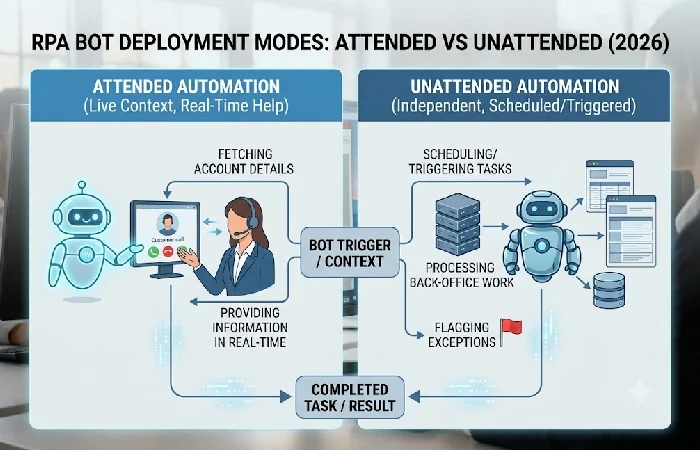
RPA bots are built by recording the exact sequence of clicks, keystrokes, and data entries a human performs, then replaying that sequence automatically on future transactions. Two deployment modes define how bots run in practice:
- Unattended automation — bots run independently on a schedule or trigger, with no human involved unless an exception is flagged.
- Attended automation bots help a live employee in a live context, often by providing information in real time (for example, finding account details while on a call with a customer).
As RPA exists on the presentation layer where the systems or applications underneath are unaffected, it has no dependency on API access or complex integrations and so works on legacy tech stacks without problem. When a bot encounters a scenario that is outside of its programmed rules including an exceptional invoice type, a missing field, it passes that transaction back to a human for review instead of guessing. That is where the reliability comes from: the bot doesn’t improvise, it just hands off.
Common RPA Use Cases
One prime area where RPA is proving most effective is in finance, HR, and customer service departments where the same high-volume process with well-baked-in rules is performed over and over. Among these, the largest and most widely deployed use case so far is in finance, with invoice processing and automating accounts payable: bots pull invoice data, check it against purchase orders, and key it into ERP systems, achieving upwards of 80–90% saved manual effort (SmartProcessFlow, 2026).
- Finance: Invoice data extraction, purchase-order matching, expense report validation
- HR: New-hire account provisioning, benefits enrollment data entry, compliance reporting
- Customer service: Order status lookups, ticket categorization and routing
- Retail/e-commerce: Inventory reconciliation across warehouses and online channels
Form registration processes specifically have been reported to run 40% faster with roughly half the staffing requirement when handled by RPA bots (Flobotics, 2026). These gains hold consistently in processes with structured inputs and few exceptions — the moment a workflow requires subjective judgment, RPA’s reliability drops and a hybrid or BPA approach becomes necessary.
Benefits and Limitations of RPA
The primary advantage of RPA is the level of quality and quantity reliability, as no breaks, missed activities or transcription errors occur when using bots, which explains the large adoption of RPA through regulated markets and industries such as banking or insurance. Adoption rate for RPA within large organizations currently sits at 85%, sourced from industry reporting by Gartner (SmartProcessFlow, 2026), with reported average ROIs over the course of 3 years range between 200–300% and a payback period of 6–12 months.
The limitations are just as concrete. RPA cannot handle:
- Processes that change frequently, since every change requires reprogramming the bot’s rules
- Unstructured data or ambiguous decisions requiring human judgment
- Poorly defined workflows — bots amplify inconsistency rather than fixing it if the underlying process isn’t standardized first
The companies that skip process standardization before rolling out RPA are actually the ones that will hit a wall before 10 bots and never get a full fledged program.
Frequently Asked Questions
1. Is RPA the same as AI?
No. RPA is process oriented, following the steps it is programmed for, while AI is data oriented and learns from patterns in unstructured data. They are complementary both ways, AI extends the scope of RPA bots, and RPA cannot imitate AI reasoning.
2. Is RPA becoming obsolete because of AI agents?
No, RPA is not being replaced by agentic automation, it’s being repositioned as the execution layer underneath it. AI agents handle the planning and decision-making, while RPA carries out the resulting task execution.
3. Do you need coding skills for RPA?
Depends. The citizen developer can create simple bots with no-code/low-code recording tools, but very large deployments with governance, security, exception handling, etc. tend to still be done by dedicated technical teams.
4. What is the difference between RPA and BPA?
RPA focuses on automating single, rules-based tasks at the desktop level; BPA is used for the automation of whole multi-step, cross-departmental business processes. Refer to the comparison above for a detailed classification.
