Published: September 1, 2026
Last Updated: September 1, 2026
Business process automation isn’t new, but its application has evolved radically. In 2024, BPA was primarily rule-based triggers “if this, then that.” Now, in 2026, this scope has grown to include AI agents that make real-time decisions and process mining software to identify bottlenecks before automation begins and orchestration platforms that connect dozens of systems into one automated pipeline.
The challenge for most teams is not whether to automate. It is knowing what to automate, which tool category fits their technical depth, and how to avoid the 30–50% failure rate that plagues poorly scoped projects. This guide answers those questions with verified data, a vendor-neutral tool framework, and a clear implementation sequence — not a product pitch.
Quick Answer: Business process automation (BPA) is the implementation of software applications that perform the repetitive, multi-step operational tasks previously performed by staff across organizations (HR, finance, operations, etc.). Companies that undertake BPA for pre-mapped workflows have an average ROI of 240% over 6–9 months. The world BPA market is expected to expand by $17.68 billion from 2024 to 2029, at an 18.4% CAGR (Technavio).
Definition: Business process automation involves the use of software to automate repeatable, multi-step business tasks such as invoice approvals and employee onboarding that once required human effort. BPA makes these tasks more efficient by replacing human intervention with rule-based or AI-driven workflows.
What is business process automation and how does it work?
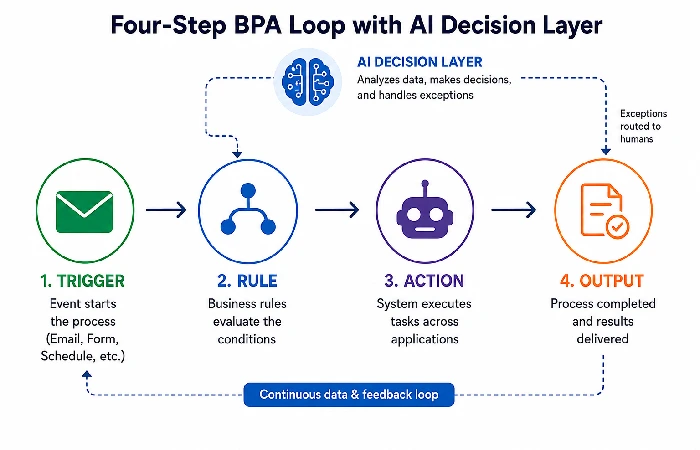
Business process automation is the use of software applications to execute complex business processes and functions that can span multiple systems and involve multiple departments with minimal human interaction. BPA isn’t just an automation of one task; it’s more of an orchestration of triggers/rules/actions over an entire workflow.
This is very much visible in the BPA market. The Business Research Company expects the market to be valued at $33.43 billion by 2030 at a CAGR of 15.4% whereas Technavio’s market reports identify a market growth of $17.68 billion over the period 2024-2029 at a CAGR of 18.4%. Both figures confirm the shift of BPA from a cost optimization tool to a core infrastructural investment.
How BPA works
A BPA system operates on a four-part loop. First, something kickstarts the process – a form submission, an email that has arrived, a change in the database, or a scheduled time. The system then compares that trigger to some set logic, like routing all invoices over $5,000 to a senior manager. From there it executes – sends a notification, modifies a record, transfers data between applications, or assigns a task. The finished action then yields a result: an approved purchase order, a provisioned employee account, or an updated CRM record.
By 2026, most of these loops have some kind of AI component built in. Agentic AI can handle unstructured inputs – emails, documents, images – and make judgment calls from pattern recognition. It only routes something to a human when confidence drops below a set threshold.
BPA vs RPA vs BPM: a quick taxonomy
These three terms overlap but are not interchangeable:
- BPA automates end-to-end processes across business systems and departments. It is a strategy, not an individual tool.
- RPA (robotic process automation) uses software robots which are programmed to perform a set of actions in the same way that a human would: by clicking buttons, copying data from screen to screen. Use of RPA focuses on executing specific tasks and not on optimizing processes.
- BPM (business process management) is the discipline of modeling, analyzing, and improving processes. BPA is the execution layer within a BPM framework.
The key distinction: BPM tells you which processes to fix. BPA executes the fix. RPA handles the specific tasks within that execution that require UI-level interaction with legacy systems.
Types of business processes you can automate
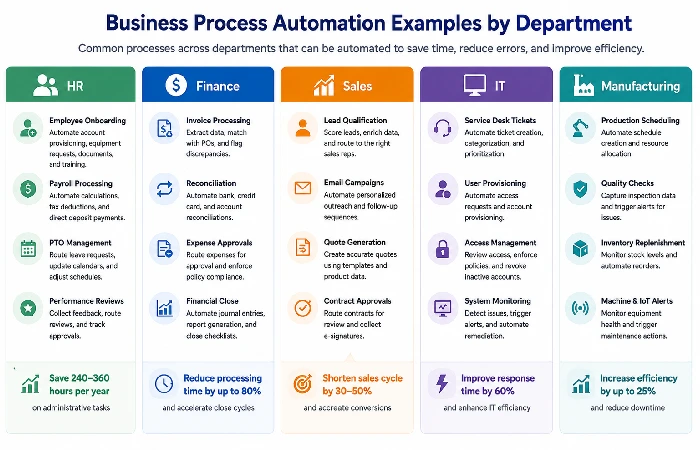
Most departments have something that can be automated. The best candidates are usually high-volume, rule-based, and something you can put a number against – time saved, cost per run, that kind of thing. A few common ones below.
HR and people operations
- Employee onboarding: Trigger account provisioning, equipment requests, delivery of compliance documents and training schedule assignment at offer acceptance. Companies that have automated onboarding say they save somewhere between 240 and 360 hours a year on the admin side of it (industry benchmark data).
- Payroll is another obvious one. Time-tracking calculations, tax deductions, direct-deposit scheduling – automating these removes the manual entry errors that creep in when people do it by hand.
- PTO works well too. Leave requests get routed to the right manager based on team assignments, shared calendars update on their own, and project schedules adjust accordingly.
Finance and accounting
- Invoice processing: Utilize optical character recognition (OCR) and AI to extract line-item data from incoming invoices, compare it to the respective purchase order, and flag discrepancies. Companies with AI-enabled invoice processing report task completion 55–75% faster than with manual processing (Statisfy).
- Expense management is fairly straightforward to automate. The system scans digital receipts against policy limits, flags anything that’s over, and sends approvals through without someone having to sit and review each one manually.
- For financial reconciliation, the system matches transactions across bank statements and internal ledgers on its own. Anything that doesn’t line up gets flagged right away.
Sales and marketing
- Lead qualification: Score your inbound leads using firmographic and behavioral signals, and auto-route qualified leads to the appropriate sales rep.
- Campaign workflows: Automated email sequences, social and CRM actions triggered by prospect behavior events – a form fill, webinar registration, pricing page visit.
IT and operations
- Support ticket routing: Categorize received tickets based on their content and urgency, then redirect them to the supporting agent or department. Automated routing decreases average response time as manual triage is no longer needed (ThinkAutomation).
- Order-to-cash (O2C): Automation handles the process from order through payment processing – updating inventory, alerting fulfillment, invoicing and establishing shipment tracking, end to end.
- System updates: Automate scheduling and deployment of patches and security updates to keep systems in line with security policy without requiring intervention from the IT department.
Manufacturing and industrial automation
- PLCs sit at the core of industrial automation. They run real-time process control directly on the factory floor – keeping conveyor speeds in check, holding temperatures within range, and sequencing assembly steps in the right order.
- SCADA systems handle the bigger picture. They monitor and control industrial processes spread across multiple sites and pipe that data back to a central dashboard.
- Industrial IoT adds another layer. Connected sensors on production machines send back performance data as it happens, which makes it possible to spot maintenance issues before something breaks down and causes unplanned downtime.
- On the robotics side, collaborative robots (cobots) handle the repetitive stuff – assembly, welding, quality checks – working alongside human operators rather than replacing them.
Benefits of business process automation
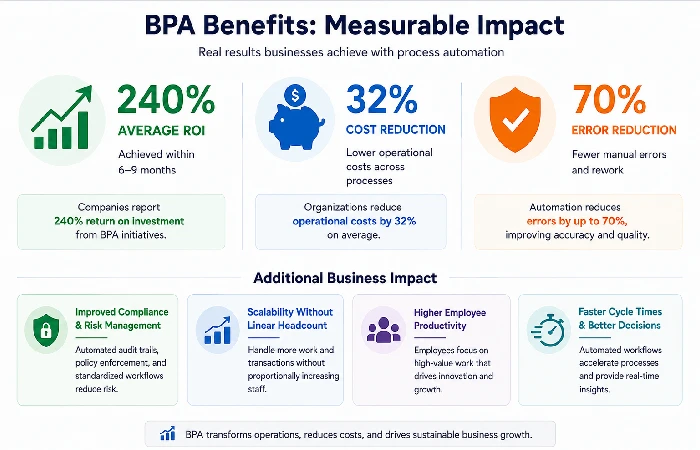
BPA delivers measurable financial and operational returns when applied to well-scoped, pre-optimized processes. The benefits fall into four categories, each backed by specific data.
Cost reduction and ROI
Organizations that implement BPA on pre-mapped workflows report an average ROI of 240% within 6 to 9 months. Top-performing companies following structured deployment practices achieve returns as high as 390% (industry benchmark data). Deloitte’s Automation with Intelligence report found that organizations scaling intelligent automation realize a 32% average cost reduction — a figure validated across multiple deployment cycles, not a single pilot.
Operational cost reductions range from 10% to 50% depending on the process complexity and pre-automation state. However, 31% of organizations report no cost change after initial investment, typically because they automated broken processes without first optimizing them.
Error reduction and compliance
Automating routine data-processing operations has the effect of reducing human introduced errors by as much as 70% (industry benchmark data). For industries that are regulated, automating standard workflows ensures consistent execution and creates auditable process logs that meet SOX, GDPR and industry-specific compliance needs.
Employee satisfaction and customer experience
Employees who are no longer engaged in repetitive data entry and approval routing report higher job satisfaction and redirecting effort toward strategic work. IT teams adopting workflow automation experience 50% time savings in routine operational tasks. Customers benefit from faster processing — shorter response times, fewer billing errors, and more consistent service delivery.
Scalability and operational resilience
Automated processes scale without adding headcount in proportion. A tenfold jump in invoice volume doesn’t suddenly mean you need ten times the accounts-payable staff. That scalability also means the business keeps moving when things go sideways – staffing gaps, a shift to remote work, a sudden spike in demand.
Edge case: when ROI never happens. The 31% ‘no cost change’ number isn’t a failure of automation technology; it signals a failure of process selection. A lot of the time, the pre-automation workflow was already broken – missing hand-off documentation, unclear approval chains, steps that existed for no good reason. BPA just runs those problems faster. The fix is a proper process audit before you touch the automation, not after.
How to implement business process automation step by step
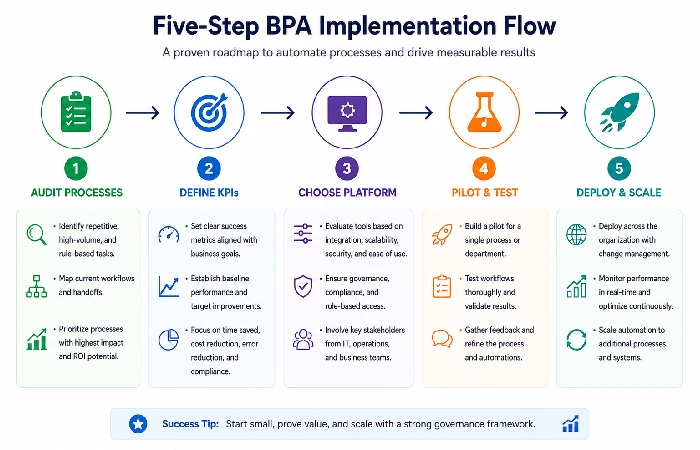
Successful BPA implementation follows five phases. Each phase has a specific output and measurable checkpoint. Skipping any phase — especially the audit — is the leading cause of the 30–50% project failure rate reported by Forbes and corroborated by KPMG and SME Automate research.
Step 1: Audit and map existing processes
Document every step in the target process before automating anything. Map triggers, decision points, handoffs, exception paths, and cycle times. Use the “minutes per run × runs per week” framework (Smart-dato.com) to calculate the cost of the manual process and establish a baseline.
Output: A visual process map (BPMN notation or flowchart) showing the “as-is” state and a redesigned “to-be” state with inefficiencies removed.
Step 2: Define goals and measurable KPIs
Pick your targets before you pick your tool. For this kind of project, that means actual numbers. How long does invoice processing take right now – five days? The goal should be 8 hours. New hire admin work sitting at 12 hours per person? Get it to 2. Data-entry errors on financial reconciliations need to stay under 1%.
Go in without those benchmarks and honestly you’re just guessing. No defined KPIs means you can’t tell if the automation did anything useful or if the same manual bottlenecks just moved to a different spot and you stopped looking.
Step 3: Choose the right platform
Matching the right platform comes down to three things. First, who’s actually going to use it – if you have developers on the team, something like n8n or Inngest gives you more control; if it’s business users only, Zapier, Make, or FlowForma are the better fit. Second, check whether it connects natively to the systems you already run – your CRM, ERP, HR tools, accounting software. Third, if you’re in a regulated industry, make sure the tool has audit trails, role-based access controls, and compliance logging baked in.
Step 4: Build, test, and pilot
Begin with one high-impact process, not ten. BOC Group recommends piloting on a single workflow with a defined 30-day evaluation window. Test all exception paths, not just the “happy path.” Ensure that the automated process accounts for all edge cases such as missing data, duplicate entries, and timeout errors before expanding.
Step 5: Deploy, monitor, and optimize
Deploy the tested workflow to production. Track initial KPIs on a weekly basis for the first 60 days. Solicit feedback from the employees interacting with the new system. Remember, automation is iterative – the first deployment is a starting point, not a finished product. Return to the process map quarterly to identify new optimization opportunities.
Common mistake: automating too many processes at once. Over-ambition is the second most cited cause of BPA project failure. Resource depletion, competing priorities, and integration conflicts compound when teams attempt parallel automation across 5+ workflows simultaneously. Start with one. Prove value. Scale from documented success.
Best business process automation tools and technologies
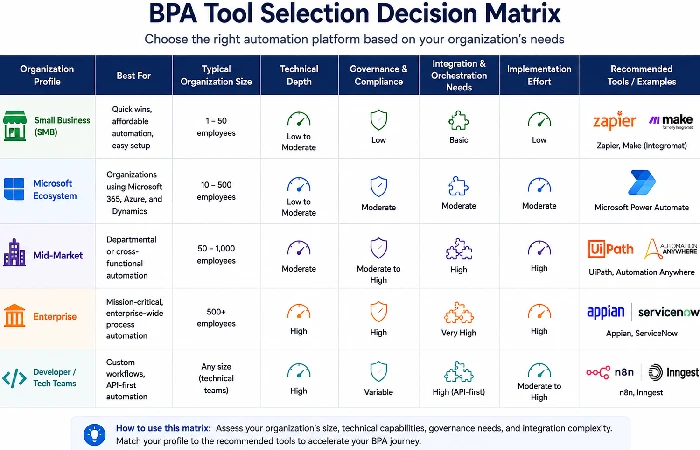
The BPA tool market in 2026 spans five categories, each serving different organizational profiles. Choosing the right category matters more than choosing the “best” tool – a mismatch between tool type and organizational maturity is a primary cause of adoption failure.
Business process automation: comparison by automation type
| Automation type |
What it automates |
Best used for |
Integration method |
Example use case |
Market signals in 2026 |
| BPA (end-to-end) |
Business processes in multiple steps that flow across systems and organizational departments |
Redesigning the strategic process through the HR, finance, operation, IT |
System-wide via APIs, middleware, orchestration engines |
Streamlining and automating the entire employee onboarding from offer letter to provisioning of IT. This has helped in reducing cycle time from 5 days to 4 hours. |
BPA market forecast to hit $33.43B by 2030 at a 15.4% CAGR (The Business Research Company) |
| RPA (task-level) |
Discrete, repetitive, rule-based tasks designed to resemble the actions of a human user interface |
Bulk data entry, screen scrapers, form fill on old legacy apps without APIs |
User interface layer clicks, copy/paste, keystrokes |
An RPA bot logs into legacy accounting software and copies invoice data into an ERP by pasting because the legacy system doesn’t have an API! |
The big names in enterprise RPA are UiPath and Blue Prism and Automation Anywhere with agentic AI added in 2025-6 |
| Workflow automation |
Sequence and routing of tasks, approvals and data handoffs |
Coordinating, multi-step approval chains, notification triggers, task assignments |
API-level and event-driven orchestration |
A purchase requisition is automatically directed to the appropriate manager based on the dollar amount. If it is not approved it is sent a reminder after 2 days, and escalated after 5 days. |
No-code workflow tools (Zapier, Make) exceeded 10M combined users by 2026. |
| The process discipline, BPM |
Full lifecycle of process modeling, analysis, optimization and governance |
Organizations that require process mapping and process redesign both prior to and following automation |
BPMN 2.0 models standards, analytics dashboards, governance modalities |
The bank models the process of approval for a credit loan, finds out there is a three-day bottleneck in credit review, redesigns the process, and then implements automation. |
BPM aligns and converges with BPA as more vendors offer process-mining diagnostics |
| Hyperautomation |
Coordinated deployment of BPA + RPA + AI/ML + process mining |
Enterprise-wide change where AI makes decisions about unstructured data |
Holistic stack: RPA bots, AI/ML models, process mining, low-code platforms, iPaaS |
Supply chain uses process mining to find bottlenecks, RPA to enter orders, ML to forecast demand, BPA platform to orchestrate everything together |
Gartner: Before we get too deep, one definition of hyperautomation. Hyperautomation being “a business-driven, disciplined approach” – top strategic trend through 2026 |
Methodology: Comparison combines definitions from Gartner’s definition of hyperautomation, Deloitte report on Automation with Intelligence, vendor documentation (UiPath, n8n and Zapier) and market data from Technavio, Grand View Research and The Business Research Company (all projections in 2024–2026).
Tool categories by organization profile
- Enterprise suites (UiPath, IBM, Appian): Designed for use cases that lean more towards larger and compliance-related. Investment and resources to implement are high. Automation teams are needed. Sale prices tend to start in five figures per year.
- Ecosystem-centric (Microsoft Power Automate): Best suits those organizations already engaged in the Microsoft 365 ecosystem. Provides robust governance controls. Has some inherent constraints in flexibility if venturing outside the Microsoft ecosystem.
- Workflow orchestration (Workato, Tray.io): Mid-market to enterprise. Connects hybrid SaaS stacks using an API-first architecture. Built for teams with more than 20 applications they need to integrate.
- No-code / SMB (Zapier, Make): Rapid deployment for non-technical teams. Visual workflow builders. Best for organizations automating 5–15 discrete processes.
- Developer / self-hosted (n8n, Inngest): Code-extensible, self-hosted options for teams requiring full control, custom logic, and data residency. Open-source or source-available licensing.
The intelligent process automation market growth forecast shows the IPA sub-sector growing at a 22.6% CAGR through 2030, according to Grand View Research. This growth reflects the convergence of BPA with AI and process mining — automation is no longer just executing predefined rules, but increasingly making context-aware decisions within workflows.
Challenges and risks of business process automation
BPA projects fail at a rate of 30–50%, according to research compiled by Forbes, KPMG, and SME Automate. The root causes are strategic, not technical. Understanding these risks before deployment prevents the most common and most expensive mistakes.
Common mistakes that cause projects to fail
- Broken processes: The single most mentioned reason for failure. If the manual process contains duplicate steps, ambiguous transitions, or undocumented exceptions, automation will simply accelerate those issues. Fix the process before automating it.
- No measurable targets: Setting the automation free of particular KPIs, such as time saved, error rate reduced, cost per transaction, leaves nothing to measure the success, and to defend further investments.
- Over-ambitious: Automating. More than 3 workflows in the first quarter distributes resources too thin and causes integration conflicts. Focus on a single strong success.
- Automating it simply as an IT project: BPA impacts operations, HR, finance, even customer service – treating it in isolation within IT leads to solutions which will never reflect user needs of actual business users.
Security, compliance, and data governance risks
Automated flows routinely work with sensitive data employee information, financial transactions, customer data. If you do not build in security controls throughout the automation architecture it can create regulatory exposure:
- GDPR and data residency: The automated transfer of data between tools needs to uphold data residency. Self-hosted tools like n8n provide more control than SaaS-enabled tools which pass data through a third-party server.
- SOX compliance: All automations in financial processes need to create auditable logs as to who approved what when and under whose authorization.
- Access controls: Automated workflows should respect role-based access permissions and not override them. The invoice-approval bot should not have write permission to the general ledger.
Legacy system integration barriers
The reality is, most businesses still operate mission critical systems built before modern APIs existed. RPA scrapes the UI to automate these processes, but UI scraping is weak and a single screen layout change can break it. For sustainability, design for underlying API integrations or use middleware connectors instead.
Frequently asked questions about business process automation
1. What is the difference between BPA and RPA?
BPA is a strategy for automating entire end-to-end business processes across multiple systems. RPA is a specific technology that deploys software bots to mimic human actions at the user-interface level — clicking, typing, copying data between screens. BPA is process level; RPA is task level. In reality, RPA is frequently just another tool to complete the individual task requiring interaction with legacy systems by user interface (for the complete comparison).
2. What is the difference between BPA and BPM?
BPM (business process management) is the discipline of modeling, analyzing, and continuously improving business processes. BPA is the technology layer that automates execution within a BPM framework. Use BPM for the navigation, and BPA to drive. Gartner’s concept of hyperautomation sees BPA and BPM as equals: BPM selects the process to be changed, and BPA carries it out.
3. Is business process automation the same as workflow automation?
No. Automation is limited to the sequence of tasks: routing approvals and notifications, setting next action. BPA includes full life cycle, transforming data, system integration, exception management, and reporting. Workflow automation is part of the BPA, not a synonym for it.
4. How much does business process automation cost?
Free tiers on Zapier and Make cover a lot of ground before you’d ever need to pay, but enterprise suites like UiPath, Appian, or IBM run six figures a year per user once you’re in that territory. Workato and Tray.io sit in the middle as mid-market orchestration tools, typically 10,000-50,000 annually. Payback usually lands somewhere in the 6 to 12 month range for most companies. Grand View Research tracks this convergence of BPA and AI as its own category, Intelligent Process Automation, projecting 22.6% CAGR through 2030 as more vendors compete on price.
5. What is an example of business process automation?
Imagine a business that automates the entire employee onboarding process. The moment a new employee signs the offer letter online he or she has the email account created, the laptop assigned and delivered, the compliance courses assigned and enrolled, the first week meetings scheduled, and the employee’s manager notified all without a single manual process. The administrative cycle time is reduced from 5 days of administrative effort to about 4 hours of automated work.
6. When should you not automate a business process?
Avoid automating processes that meet any of these three conditions: (1) the process is poorly documented, with steps that vary by individual rather than by rule; (2) the process requires frequent human judgment on exceptions that cannot be codified into decision logic; or (3) the process changes structure frequently — quarterly or more often — making automation maintenance costs exceed the time savings. In all three cases, document and stabilize the process first. Then automate.
