Published: August 16, 2026
Last Updated: August 16, 2026
Most of the IFTTT versus Home Assistant comparisons I found on websites in 2024 are still quoting dead links for cost, gloss over protocols, and do not even address the most important question most readers have: what if I use both? So this comparison at six practical aspects of these two platforms setup, speed, privacy, automation capacity, ecosystem size, 12-month cost, and offline robustness, based on price and feature data confirmed for August 2026 against the vendors’ own documentation.
Definition: IFTTT is an online applet service that links together apps on the cloud with very simple triggers, whereas Home Assistant is an open source backend app that runs your automations locally on your own hardware; installation is quick with IFTTT, but Home Assistant runs fine without an internet connection and costs less over the longer term.
Quick answer: For privacy, keeping control without an account, and working offline (besides initial install), Home Assistant wins. For free, zero-setup automation for 1 to 2 cloud services, IFTTT is better.
Quick verdict: IFTTT vs Home Assistant at a glance
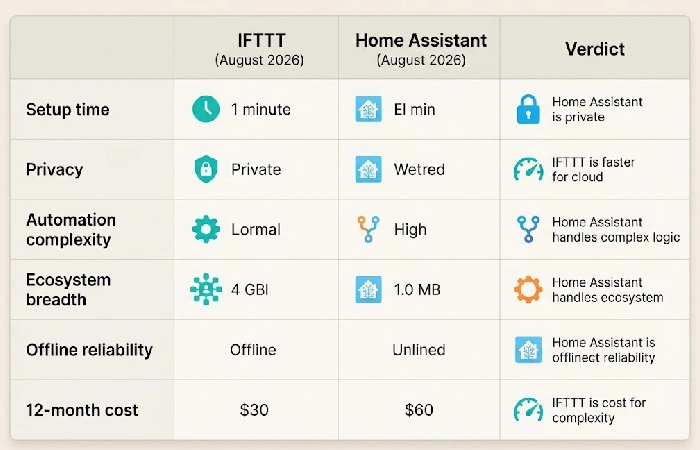
Home Assistant wins on privacy, offline reliability and complex automations. IFTTT wins on the speed five-minute set-up time of a simple cloud-to-cloud integration. No hardware or software required.
| Factor |
IFTTT (27 August 2026) |
Home Assistant (August 2026) |
Verdict |
| Setup time |
Less than 5 minutes register, select a pre-made applet, grant access to 2 other services, turn on it up. Zero installations of hardware or software. |
Between 30 minutes and 2 hours install your HA OS on a Raspberry Pi or mini PC, connect it to your network, and make your first integration. |
All it takes, for something as simple as an automation, IFTTT is much quicker. Home Assistant requires preparation in advance to set it up. |
| Privacy |
All data was stored and processed on IFTTT’s servers. IFTTT requires accepting its data policy, and giving OAuth to each service. IFTTT solution is not self hosted. |
All data stays local. Nothing is sent outside to our servers unless you choose to use Nabu Casa Cloud ($6.50/mo). Completely self-hosted and open-source. |
If you want your data to stay on-premises, Home Assistant is the obvious choice. |
| Automation complexity |
Only single-trigger applets. Pro ($2.99/month) adds multi-action; Pro+ ($8.99/month) adds TypeScript filter code. No looping, branching, or state tracking. |
Multi-trigger, multi-condition automations with history states, Jinja2 and scripts. The Add-on uses Node-RED for branching and for-loops. |
Conditional logic is Home Assistant territory. IFTTT can’t cover it. IFTTT is for simple, straightforward pairs. |
| Ecosystem breadth |
1,000+ services and consumer IoT brands. Strongest for cloud to cloud connections. |
Over 1,500 integrations in 100+ categories, and more than 80 HACS add-ons. Built-in support for Zigbee, Z-Wave, Matter, Thread, Wi-fi & Bluetooth. |
Home Assistant supports more devices and protocols. IFTTT supports more web applications. |
| Offline reliability |
Needs internet for all automation. Cloud round-trips add a delay of 1–15 seconds. |
Runs on your local network without internet connection. Runs in less than 1 second. Only needs Nabu Casa to access the internet. |
Home Assistant is noticeably faster and more dependable for anything time-sensitive. |
| 12-month cost |
Free: $0/year, 2 applets. Pro: $35.88/year Pro+: $107.88/year. No need for hardware. |
Software: 0. Hardware: $15–$150 once. Optional Nabu Casa: $65/year. Year one total: $80–$215. |
For 20+ automations, Home Assistant also costs about the same or less than IFTTT Pro, with no limit on the number of applets. |
Methodology
Cost figures come from ifttt.com/plans and nabucasa.com. Integration counts come from home-assistant.io/integrations, and the latency numbers are taken from posts on r/homeassistant and other forum threads. This represents what was publicly available as of August 2026.
What does IFTTT do, and where does it fall short in 2026?
IFTTT links over 1000 different web services and IoT gadgets by providing ready-made “applets” and basic if-trigger-then-action rules; no coding and no local hardware needed. And it’s still the most rapid solution to connect two cloud services that never speak. For example logging calendar events to a spreadsheet, or firing off a push notification when a Ring doorbell moves.
However, the platform’s limitations are evident once you look past simple automations. The free level is now limited to 2 active applets, essentially a trial rather than something usable. Per IFTTT’s pricing page, the Pro ($2.99/mo) level allows 20 applets and multi-action workflows, while the Pro+ ($8.99/mo) level eliminates the limit and adds filter code in TypeScript and AI enabled services. With all processing running through IFTTT’s cloud, every automation depends on your internet connection and IFTTT being online. Data posted to r/homeautomation and r/smarthome shows cloud round trip delays of 1 to 15 seconds per trigger, great for a notification, not great for a motion activated light that needs to turn on instantly.
What does Home Assistant offer as a local-first platform?
Home Assistant – Free, open source self-learning automation system that runs on your own hardware (something like Raspberry Pi (15-15-50 used) or a dedicated mini PC (80-80-150) and runs all the automation locally. It has 1500+ official integrations across lighting, climate, security, energy monitoring and media while a community maintained marketplace called HACS (Home Assistant Community Store) has thousands of community add-ons.
Another major differentiator in 2025–2026 is native support for Matter and Thread, smart-home interconnection protocols across multiple manufacturers, designed for cloudless, cross-manufacturer interoperability without routing through any cloud API. When added to the existing Zigbee, Z-Wave, Wi-Fi, and Bluetooth support, virtually all smart home hardware can be addressed directly at the protocol level, something IFTTT cannot do, since it can only use each manufacturer’s cloud API rather than talking to devices locally. The disadvantage is time required to install: about minutes to two hours to install and set up the first device, sometimes modifying YAML files for more complex automations, although the in-browser interface has vastly improved since 2024.
Head-to-head comparison: which platform wins on the 6 factors that matter?
The above comparison matrix is the full breakdown, though three items warrant elaboration as they are routinely poked fun at by competitors for being too simple.
- 12-month ownership cost. IFTTT’s free plan provides at most 2 applets. Even with 20 automations, a user must pay $35.88/year for IFTTT Pro. With Home Assistant, that same user pays $0 for the software, between $15 and $150 once for hardware, and optionally $65/year for Nabu Casa remote access, resulting in a first-year total of $80–$215 that drops to $0–$65/year in future years once hardware is purchased. For anyone requiring greater than 20 automations, IFTTT Pro+ at $107.88/year costs more than the average Home Assistant user even with Nabu Casa.
- Automation logic ceiling. IFTTT’s applet model is linear: a single trigger causes one or more actions. There is no conditional branching (“if motion now AND time is after sunset AND no one is home, then arm the alarm”), no state-awareness across multiple devices, and no looping or repetition. Home Assistant natively supports all of these through the automation engine, as does the Node-RED add-on for a visual, drag-and-drop flow canvas for flow-based programming.
- Privacy. IFTTT keeps everything on its cloud. Home Assistant keeps everything on hardware you control. If you live in a place with strong data-residency regulations, or if you’re just uncomfortable giving OAuth tokens to some service that will store it for every connected account, the only tool that never transmits your automation data out of your home network is Home Assistant.
When should you use both? The hybrid setup approach
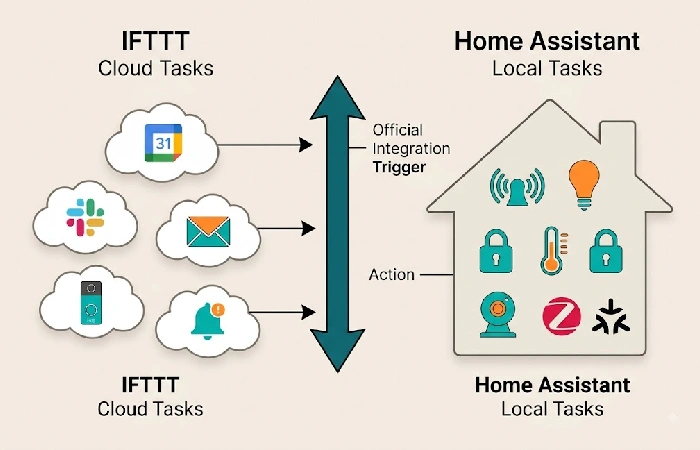
Most experienced smart home users run both, one for complex integrations and automation, and one for simple cloud-to-cloud triggers, without local control or latency requirements. Use IFTTT for things like clicking a button on the web, and then having a message posted to Slack, or a daily weather summary emailed to you, or a subscription to your favorite online publication straight to your Kindle. Use Home Assistant for anything that needs local device control (sensors, cameras, locks, lighting, etc.), sub-second timing, or conditional logic across multiple triggers.
The other product IFTTT has for Home Assistant is an official integration so that automations can be triggered in Home Assistant by IFTTT applets, and for actions that are too complex for IFTTT’s linear logic but beyond the capacity of the Home Assistant YAML automations, Node-RED is a free, visual flow programming environment that can be installed and used as an add-on to Home Assistant.
What alternatives are worth considering beyond IFTTT and Home Assistant?
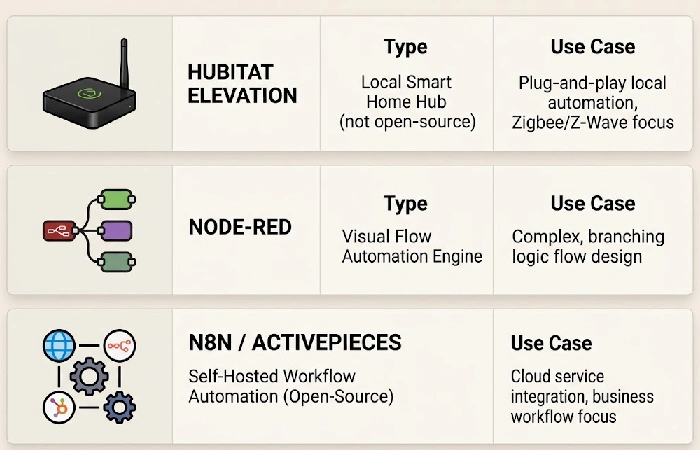
If neither of those works for you, three more options fill specific gaps. Hubitat is a local-first smart house hub (not open-source) with plug-and-play hardware and no fee, bridging the gap between IFTTT and Home Assistant, though with a limited library of integrations. Node-RED is a separate (not HA add-on) automation server for visual flow-based programming without heavy HA commitments. n8n and Activepieces are open-source, self-hosted workflow automation engines that focus on marketing/content teams; Not quite a smart house hub, but certainly an up-to-date automation alternative to Zapier for readers with “Automations” needs outside of home devices.
Frequently asked questions
1. Is IFTTT still worth it in 2026?
For the time being, IFTTT is still usable to automate 1 or 2 cloud automations freely, but being limited to 2 applets concurrently means that their free plan is, in all but name, a trial period. The Pro plan, for $2.99/month, is not unreasonable for those who only need 20 simple automations and don’t want to buy hardware to run it. Those who need more than 20 automations, or those who want conditional dependencies, should look to HA or a self hosted alternative.
2. Can I use IFTTT with Home Assistant?
Definitely yes. Home Assistant offers a built-in IFTTT connection that is capable of firing Home Assistant automation through IFTTT applets and vice versa. Imagine a hybrid configuration: IFTTT for integration with cloud services, Home Assistant for device management at a local level. This can be easily sustained without an excess of rules.
3. How much does Home Assistant actually cost?
Software is free and open source. Hardware costs run from $15 for a used Raspberry Pi 3 to $150 for a dedicated mini-PC. Nabu Casa Cloud (for remote access and voice assistant support) is $6.50/mo ($65/year). An average first year total would be $80–$215; in later years the cost drops to $0–$65 (if you subscribe to the Nabu Casa).
4. Which platform is more private?
Home Assistant keeps everything locally on your own machine. NO data from automations ever leaves your network unless you decide on the Nabu Casa Cloud service for remote access. IFTTT keeps everything on its cloud servers and requires OAuth access on every service. If you need data residency or a privacy first app, Home Assistant is the only way to keep everything on premises.
First choose if your home requires more offline reliability or zero-configuration simplicity before choosing one of the following. For more background about protocols, ecosystems, and how to start with home automation (besides in this single comparison), check out the complete home automation guide.
