Published: July 20, 2026
Last Updated: August 31, 2026
You don’t need another list of 15 wireless chargers you will never sort through. What matters is simpler: does it work with your actual phone, hit the speed it claims, and stay cool enough to leave on your nightstand overnight? That’s really a Qi2-versus-MagSafe question before it’s anything else.
Short on time? The best wireless phone chargers in 2026 are Qi2-certified pads and stands running 15W to 25W off magnetic alignment — the Anker MagGo for most buyers, the Belkin UltraCharge if you want the extra speed, the Baseus Nomos if your desk has more than one device fighting for power. Pressed for time?? Skip to the comparison table. Everyone else, keep reading — buying the wrong charger is easier than you’d think.
What “Wireless Charger” Actually Means
A pad or stand that pushes power into your phone through electromagnetic induction, using the Qi or Qi2 standard, with no cable involved. That’s the whole idea. The details are where people get tripped up.
How to Know If Wireless Charging Makes Sense for Your Phone
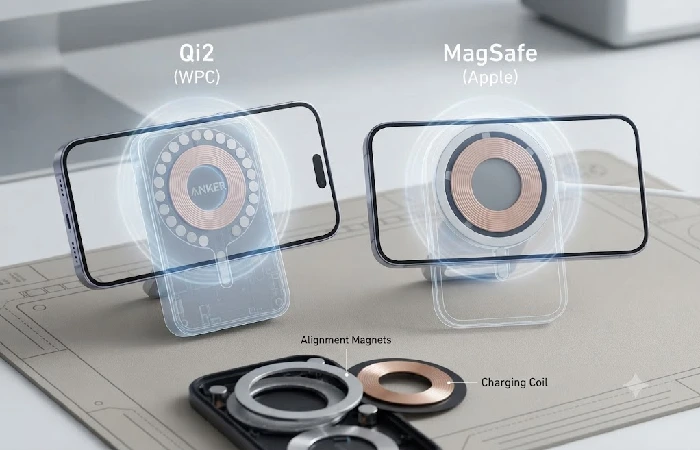
Not every phone charges wirelessly. Even among those that do, speed and experience vary enough that you should check before spending money.
Most Android phones from the last five years support it. So does every iPhone since the 8. Qi2 came next — the Wireless Power Consortium launched it in 2023, and by 2026 it’s the one that dominates.
It borrows Apple’s magnet-alignment trick from MagSafe and supports up to 15W on most devices, with a 25W tier now rolling out. MagSafe itself is Apple’s proprietary version of the same idea, running at the same speed as Qi2 25W on newer iPhones — the difference is the magnet ring lives inside the phone rather than the charger.
Here’s where it gets messy. Samsung’s Galaxy S25 series is, as of publicly available specs, “Qi2 Ready” — which sounds like Qi2 but isn’t quite. The hardware can handle it, but there are no built-in magnets — you need a Qi2 Ready case with magnets inside to get alignment and the faster speeds. Most people find this out the hard way — they buy a Qi2 stand, and then spend ten minutes wondering why their S25 won’t stop sliding off it. Google took a different route with the Pixel 10, building its own magnetic system called PixelSnap. It plays fine with MagSafe chargers, just not with every MagSafe feature.
So check your phone first. Got an iPhone 15 or newer? MagSafe and Qi2 both work, no case required. iPhone 12 through 14 get MagSafe only, capped at 15W — and a Galaxy S25 only reaches Qi2 Ready territory once you’ve added a magnetic case. Pixel 10: PixelSnap, which plays nice with most magnetic chargers but not all of them. Anything older is standard Qi, 5W to 10W, no magnets at all.
If you’re also shopping for cables or cases, our guide to the best mobile accessories covers the rest of the setup.
Which Charger Type Fits Your Routine
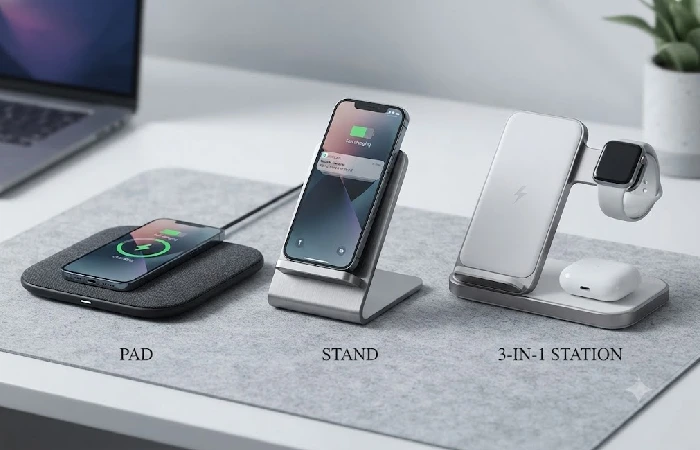
Pads make sense on a nightstand. You drop the phone, you walk away, no alignment stress and no bright LED in your face at 2 am. The tradeoff is speed — most pads top out at 15W, and you can’t use the phone while it’s charging. If checking your phone before bed is the whole use case, a pad is your answer. A good one should stay cool and cost under $25.
Stands are the desk answer. The phone props up at an angle so you actually see notifications, and you can video call while it charges. Most stands now use magnets, so the phone stays put even under a hard tap on the screen. That’s not an accident with the Anker MagGo or Belkin UltraCharge — both are stands, and stands have become the default for anyone charging while they work.
Three-in-one stations charge phone, watch, and earbuds off one brick, and they’re where manufacturers cut corners most. Charge all three at once and your phone’s share of the power often drops — some stations only hit 15W on the phone pad when the watch and earbuds pads sit empty. Read the fine print on total wattage before buying one. The Baseus Nomos is the exception here: 140W total output means the phone pad keeps its full 15W even with a laptop and tablet plugged in alongside it.
Car mounts with built-in charging are their own category, most clamping the phone to a vent at 7.5W to 15W. The good ones add a fan for the heat that builds when your phone is running GPS and charging at the same time. The bad ones just cook your battery on a long drive.
The Best Wireless Phone Chargers We Recommend in 2026
| Model |
Type |
Max Wireless Speed |
Best For |
Price (US) |
Price (India) |
| Anker MagGo Wireless Charger (Stand) |
Stand |
15W (Qi2) |
Most people |
$35 |
Rs. 2,999 |
| Belkin UltraCharge Magnetic Charger |
Pad/Stand |
25W (Qi2 2.1) |
Speed seekers |
$45 |
Rs. 3,999 |
| Baseus Nomos 5-in-1 Charging Station |
Desktop station |
15W (Qi2) + 100W USB-C |
Multi-device desks |
$70 |
Rs. 5,999 |
| Anker MagGo Magnetic Wireless Car Charger |
Car mount |
15W (Qi2) |
Drivers |
$40 |
Rs. 3,499 |
| Nimble Apollo Wireless Pad |
Pad |
15W (Qi2) |
Eco-conscious buyers |
$19 |
Rs. 1,599 |
These stood out against a consistent set of criteria: real-world speed, thermal behavior, case compatibility, and whether the price holds up
Best Overall: Anker MagGo Wireless Charger
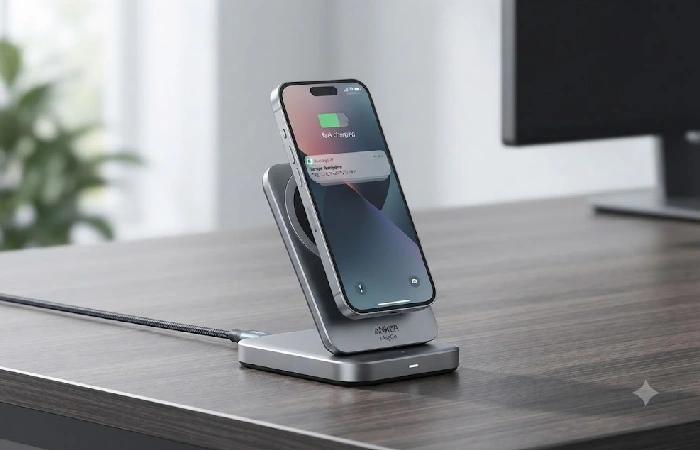
It’s not the fastest charger here. What it does is disappear into your routine. The magnetic surface tilts to any angle, so you prop the phone vertically for notifications or horizontally for video, and it charges iPhones and Qi2 Android phones at 15W — enough for 20% to 80% in about 90 minutes. The MagGo takes up less desk space than a coffee mug, and at $35 it’s priced where a second one for another room doesn’t feel like a splurge.
Two catches worth knowing before you buy. If your phone doesn’t have built-in magnets, you’ll need a magnetic case or a thin metal ring stuck to the back. And that 15W speed only holds with a 20W-or-higher USB-C adapter, which Anker doesn’t include — most people already own one, but if you don’t, add $15 to the real cost.
This is the charger that keeps coming up when people ask where to start with wireless charging. Set it on the desk, forget it’s there, and it just works.
Best for Speed: Belkin UltraCharge Magnetic Charger
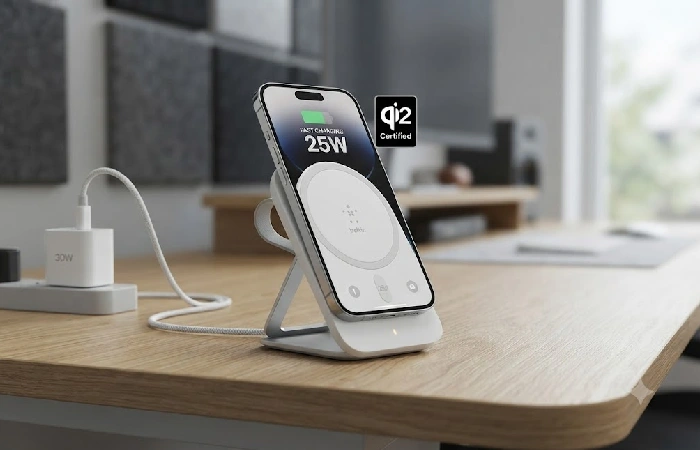
Belkin was one of the first brands to land Qi2 25W certification, and the UltraCharge is what that looks like in practice: a puck with a kickstand and a finger loop, both of which turn out to be genuinely useful rather than gimmicky.
That 25W ceiling only applies to specific phones right now — mainly the iPhone 17 range and the Pixel 10 Pro XL. Everything else still charges at 15W, which is fine, just not what you’re paying for.
At $45, it’s not cheap, and buying it for a phone that caps at 15W means leaving speed on the table. If your phone supports the full 25W, though, this is the charger built for it. Everyone else should look at the MagGo instead.
Best for Android Desks: Baseus Nomos 5-in-1 Charging Station
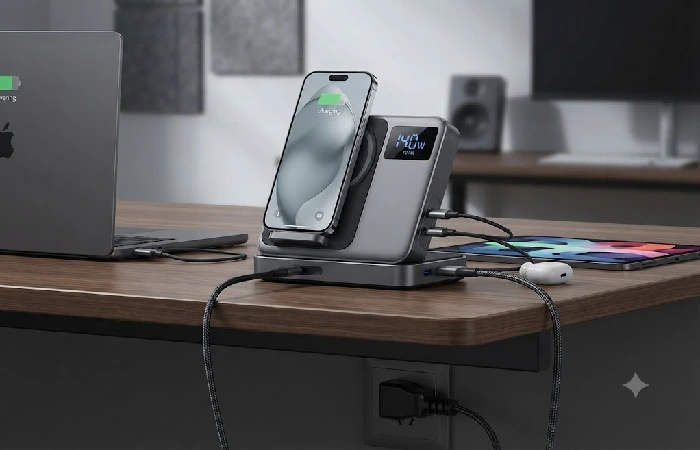
The Nomos is overkill for most people, and that’s the point. If your desk has a laptop, tablet, phone, and earbuds all fighting for outlets, you’ve probably got four adapters and a rat’s nest of cables to show for it. The Nomos replaces the whole pile.
The top pad runs Qi2 at 15W. A retractable USB-C cable delivers 100W to a laptop, two more USB-C ports cover 140W total, and a USB-A port handles older gear — you can run all five outputs at once without the phone pad slowing down, which is rare. Most multi-device stations split power dynamically, and the phone is always the one that loses.
At $70 it replaces half your desk power setup. If you only need to charge a phone, skip it. If you live at a desk, it’s the best money you’ll spend on cable management this year.
Best for Your Car: Anker MagGo Magnetic Wireless Car Charger
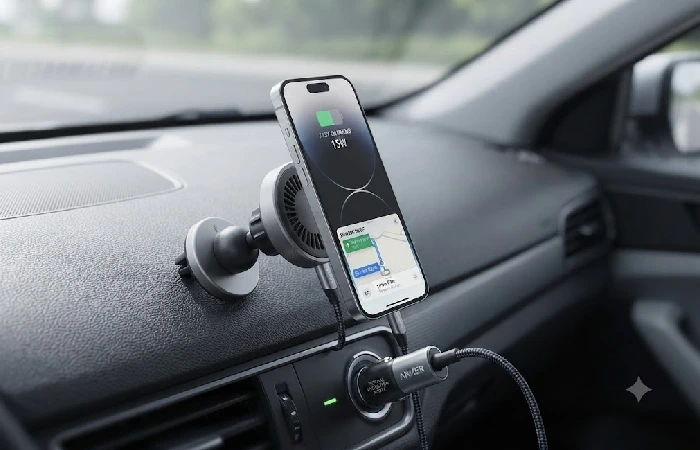
Car chargers have a heat problem most people don’t think about. Your phone is running GPS, streaming music, and pulling cellular data all at once — add wireless charging on top and the temperature climbs fast. Most car mounts just ignore this. The MagGo doesn’t: it has a temperature sensor that throttles charging when the phone gets too warm, then resumes once it cools. Slower charging on a hot summer drive, sure, but your battery isn’t cooking the whole way there.
The mount holds through potholes on a suction cup, and because it’s Qi2, it works with any Qi2 or MagSafe phone — including a Galaxy S25 wearing a magnetic case.
At $40 it’s mid-range for car mounts. Cheaper options exist. None of them have the thermal protection, and if you’re driving more than half an hour at a stretch, that protection is worth the extra $15.
How to Charge Wirelessly Without Shortening Your Battery’s Life
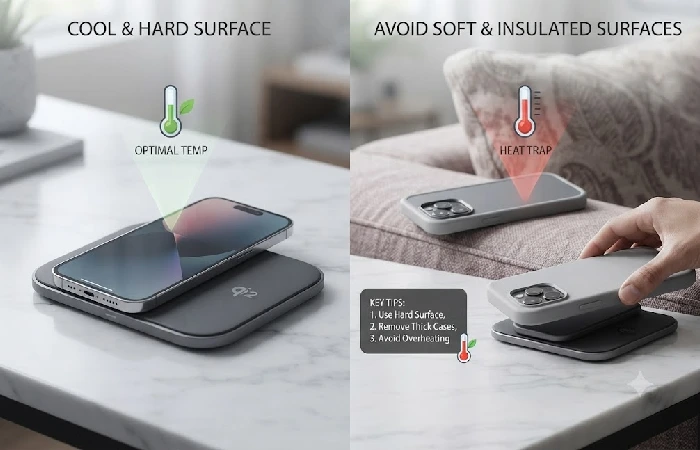
This is the part most people get wrong: wireless charging isn’t inherently bad for your battery. Heat is. And wireless charging generates more of it than a cable does, simply from energy loss across the air gap between the two coils.
One study published in ACS Omega found that lithium-ion battery capacity degraded roughly three times faster at 70°C compared with normal operating temperatures — a reminder that even modest heat spikes during charging add up over time, though the exact rate depends on the battery and the conditions. That doesn’t mean wireless charging is destroying your phone. It means temperature is the variable worth managing.
Here’s what actually helps: skip wireless charging inside a thick or insulated case, since leather and silicone trap heat. Soft surfaces like beds and couches block airflow too, so charge on something hard. Use the fan if your charger has one. And if the phone feels hot to the touch, pick it up and let it cool before setting it back down — save the cable for when you actually need a fast top-up.
Phone manufacturers cap how far a battery can charge and discharge, so you can’t overcharge by leaving it on a pad overnight. But you can keep it warmer than it needs to be, and that’s the habit that costs you a chunk of capacity over two or three years, not any single overnight charge.
What to Skip (and Why)
Proprietary chargers from phone makers top the list. OnePlus’s AirVooc 50W stand is reported to hit that speed only with OnePlus phones, based on current product listings — put a Samsung or iPhone on it and you’re stuck at 10W. Fine if you know you’ll never switch brands. Most people shouldn’t lock themselves in that tightly.
Skip anything without thermal protection, too. If the product page doesn’t mention a temperature sensor, active cooling, or an overheat safeguard, assume it doesn’t have one — especially true of sub-$15 pads from brands you’ve never heard of. They work fine until the day they don’t, and when they fail, they tend to fail by getting hot.
Three-in-one stations under $40 round out the list. The cheap ones split power so aggressively your phone can end up charging at 5W the moment the watch and earbuds pads are also occupied — slower than the charger that shipped with your phone five years ago. Either spend enough to get real wattage, or just stick to a single-device charger.
FAQ
1. Does my phone support wireless charging?
Probably, if it’s from the last five years. iPhones from the 8 onward, Samsung Galaxy S10 and up, Pixel 3 and later. Check the specs for “Qi wireless charging” or look for the Qi2 logo on the box — if it says “Qi2 Ready” instead, you’ll need a magnetic case to get the full feature set.
2. Is Qi2 better than MagSafe?
They’re converging. On an iPhone 15 or newer, they’re functionally the same thing. On Android, Qi2 is the only magnetic option that works across brands, since MagSafe is Apple’s own system.
3. Do wireless chargers work with phone cases on?
Yes, up to a point — usually a 3 to 5mm thickness limit. Thick wallets, battery cases, or anything with a metal plate will block charging outright. A magnetic case built for Qi2 or MagSafe actually helps alignment, even with an extra millimeter or two of material in the way.
4. Is wireless charging bad for battery health?
Not inherently. Heat is the real factor, and wireless generates more of it than wired does. Charge on hard surfaces, skip thick cases, and avoid topping up wirelessly when the phone’s already warm from GPS or gaming.
5. What’s the fastest wireless charging speed in 2026?
Qi2 25W is the current open-standard ceiling, and the Wireless Power Consortium confirmed the rollout is now reaching iPhone 17-range and Pixel 10 Pro XL devices. Proprietary systems like OnePlus’s AirVooc hit 50W, but only paired with their own phones.
6. Can I use a MagSafe charger with an Android phone?
Sort of. You’ll get basic Qi power, usually 5W to 10W, but no magnetic alignment unless the phone or case has magnets of its own. Google’s PixelSnap cases cover this for Pixel 10 phones; Samsung’s Qi2 Ready cases do the same for the Galaxy S25.
7. Should I wait for 50W wireless charging instead of buying now?
Only if you’re committed to a brand with proprietary 50W charging already. For everyone else, 15W to 25W is the realistic ceiling through 2027 — commercial 50W Qi2 products aren’t expected for at least another year or two based on current WPC rollout pacing, though no official date has been published.
Bottom line
Qi2 is the standard that matters here. MagSafe is just Apple’s branding for the same underlying idea on iPhone. The MagGo covers most people. If you’re chasing speed, the UltraCharge earns its price tag — and if your desk looks like a cable graveyard, the Nomos is the one to grab. Past that, it’s just a matter of matching the charger to your phone and your habits: keep it on a hard surface, and steer clear of proprietary lock-ins unless you already know you’re never switching brands.
