Published: July 1, 2026
Last Updated: August 31, 2026
Six cables. Zero of them stay where you put them. Your phone charger disappears behind the desk the moment you unplug it, the power strip’s still sitting on the floor from when you set it up, and every new device you add just makes it worse. Fix it with three categories of gadgets and about 30 minutes — that’s genuinely all this takes once you know where each cable needs to end up.
This guide splits your workspace into three physical zones, matches each to the right product, and gives you shortlists built for fixed desks, standing desks, and multi-monitor rigs. Rethinking the whole desk rather than just the cables? The office desk gadgets guide is where that starts.
Picture an adhesive tray running a full power strip under a desk that heats up every summer. The tape softens under sustained warmth, and eventually the tray lets go, dragging the strip and every cable in it down to the floor, usually at the worst possible time. A cable spine cut just short enough to clear a sitting desk fails the same way the moment someone raises it, yanking the strip loose mid-adjustment. Both point to the same fix: clamp-on or screw-in trays over adhesive, and spines measured at maximum desk height with 15–20 cm of slack built in.
Key Points: Cable management on a desk really breaks down into three zones, and they’re not the same problem. Under the desk, you’re dealing with the power strip and the bulk of your cables. On the surface itself, it’s the charging cables you’re managing. Then there’s the vertical run, floor to desk, on standing desks, where the power cord has to travel through the full height range. A clamp-on cable tray plus some Velcro ties and magnetic clips will sort a fixed desk for under ₹3,000 (40). Add a standing desk to the mix, and you’ll want a cable spine too, which pushes the total to under ₹5,000 (40), but it keeps everything controlled no matter what height you’re working at.
Definition
Desk cable management, at its simplest, is just keeping your cables from turning into a mess under and around your desk. Trays, clips, ties, whatever keeps them out of the way. A cluttered desk is annoying to work at, sure, but the real issue is loose cables catching on chair wheels or your feet, which happens more than you’d expect. There’s also the accidental unplug, which is the one nobody thinks about until it happens to them.
Disclaimer: everything here reflects publicly available info on desk cable management gadgets as of July 2026 — mostly practical setup patterns and general safety guidance, nothing manufacturer-specific. Check the product page or the manufacturer’s docs before you buy or install anything, since details shift.
Three Zones, and Why One Gadget Won’t Fix All of Them
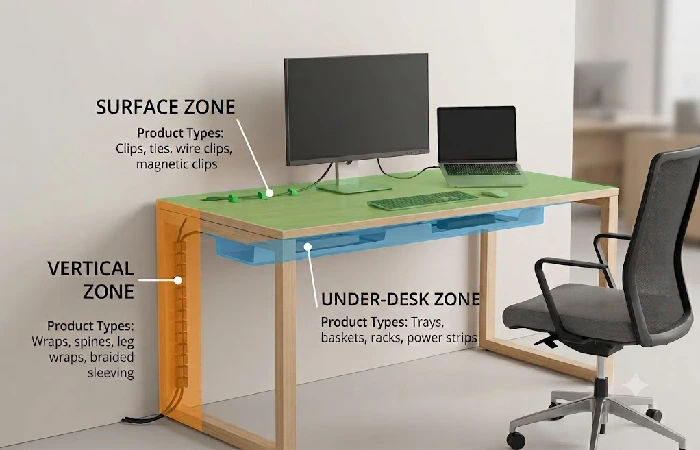
Mount a cable tray under the desk for your power strip, bundle loose wires with Velcro ties, and add magnetic clips to hold charging cables at the desk edge. For most simple home office setups, you can complete the initial routing in under 30 minutes, with total hardware costs typically falling between ₹2,000 and ₹5,000 (25–25–60) as of July 2026.
That’s the short version. The longer version is that every desk cable management problem maps to one of three physical zones. Zone 1 sits under the desk, horizontal, where the power strip and all the cable slack need to live. Zone 2 is the desktop surface, where your phone charger and headphone cable need to stay reachable without falling off the edge. And Zone 3 runs vertically from the floor up to the desk, which only becomes a real problem if you have a standing desk that moves.
Buy one product expecting it to cover all three? It won’t. At minimum, you need one solution per zone.
What to Buy, Zone by Zone
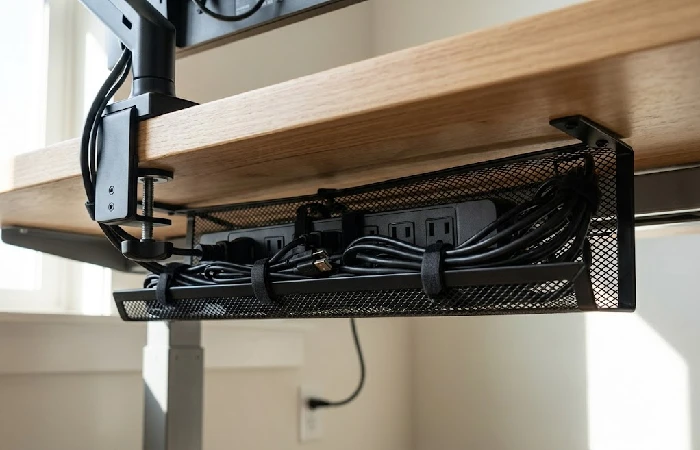
Under-Desk Cable Trays
This is where your power strip, power bricks, and all the cable length you never want to see again go. The tray mounts underneath the desk, and there are two ways to attach it. Clamp-on grips the edge without any drilling involved. If you’re stacking a thick surge protector and two laptop bricks, though, go with the screw-in version instead; it’s permanent but holds a lot more weight.
One thing people skip: measuring the power strip first. A tray that’s too narrow forces the strip sideways, which blocks half the outlets. Go with metal mesh if you can, because open designs allow better airflow around power strips and adapters, reducing the chance of heat buildup inside tight spaces. ₹800–₹2,500 (15–15–40).
Cable Management Boxes
A closed container that sits on or near the desk and hides a power strip inside. Useful when your charging station needs to stay accessible but you don’t want it visible.
The risk nobody talks about is heat. Two or three charging bricks inside a sealed plastic box generate real warmth. Look for boxes with ventilation slots, especially if your room regularly runs above 35°C. A sealed box with no way for warm air to escape just makes the heat problem worse. ₹500–₹1,500 (10–10–25).
Magnetic Cable Clips
These attach to the desk edge and hold your charging cable in place when it’s not plugged into anything, which sounds minor until you skip it. Without clips, the cable slides behind the desk and you end up fishing for it every single time.
But check the weight rating. Standard magnetic clips grip thin Lightning and micro-USB cables fine. Braided USB-C cables are heavier, and budget clips can’t hold them. If you’ve already moved to USB-C, test the clip with your actual cable before you stick it down permanently. ₹300–₹800 (5–5–12).
Raceways, Sleeves, and Velcro Ties
Raceways are rigid channels that create a fixed path along the desk underside or wall. Sleeves work differently; they’re flexible tubes that bundle multiple cables into one visible line. Velcro ties are the simplest of the three, and they hold any bundle together but come off without scissors whenever you need to swap something out.
Use raceways when the route is permanent. Sleeves when you want a clean floor-to-desk line. Velcro everywhere else. And honestly, Velcro ties are the single most useful cable accessory you’ll buy because they’re reusable, which means you’re not cutting zip ties every time you change a peripheral.
Raceways: ₹400–₹1,200 (8–8–20). Velcro ties: ₹200–₹500 (3–3–8).
Cable Spines for Sit-Stand Desks
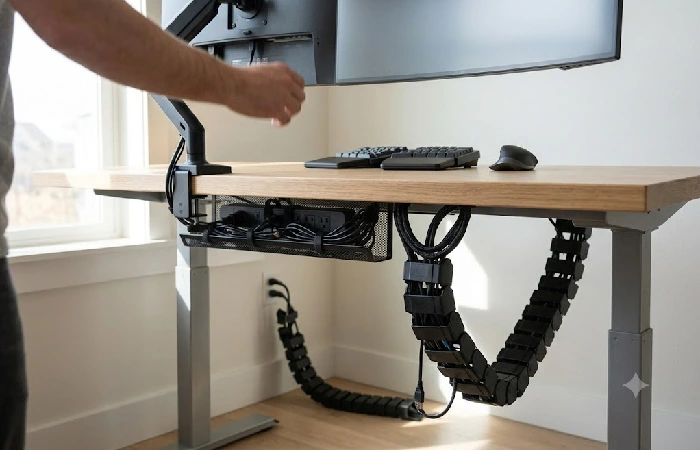
A cable spine is a flexible, segmented column that runs from the floor up to the underside of your standing desk. It stretches as the desk rises and compresses as it comes back down, so whatever’s inside stays protected the whole time.
You need one if any cable travels from the desk down to a floor-level outlet. Skip it, and that cable ends up in trouble either way, pulling tight and risking damage at max height, or puddling into a mess at the lowest setting. Loose cables near the desk legs are also a real trip hazard, and OSHA’s own workplace safety guidance flags cords and cables in walkways as a common cause of slips, trips, and falls, as their walking-working-surfaces guidance notes.
Sizing matters. Measure floor-to-desk at the lowest desk position, then add 15–20 cm for slack. ₹1,500–₹3,500 (20–20–45).
Quick comparison, all six product types:
| Product type |
Best for |
Mounting |
Price (₹ / $) |
Fixed desk |
Standing desk |
| Under-desk tray |
Power strips, bulk cable |
Clamp-on or screw-in |
₹800–₹2,500 / $15–40 |
✓ |
✓ |
| Cable management box |
Hiding chargers on desk |
Freestanding |
₹500–₹1,500 / $10–25 |
✓ |
✓ |
| Magnetic cable clips |
Charging cables at desk edge |
Adhesive or magnetic |
₹300–₹800 / $5–12 |
✓ |
✓ |
| Cable raceway |
Fixed-path routing |
Adhesive or screw-in |
₹400–₹1,200 / $8–20 |
✓ |
Horizontal only |
| Cable spine |
Floor-to-desk vertical run |
Weighted base + desk clamp |
₹1,500–₹3,500 / $20–45 |
✗ |
✓ |
| Velcro ties (pack) |
Bundling any cables |
Wrap-on |
₹200–₹500 / $3–8 |
✓ |
✓ |
Fixed Desk, Standing Desk, or Full Rebuild
Fixed Desk Under ₹3,000 ($40 as of July 2026)
A clamp-on tray, some Velcro ties, and a set of magnetic clips will cover you here. That’s really it for a fixed desk setup. A laptop, an external monitor, a phone charger, plus a peripheral or two, none of that pushes past what these three handle. If you want somewhere for stray dongles and adapters instead of letting them scatter across the surface, a desk drawer organizer solves that on its own.
Standing Desk Under ₹5,000 ($60)
Same three items, plus a cable spine for Zone 3. The spine is the only addition standing desks require because it’s the only zone that changes when the desk moves.
Measure before you buy. Raise the desk to full height, measure to the floor, add 15–20 cm. That’s your spine length. Route only the main power cord through it. Everything else stays plugged into the tray, travels with the desk, and never needs to reach the floor.
Multi-Monitor and Premium Setups
At ₹6,000–₹10,000 (75–75–130), you’re adding a monitor mount with cable management built into the arm, which hides display cables completely. A USB-C dock consolidates the laptop connection to a single cable.
The result at this tier is a desk where nothing’s visible from any normal angle. If you’re shopping for a monitor arm anyway, the ergonomic desk gadgets guide gets into what matters for posture and screen height.
The Install, Start to Finish (Under 30 Minutes)
- Unplug everything from the desk. Lay every cable out where you can see it.
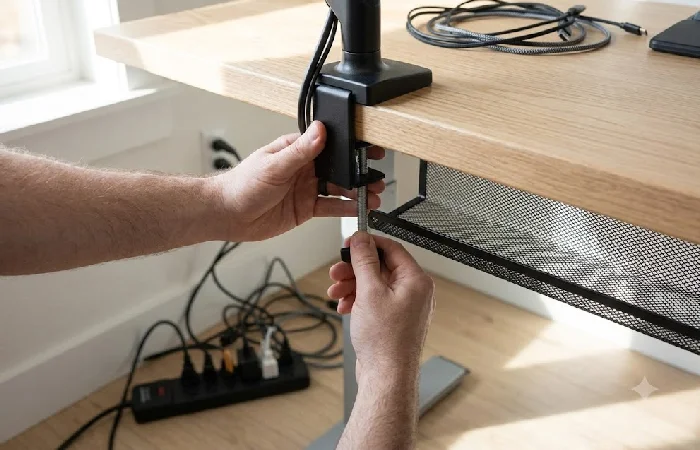
- Mount the under-desk tray first. Clamp-on: slide it onto the desk edge and tighten the clamp. Screw-in: mark your holes, drill, attach. Position the tray near where the power strip will sit.
- Put the power strip in the tray. Plug it into the wall. This single step hides the worst of the mess.
- Reconnect each device one at a time, not all at once. After plugging in each cable, bundle the slack with a Velcro tie and push it into the tray before moving to the next one.
- Stick magnetic clips at the desk edge wherever a charging cable needs to be within reach. Test each clip with the real cable you’ll be using daily.
- For standing desks: attach the cable spine between the tray and the floor, thread the power cord through, and cycle the desk through its full range. Watch for any pull or snag.
- Sit down normally. Roll your chair around. If nothing catches, nothing disconnects, you’re done.
Where Setups Fail (and How to Avoid It)
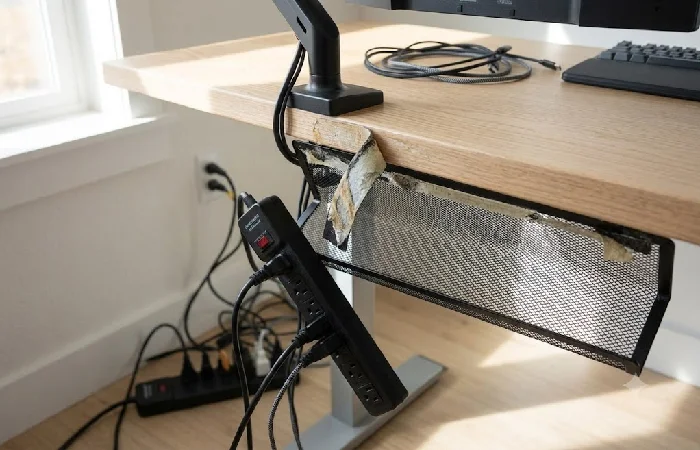
Adhesive-mounted trays in warm rooms are often the first casualty. VHB tape, the double‑sided adhesive most no‑drill trays use, loses holding strength above 35°C, and sustained heat exposure can degrade its bond performance, as 3M’s VHB tape documentation notes. If your room is not air‑conditioned through summer, go clamp‑on or screw‑in, because a tray that drops at 2 AM takes the power strip and everything plugged into it down to the floor.
Cheap magnetic clips and USB-C cables do not mix. Budget clips were designed for thin, light charging cables, while a braided USB‑C cable can weigh two to three times more than a standard micro‑USB. Test the clip with your real cable before you commit to sticking it down permanently.
Cable spines are another common failure point. Many people measure the desk‑to‑floor distance at sitting height and buy a spine that length, forgetting that standing height adds another 30–50 cm. The first time the desk goes up, the spine pulls tight and the power strip disconnects. Always measure at max height, add 15–20 cm for a service loop, and buy that length, not shorter.
Don’t Layer New Cables on Top of Old Routing
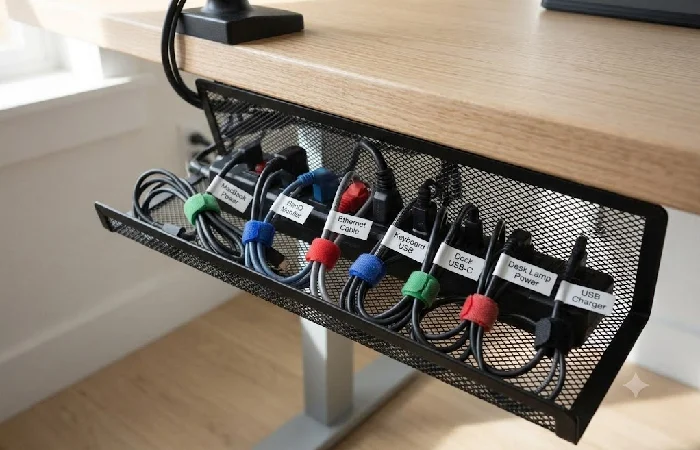
Every time you add a device, it’s tempting to just drape the new cable over whatever’s already there instead of dealing with it properly. Resist that. Swap a monitor, replace a charger, whatever the change is, go back to the tray and re-route it instead of piling on. A Velcro tie makes that kind of reset quick, maybe five minutes. A zip tie means cutting it off and starting over, which is really the only argument you need for picking Velcro in the first place.
If you’ve got more than five cables going to the tray, label both ends of each one. A ₹100 label maker pays for itself the first time you need to pull one specific cable without guessing.
Your cables are handled, and the desk surface you just cleared is ready for something more useful. The cool desk accessories guide covers what belongs there next, from organizers to ergonomic add‑ons that make the space feel finished.
Frequently Asked Questions
1. How do I manage cables under my desk without drilling?
Clamp-on trays grip the desk edge, no holes at all. Adhesive J-channels stick to the underside, though you’ll want to wipe the surface with isopropyl alcohol first. Skip adhesive-only options in rooms that stay above 35°C through summer.
2. What’s the difference between a cable tray, a cable box, and a raceway?
Tray: open container under the desk, holds the power strip and slack. Box: enclosed, sits on or near the desk, hides a charger cluster inside. Raceway: rigid channel that locks cables onto a fixed path. Different jobs entirely. The table in the product section above maps each one.
3. Do I need a cable spine if I have a standing desk?
Yes, for any cable running from the desk to the floor. Power cord, Ethernet, anything. Without it, you get either a tight pull at max height or a cable pile at min height.
4. Are cable management boxes safe?
Generally, yes, as long as they’re ventilated. Sealed boxes trap heat, and that’s the actual risk nobody mentions upfront. The Electrical Safety Foundation International backs this up too, their guidance calls for giving power strips and adapters enough airflow so they don’t overheat inside an enclosed setup. Don’t cram multiple large power bricks into a sealed box, and if it feels unusually warm after an hour, switch to something vented or just cut the load.
5. How much does a full setup cost?
Fixed desk, the basics: ₹1,500–₹3,000 (20–20–40). Standing desk with spine: ₹3,000–₹5,500 (40–40–70). Premium multi-monitor build: ₹6,000–₹10,000 (75–75–130).
6. How often should I reorganize?
This isn’t tied to a calendar; it’s tied to your setup. Add a device, swap one out, or clear out something you’ve stopped using, and that’s your cue. Most people land at two or three times a year. Switch to Velcro ties instead of zip ties and the reset takes about five minutes.
7. What’s the cheapest way to start desk cable management?
A clamp-on under-desk tray plus a pack of Velcro ties — those two alone cover Zone 1, and together they’ll run you under ₹1,200 ($18) as of July 2026. Magnetic clips can wait; grab them once you’re tired of fishing around the edge of the desk for your charger.
You have the product list, the zones, and the install order. None of it matters if the tray sits in its box for three weeks because you are “waiting for the weekend.” Thirty minutes is a lunch break or one episode of whatever you are watching tonight. The difference between a desk that works for you and one that fights you every morning is a clamp, some Velcro, and the decision to do it today instead of bookmarking this article and forgetting about it.
