Published: June 30, 2026
Last Updated: August 31, 2026
You’ve been staring at the same bare desk for months. A laptop, a tangled charger, maybe a coffee mug pulling double duty as a pen holder. The setup works, technically. It just doesn’t work for you.
That gap between “functional” and “actually enjoyable” is where most work-from-home desks get stuck. You didn’t plan the setup — it just accumulated. And now you’re scrolling through 50-item listicles that all recommend the same stuff without telling you what to buy first, what to skip, or what actually fits a home desk in India or on a tight budget.
We’ve seen the same patterns in real work-from-home setups we’ve helped improve — lots of gear bought on impulse, very few pieces chosen to solve a clear daily problem.
This guide takes a different approach. We picked 20 cool desk accessories and sorted them by what they fix — comfort, clutter, productivity, or aesthetics — so you can upgrade in a weekend without the buyer’s remorse. If you’re building your workspace from scratch, our office desk gadgets guide covers the bigger picture.
Quick answer: The best cool desk accessories for a work-from-home setup combine daily function with visual appeal. A monitor light bar gets you started, then a cable management box and a desk mat, plus a vertical ergonomic mouse and a USB-C hub round things out — eye strain, clutter, aesthetics, wrist fatigue, connectivity, pretty much every pain point covered in one go, and it lands under ₹15,000 / $200 based on what’s actually listed across Indian and global marketplaces right now, June 2026.
Disclaimer: This is built off what’s publicly listed for work-from-home desk accessories as of June 2026, leaning on pricing commonly seen across major Indian and global marketplaces. Prices shift, though, so check the official product page before you actually buy.
Why Your Desk Setup Needs More Than Just a Laptop
Monitor light bars, cable management boxes, ergonomic mice, desk mats — these are the cool desk accessories that actually earn their spot on a desk, solving the daily friction of working from home while making the setup look like someone meant for it to look that way.
The 4 Categories That Actually Matter
Most “best desk accessories” lists throw 25 products at you in a numbered list and call it a day. That’s how you end up with a desk that looks like a gadget graveyard.
We’re splitting this into four functional groups instead. Each one solves a different problem, and you don’t need to buy from all four to see a real difference:
- Comfort & Ergonomics — saves your wrists, neck, and back
- Organization & Cable Management — kills the visual chaos
- Tech & Productivity — removes friction from your daily workflow
- Aesthetics & Personalization — makes the space feel yours intentionally

Pick the category that matches your biggest daily frustration, start there, and add from the others when it makes sense. Not before.
Comfort & Ergonomics — Accessories That Save Your Body
If you spend 6+ hours a day at a desk, comfort isn’t a luxury purchase. A systematic review indexed on NIH’s PubMed Central reported that remote workers, on average, spend more time sitting and take fewer daily steps than in‑office workers, with differences in sitting time and step counts that can add up over months. That sedentary load compounds quickly when your input devices and screen height are wrong.
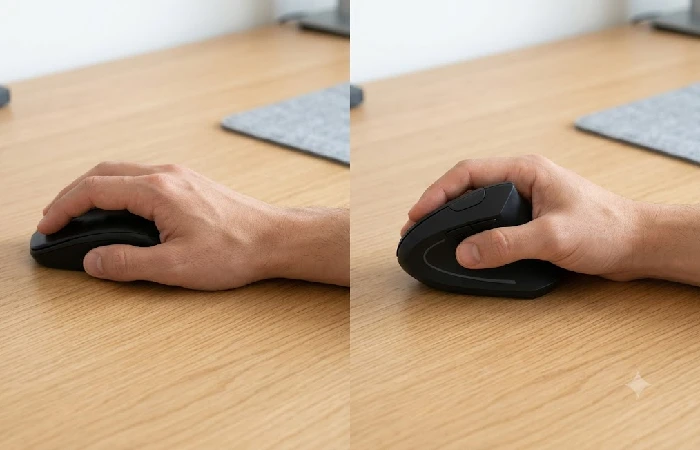
- Vertical Ergonomic Mouse (₹3,000–4,500 / $45–70): The Logitech Lift is the go-to here, and the reason’s simple — it angles your wrist into something closer to a handshake instead of forcing the flat, palm-down grip every standard mouse defaults to. Wrist fatigue tends to ease off within the first week of switching, at least according to most people who’ve made the jump. Out of budget? The Anker Ergonomic Vertical Mouse handles the basics for around ₹1,200.
- Monitor Stand or Arm (₹1,500–6,000 / $25–90): Your screen should sit at eye level. Below that line, your neck’s doing the work your monitor should be doing, tilting forward hour after hour — an aluminum laptop riser or a clamp-on arm sorts this out in minutes flat. We go deeper on posture-specific picks in our ergonomic desk gadgets guide.
- Cushioned Footrest (₹1,000–2,500 / $15–40): Underrated, especially if your chair is slightly too tall or you work barefoot. The Everlasting Comfort Foot Rest is the one that keeps showing up in verified long-term reviews with consistent ratings.
- Keyboard Wrist Rest (₹400–1,200 / $8–20): Memory foam or gel. Match it to your keyboard’s width, and you’re set — the cheapest upgrade on this entire list, and it earns its keep by day one.
These accessories help, no question, but they’re not going to fix an actual injury. Persistent pain calls for a healthcare professional or an ergonomics specialist — not a footrest.
Organization & Cable Management — Kill the Clutter
A tangled cable situation isn’t just ugly — it’s a low-grade daily irritant. You reach behind the desk, yank the wrong cord, knock something over. The friction adds up.
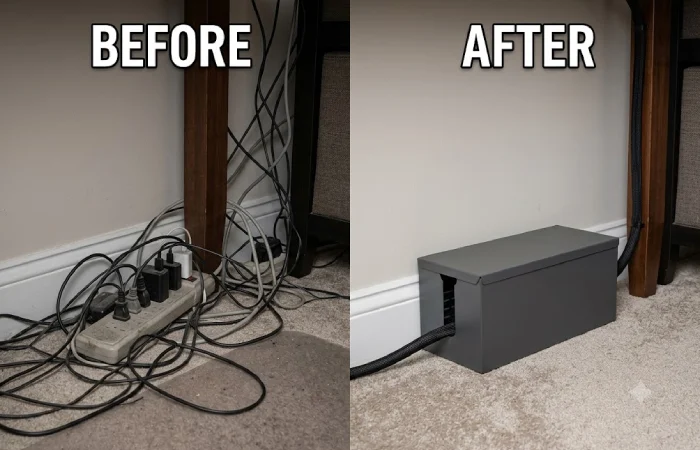
- Cable Management Box (₹800–1,500 / $12–25): A steel or heavy-duty plastic box that hides your power strip and the mess of charging bricks behind it. This single accessory delivers the biggest visual cleanup of anything on this list. If you use a height-adjustable desk, pick one designed for moving setups so cords don’t snag when you raise it.
- Under-Desk Swivel Drawer (₹600–1,200 / $10–20): Attaches underneath your desk surface. Stores pens, sticky notes, SD cards, earbuds — all the small items that otherwise scatter across your workspace. The swivel mechanism lets you slide it out of the way when you don’t need it.
- Desk Organizer / Caddy (₹500–2,000 / $10–30): Go for mesh metal or solid wood. Avoid the lightweight plastic ones — they slide around every time you reach for something. DailyObjects has a solid India-focused collection if you want something that looks intentional rather than like office surplus. Their vegan leather and felt options hold up well.
- Magnetic Cable Clips (₹300–600 / $5–10): These anchor specific cables to the edge of your desk so they don’t slide off when you unplug. Small purchase, surprisingly high impact. The Anker Magnetic Cable Holder is the one with the most consistent user satisfaction across verified reviews from early 2026.
Tech & Productivity — Gadgets That Earn Their Spot
These are the accessories where “cool” and “useful” actually overlap. Each one removes a specific friction point from your workday.
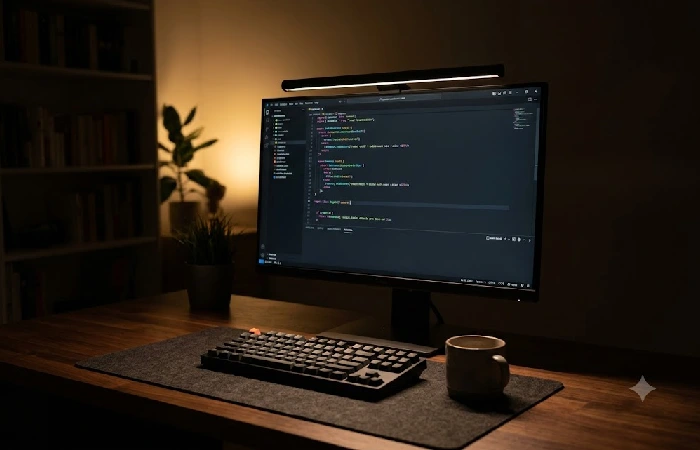
- Monitor Light Bar (₹2,000–8,000 / $30–110): In our editorial opinion, this is one of the highest-impact desk accessories you can buy for comfort and visibility. A light bar clips to the top of your monitor and throws asymmetric light downward onto your desk — illuminating your keyboard and documents without creating screen glare. Occupational ergonomics research commonly recommends around 300–500 lux for sustained desk work, and a decent light bar can help you reach that range without a bulky desk lamp eating your surface area. The BenQ ScreenBar is the premium pick. The Baseus and Xiaomi alternatives perform well at a third of the price and are widely available on Amazon India and Flipkart.
- USB-C Docking Station (₹2,500–6,000 / $35–85): Working off a laptop, a USB-C hub turns one port into multiple displays plus USB-A ports, SD card readers, and Ethernet if you need it. The Anker 8-in-1 gets reviewed widely as the mid-range option, though specs and compatibility shift often enough that the manufacturer’s site is worth a check before you buy. Ports aren’t really the selling point, though — it’s sitting down, plugging in exactly one cable, and having everything just connect.
- Pomodoro Timer (₹500–1,500 / $8–25): A physical timer that you twist to set a focus block — no app, no notifications, no phone screen lighting up mid-task. The OORAII Rotating Timer kept showing up as a favorite across WFH productivity communities on Reddit through Q1–Q2 2026. Sounds minor, sure, but handing the job of managing focus blocks to a physical object keeps your phone out of the equation entirely.
- Programmable Macro Pad (₹3,000–10,000 / $45–150): Streamers aren’t the only ones using the Elgato Stream Deck MK.2 anymore. Map a button to open an app, fire off a keyboard shortcut, mute your mic mid-call, launch a specific file — whatever you do twenty times a day. Based on long-term user reports, people who integrate a macro pad into their workflow tend to stick with it, and the time savings only compound once you’ve mapped your most common actions.
Aesthetics & Personalization — The Finishing Touches
These are the pieces that turn a “functional setup” into a space you actually like sitting at. Just don’t lead with these — buy them after the functional stuff is in place, or your desk will look great but still feel frustrating to work at.
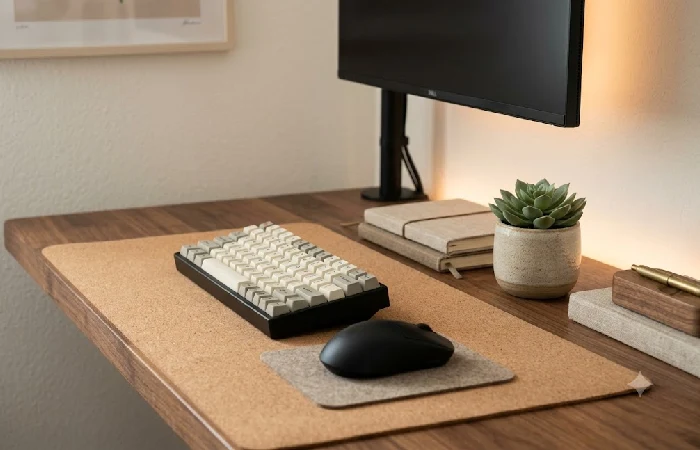
- Premium Desk Mat (₹500–2,000 / $10–35): Felt, vegan leather, or cork. A large mat is doing three jobs at once — surface protection, a consistent tracking area for your mouse, and tying the whole setup together visually — so pick a color that actually matches or complements what’s already on the desk. Easiest minimalist upgrade you’ll find on this list.
- Desk Plant — Real vs. Fake: Let’s be honest: most small desk plants in a home office die within two months unless you’re genuinely attentive to watering. A high-quality faux succulent or pothos does the same visual job without the guilt. If you insist on real, a ZZ plant is the hardiest indoor option — it tolerates low light and irregular watering.
- LED Ambient Lighting (₹400–2,000 / $8–30): A bias light strip behind your monitor cuts the harsh contrast between a bright screen and a dark room, which makes it one of the rare RGB accessories that’s actually doing ergonomic work and not just looking pretty. Govee strips get the most reviews in this category. Skip the ultra-cheap ones, though — they tend to peel off your monitor inside two weeks.
- Themed Stationery or Desk Décor: One item that reflects your personality — a custom nameplate, a small figurine, a geometric bookend. Just one, though. Add a third decorative object with zero function and you’re back to clutter, full circle. And if you’re hunting for office gifts for someone else’s desk, a single well-made décor piece will beat a bundle of generic desk toys every time.
Five Things Worth Buying If You’re Starting From Zero
You don’t need all 20 to see a real difference. If budget or desk space is limited, here’s the priority stack — ranked by impact per rupee (or dollar) spent:
- Monitor light bar — biggest single comfort upgrade; reduces eye strain within the first session
- Cable management box — biggest visual cleanup; takes 10 minutes to install
- Desk mat — instant aesthetic upgrade; makes the whole surface feel intentional
- Vertical ergonomic mouse — biggest ergonomic win; wrist relief from day one
- USB-C hub — biggest workflow upgrade; one cable, everything connected
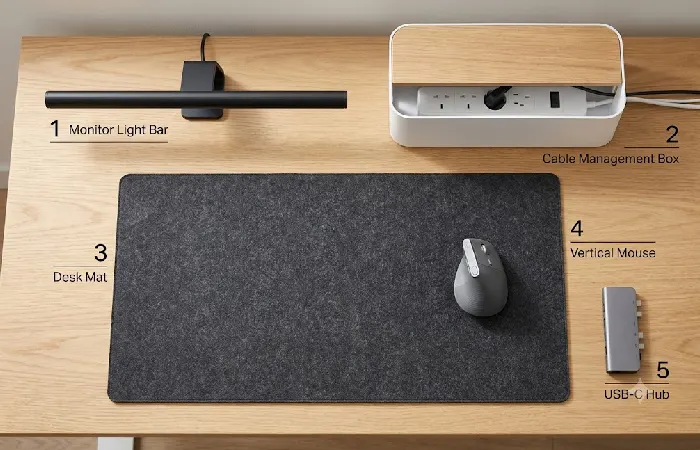
Work mostly at night? Grab the light bar first. If clutter stresses you out more than physical discomfort does, flip the order and start with the cable box and desk mat before touching the ergonomic stuff.
All five together run roughly ₹8,000–15,000 / $100–200 depending on brand, which is less than what most people drop on a single pair of headphones.
What to Skip — Common Desk Accessory Regrets
Not everything that shows up in “cool desk accessories” lists is worth your money. Based on aggregated community feedback across Reddit’s r/battlestations and r/desksetup up to early 2026, these are the categories that most frequently generate buyer’s remorse:
- Cheap RGB strip lights — the adhesive fails within weeks, they peel off your desk or monitor, and the color quality is inconsistent. If you want bias lighting, spend ₹800+ / $15+ on a Govee strip instead of the ₹200 no-name ones.
- Novelty desk toys (fidget cubes, mini basketball hoops, desktop punching bags) — fun for about 72 hours. After that, they collect dust and eat desk space. Every. Single. Time.
- Flimsy plastic organizers — if it slides across the desk when you pull out a pen, it’s creating more friction than it removes. Mesh metal or wood only.
- Oversized mouse pads when a desk mat does the same job better. If your mat already covers your mouse area, a separate mouse pad is redundant weight.
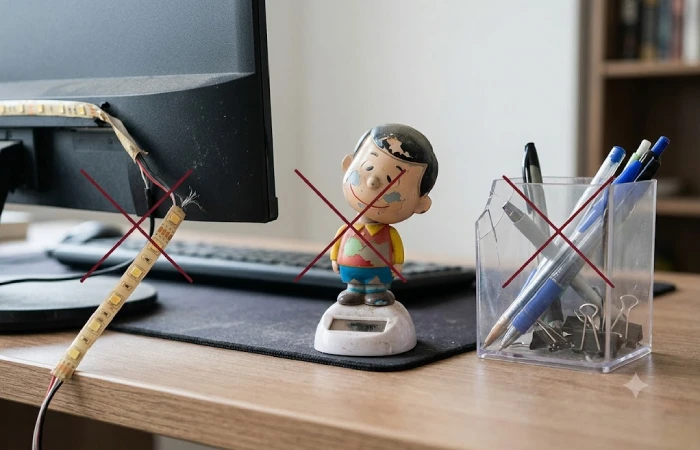
Here’s the filter that works: if you can’t name the specific problem an accessory solves for you, don’t buy it. “It looks cool” is not a problem statement.
FAQ
1. What are the best desk accessories for working from home?
Start with three: a monitor light bar, a cable management box, a desk mat. Between them they cover eye strain, visual clutter, and that half-finished look most home desks never shake. Once you’ve got those down, layer in the ergonomic input devices — vertical mouse, wrist rest — and let the hours you actually log each day decide how far you go.
2. How do I make my desk look aesthetic without adding clutter?
One color palette, one or two decorative pieces, nothing more. A desk mat plus a quality organizer plus consistent materials — all wood, all matte black, whatever — gets you that “designed” look without the surface ever feeling crowded. If it doesn’t do something, it doesn’t stay.
3. Are desk accessories actually worth the money?
The functional ones, yes. A ₹2,000 light bar or an ₹800 cable box changes how the workspace feels inside a day. Industry estimates put the global market for WFH setup products at tens of billions of dollars by 2026, growing at a mid-single-digit clip annually — this stopped being a niche hobby a while ago. Skip anything purely decorative, and you’ll recoup the cost fast.
4. What should every home office desk have?
Three things, really: a way to raise your screen to eye level, a way to hide your cables, and a light source that doesn’t throw glare onto the screen. Everything past that is quality-of-life, not foundation.
5. How do I organize a small desk with limited space?
Go vertical. An under-desk swivel drawer, a wall-mounted shelf, magnetic cable clips — all of it frees up surface area without forcing you into a bigger desk. One thing worth measuring first: your desk’s depth, since some monitor stands eat 15–20 cm that a small desk just doesn’t have to spare.
6. What desk accessories should I avoid buying?
Anything you can’t tie to a specific daily problem. Desk toys, decorative items with no function, ultra-cheap accessories that fall apart fast (cable products and organizers especially) — they end up creating more frustration than they solve, so the same budget spent on fewer, better items wins every time.
A desk you actually like sitting at changes how you show up to work. Start with the five essentials. Build outward whenever the budget and the needs catch up to each other, and treat the rest of this guide less as a finish line and more as something to revisit.
