Published: September 14, 2026
Last Updated: September 14, 2026
Cloud wins for spiky, growing or unpredictable workloads. On-premises wins for steady, predictable workloads, once the hardware is paid off. That’s the quick answer and the rest of this page provides the figures behind this so you can see for your own setup rather than speculating.
Quick Answer: Cloud tends to win once workloads get spiky or start growing fast. On-premise is usually the better call for steady, predictable stuff, once you’ve paid off the hardware.
Definition: “Cloud vs on-premise really just comes down to this, rent flexible infrastructure that your provider manages, or buy your own gear and deal with installing, running, and locking it down yourself.”
Cloud vs On-Premise at a Glance
| Factor |
Cloud |
On-premise |
Verdict |
| Upfront cost |
Near-zero setup; usage-based billing starts immediately |
Full hardware purchase required before first use |
Cloud wins for limited starting budget |
| Cost over time (steady workload) |
Monthly bill continues indefinitely, scaling with usage |
Refurbished hardware breaks even against cloud in 3 to 6 months, then costs drop to power and connectivity only |
On-premise wins once workload is steady and predictable |
| Cost over time (spiky workload) |
Pay only for the burst, then scale back down |
Hardware sits idle outside peak periods, wasting the capital spent |
Cloud wins decisively for variable demand |
| Encryption key custody |
Held by the provider by default |
Held internally by the organization |
On-premise wins for strict data-control requirements |
| Deployment speed |
Provisioned in hours, no physical installation |
Requires physical procurement, installation, and configuration |
Cloud wins on speed to first use |
| Scalability |
Elastic; capacity adjusts automatically to demand |
Fixed to installed hardware capacity; scaling means buying more |
Cloud wins for unpredictable or fast growth |
| Compliance for regulated data |
Requires vendor due diligence to confirm compliance posture |
Full internal control simplifies audit trails |
On-premises often preferred for high-regulation industries |
| 2026 enterprise pattern |
Used for customer-facing apps, dev/test, analytics, AI/ML workloads |
Used for mission-critical databases, regulated data, stable high-volume compute |
Hybrid split by workload type is the reported majority pattern |
Methodology: based on publicly available 2026 pricing and cost-comparison data. Figures are directional, not a quote for your workload.
What Is the Difference Between Cloud and On-Premise Computing?
Fundamental to the idea of cloud computing is that a third party owns and is responsible for the hardware, while your organization controls the data on it. That third-party provider you will be renting the capacity from over the internet, and you pay for actual use. In on-premises, your organization purchases the hardware and hosts it within your own location; whether that is a server room in the office or a rack in a colocation facility.
That distinction drives everything else in this comparison:
- Ownership: cloud is rented, on-premises is owned
- Location: cloud lives in the provider’s data center, on-premises lives in your site
- Billing: cloud is an OpEx (recurring); on-premises is mostly a CapEx (upfront)
- Software stack: no difference, the same software stack (e.g. the same Kubernetes+VMware setup or the same Windows Server setup) is being run in both cases – this is not a software decision, but a location/ownership decision
Cloud vs On-Premise: Which Costs Less?
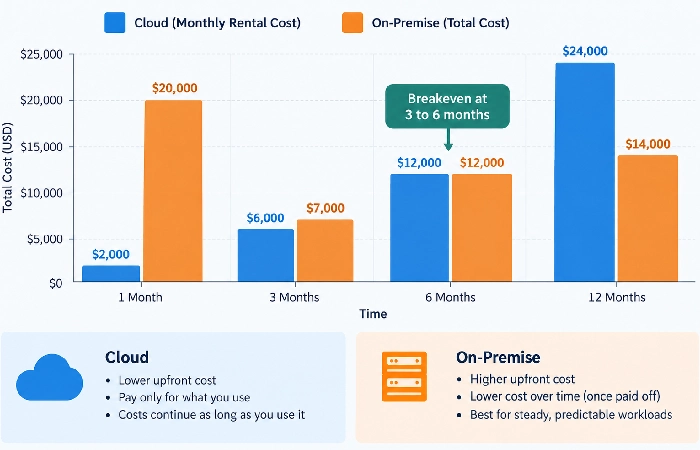
For steady, always-on workloads, owned hardware costs less within a year. For unpredictable or bursty workloads, cloud costs less indefinitely, because you never pay for idle capacity.
The most obvious data point on this is from a 2026 cost comparison that priced a commodity AWS equivalent against a refurbished Dell PowerEdge server, using the real electricity prices from the US Energy Information Administration and up-to-date colocation rates. The conclusion: for a continuous persistent 24×7 workload, the server paid itself off against its cloud twin in 3 to 6 months. Then after that, your only remaining costs are power, bandwidth and anything you elect to spend on maintenance.
This is where the math really turns upside down with spiky and seasonal demand. An on-premises server purchased to meet your peak week sales is the king of white elephants for the other 51 weeks, hard cash spent to maintain capacity you weren’t even using. The cloud eliminates this: grow when you need to, shrink back again afterward, and only pay for what you used.
So the real question isn’t “which is cheaper” in the abstract. It’s whether your workload is steady enough to justify ownership, or variable enough that renting capacity beats owning it.
Which Offers Better Security and Data Control?
There is no more secure solution between the two models. The real question is who has the ability to control access policies and access keys.
In the cloud, you have a provider who manages the encryption and access, handling where data is stored, how it’s encrypted, and how internal access is enforced. Yes, this is convenient, but your organization is then relying on a third party to manage all of these aspects. When everything is on–premises, your organization is in complete control of the encryption keys and access policies, which matters most for:
- Government and banking-industry workloads with heavy constraints imposed by an external regulatory environment
- Healthcare data covered under statutory rules such as the American (HIPAA).
- Intellectual property, legal documents, and financial records, the stuff that has to stay confidential.
Most organizations end up splitting the difference, safe collaboration and the less-sensitive work stays in the cloud, while sensitive content and internal processes stay put on-premises. It’s not hesitation, it’s risk management that’s specific to the workload, and by 2026 that’s become the rule rather than the exception.
Cloud vs On-Premise Performance and Scalability
Cloud scales in and out automatically depending on demand; on-premises only scales as fast as you can actually go buy and install more hardware.
It matters for customers-facing applications, seasonal spikes of traffic, and AI/ML workloads that require burst capacity, as cloud infrastructure scales up and down in almost real time. On-premises infrastructure is limited to what’s physically installed. That is a problem for scaling up, but an advantage for latency-sensitive systems: realtime trading floors, manufacturing control systems, for example, can’t take the round-trip time to a remote data center, and on-premises or edge compute is the sole solution.
The 2026 model that has evolved in enterprise IT: customer-facing apps, dev and test, analytics, and DR are cloud-based, while mission-critical apps and data, regulated data, and high-volume stable compute remain on-premises. That isn’t a compromise; it’s matching each workload to the right model.
How to Choose Between Cloud and On-Premise Infrastructure
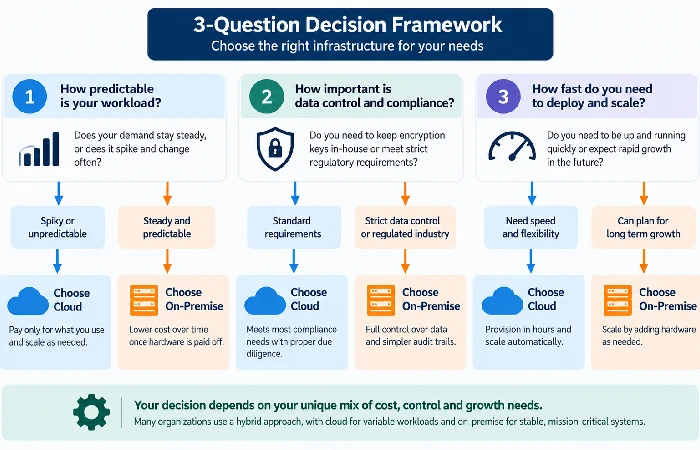
Choose cloud by default. Choose on-site only if your workload is predictable and stable and you have a team that can run the hardware for no hidden expense.
Ask these three questions before deciding:
- Is the shape of the load steady or spiky? Steady, round-the-clock use favors on-premises after adjusting for the breakeven point. Fluctuating or seasonal use favors the cloud.
- Do you have the internal capability to operate the hardware? If your IT department is running the on-premises hardware as a filler, rather than core activity, then costs tend to be significantly more than appear on your ledger.
- What are the requirements for compliance? A category of data that is regulated, particularly a category of data bound by data sovereignty laws, could mean that you’re limited to a specific model to run certain workloads.
For most organizations after the startup phase, the truth is that the decision is a workload-by-workload split rather than a yes/no choice: see types of cloud computing for information on the part of the split covered by public, private and hybrid, and cloud computing applications for the specifics once you’ve chosen.
Frequently Asked Questions
1. Can you move from cloud back to on-premises?
Yes, that’s cloud repatriation, and it’s actually gaining steam going into 2026 – companies keep finding out their workloads were steadier and more predictable than they’d assumed going in. It’s most common with compute-intensive, always-on tasks, the kind where the cloud bill has crept past what owning similar hardware would’ve cost.
2. Is hybrid cloud more expensive than picking one model?
No, hybrid ends up costing more only when workloads get split arbitrarily instead of by how they’re actually used. Get it right and hybrid actually costs less than going all-cloud or all-on-premises, since each workload just sits on whichever model works out cheaper for what it’s doing.
3. What happens to on-premises costs after the hardware is paid off?
Costs plummet. After the initial purchase is recovered usually in three to six months for consistent workloads (using 2026 refurb hardware costs) “running costs” are just electricity, bandwidth and if you like a support contract.
4. At what point does on-premise stop making financial sense?
Once a workload becomes unpredictable or growth-driven rather than steady. Fixed hardware can’t scale on demand the way cloud capacity can, so fast-growing or seasonal workloads accumulate wasted idle capacity that erodes the ownership advantage.
