Published: September 14, 2026
Last Updated: September 14, 2026
So cloud computing, in plain terms, is renting computing power, storage and software over the Internet instead of buying all that hardware yourself and keeping it running. Sounds simple, but there’s a catch – the savings are real, sure, but so is the risk, and most guides gloss over just how tangled up those two things actually get.
Quick Answer: Cloud computing cuts IT costs 20-40% but raises breach exposure, so the real question is your own security discipline.
Definition: Cloud cuts IT expenses by 20-40%, but it also raises breach exposure – so the real question comes down to how disciplined your own security practices are.
What Are the Main Advantages of Cloud Computing?
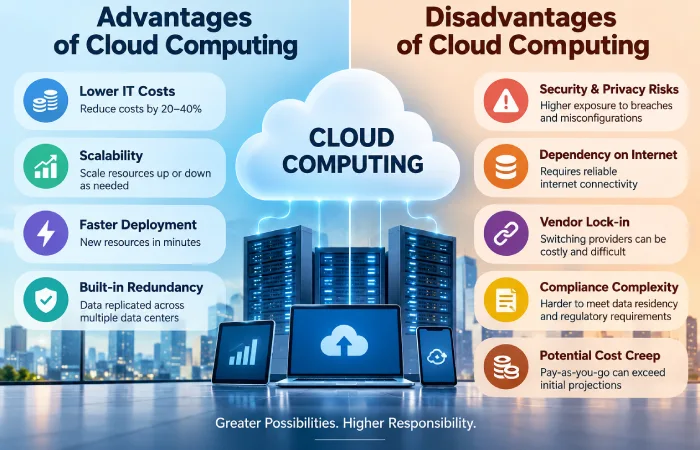
Cloud computing’s biggest advantage is turning fixed infrastructure costs into flexible operating costs you can scale up or down as demand changes. You stop buying servers you might not need in six months and start paying for what you actually use.
The concrete gains show up in a few places:
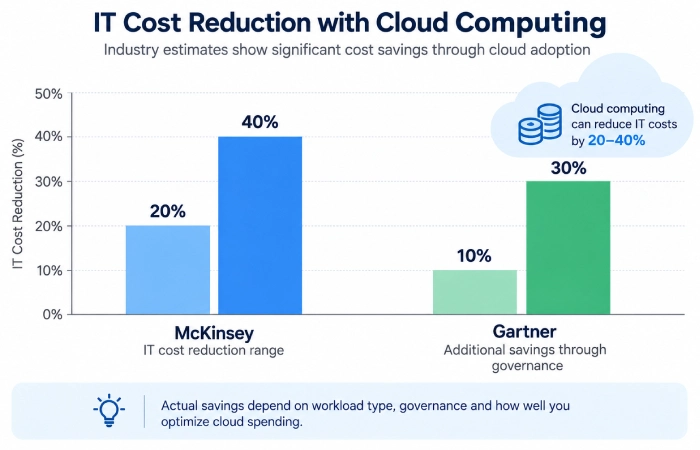
- Cost restructuring: cloud enables lowering IT costs by 20% to 40%, per a McKinsey analysis referenced in cloud adoption research.
- Combine that with governance savings: Gartner suggests that once workloads are migrated, you could reduce costs by a further 10% to 30% through improved management and governance.
- Speed to deploy. New compute or storage, minutes to spin up. A physical server order used to mean weeks of waiting, sometimes longer.
- Built-in redundancy. Your data gets copied across multiple data centers by the provider. One piece of hardware failing won’t take everything down with it.
That’s a big reason over 90% of companies have at least some workloads on cloud infrastructure by now. However, this benefit is not a standard default; it depends on which service model you employ, which the types of cloud computing service models guide breaks down in more detail.
How Can Cloud Computing Reduce IT Costs?
Cloud computing reduces IT costs mainly by eliminating capital spending on hardware and shifting maintenance labor onto the provider. The savings compound as usage scales, but only if you actually track and optimize spend.
Small and mid-sized firms also face a more modest starting cost. SMBs average $21,000 in annual cloud expenditures, and 56% cite cost savings as the reason they adopted cloud services in the first place, that’s a significantly lower threshold than in-house data centers. But holding costs down isn’t a one-off event. Enterprises indicate that roughly a third of their cloud expenditures are wasted by “idle” or excess resources, which is exactly why the McKinsey and Gartner estimates above come with a caveat: they assume active governance, not a “set it and forget it” migration.
Three levers worth pulling here, they’re what pushes you toward the top or the bottom of that 20-40% range:
- Right-size your compute instead of over-provisioning for whatever peak load might hit
- Using reserved or committed-use pricing instead of pure pay-as-you-go for predictable, stable workloads
- Shutting down or archiving unused storage and dev/test environments on a schedule
What Are the Disadvantages of Cloud Computing?
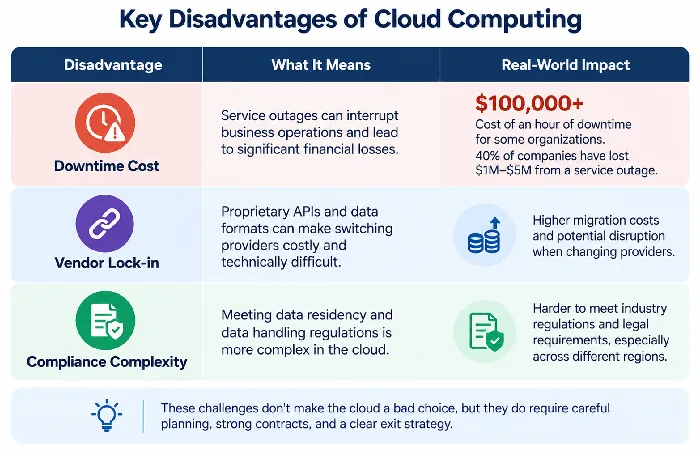
Cloud computing’s core disadvantage is dependency: on your internet connection, on your provider’s uptime, and on a shared security model where a chunk of the risk shifts to you. None of these are hypothetical.
The cost of an hour of downtime for an organization can be as high as over $100,000, and forty percent of companies have lost from a service outage between one million and five million dollars. Cloud services are designed to be accessed over the internet and a problem with your connectivity, not the providers, can prevent access as effectively as an outage.
Other disadvantages worth weighing before migration:
- Recurring cost creep: pay-as-you-go pricing can end up costing more than anticipated once usage exceeds initial projections, especially for a small number of applications or projects of short duration.
- Lock-in with vendor: Proprietary APIs and data formats can make changing vendor costly and technically difficult a few years into a platform.
- Compliance complexity: compliance with data residency and data handling laws becomes ever more difficult once your data is stored inside a provider’s infrastructure rather than your own building.
None of these downsides are reasons to avoid the cloud entirely. These are reasons to negotiate contracts and design your architecture with an exit plan in mind from day one.
What Security and Privacy Risks Should You Consider?
The main security threat cloud computing presents isn’t anything fanciful, it’s basic misconfiguration, and the monetary risk from getting it wrong has only increased. As of 2025, 82% of data breaches involved cloud-stored data.
The current threat landscape breaks down like this:
- Average breach cost: $4.44M globally in 2026, according to Cloudaware’s cloud security threat analysis, with regulated industries such as healthcare and finance often paying $10 million or more per incident.
- Entry point shift: for the first time ever, software vulnerabilities replaced stolen credentials as the most common attack path, accounting for 31% of breaches.
- Root cause pattern: over 80% of cloud breach origins are due to compromised credentials or misconfigurations rather than zero-day exploits that can be avoided through basic I&A hygiene.
This is the shared responsibility model in action, the provider owns the base system but you own how you set up access, rights, and data leakage on top of that base system. Saying “the cloud is secure” as a blanket statement is the single most common mistake companies make just before a breach, not after.
Is Cloud Computing Right for Your Business?
Cloud computing definitely makes sense if there are variable workloads, your team can’t staff around-the-clock infrastructure maintenance, and you are willing to actively manage cost and access rather than rely on the provider to do so. It makes less sense if you have predictable, steady-state workloads and a fixed on-premises cost would be cheaper, or if you have compliance issues requiring data to reside where the cloud cannot guarantee it.
A reasonable decision framework:
- Estimate current infrastructure cost against a realistic cloud equivalent, including the governance overhead needed to actually hit the 20-40% savings range
- Audit whether your team has the IAM and configuration discipline to avoid becoming part of that 82% breach statistic
- Check contract terms for exit costs before signing, not after
For a look at how these trade-offs play out in practice, the real-world cloud computing applications guide walks through specific use cases across industries. For the complete decision framework covering service models, providers, and migration planning, see the full guide to cloud computing.
FAQ
1. Is cloud computing safe for small business?
Cloud computing can be safe for small businesses, but safety depends on configuration, not the provider alone. Small businesses using default settings without proper access controls are exposed to the same misconfiguration risks that account for the majority of cloud breaches industry-wide.
2. How much does cloud computing actually save a company?
Companies can reduce IT costs by 20-40% through cloud migration, depending on workload type, according to McKinsey, and a further 10-30% through active cost governance, per Gartner. Actual savings vary widely based on workload type and how well spend is managed.
3. What is vendor lock-in in cloud computing?
Vendor lock-in occurs when a company becomes reliant on a single vendor’s proprietary tools, APIs, or data format such that migrating to another provider is either cost-prohibitive or technically unfeasible. Minimised by choosing open standards and multi-cloud-compatible architecture from the beginning of a migration.
