Published: September 14, 2026
Last Updated: September 14, 2026
Cloud security gets treated like a checkbox that most vendors already handled for you. It isn’t. The provider secures the servers; what happens to your data on top of them is still your job, and that gap is where most breaches actually start.
Quick Answer: Cloud security depends more on identity controls than on the provider — misconfigured access is now the top risk.
Definition: “Cloud computing security is the set of identity controls, encryption practices, and configuration policies that determine whether data stored outside your own servers stays protected.”
What Is Cloud Computing Security?
Cloud computing security is the combination of access controls, encryption, and configuration management that protects data, applications, and workloads running on someone else’s infrastructure. It isn’t a single product. It’s a layered set of practices split between what your cloud provider locks down and what you’re left to configure yourself.
Providers like AWS, Google Cloud, and Microsoft Azure secure the physical data centers, hardware, and core network — the part most people picture when they hear “cloud security.” What they don’t do is set your access permissions, encrypt your specific files, or catch a storage bucket you left open to the public. That split has a name: the shared responsibility model, covered fully further down. For now, the practical takeaway is that “using a secure cloud provider” and “having secure cloud data” are two different things, and conflating them is the single most common mistake in this space.
Read more on types of cloud computing if you’re still deciding which deployment model fits your setup before locking in a security approach.
What Are the Most Common Cloud Security Risks?
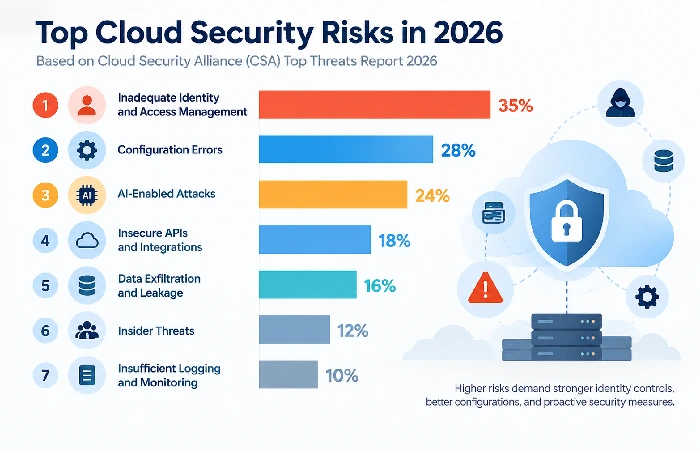
Identity and access failures have actually pulled ahead of misconfiguration as the top cloud security threat now, which is the first time that’s happened. The Cloud Security Alliance’s 2026 Top Threats report has inadequate identity and access management sitting at number one, and it’s being driven by excessive permissions, non-human identities that aren’t managed properly, and credentials that don’t get tracked well across federated systems.
Two other risk categories worth naming specifically:
- Configuration error – still one of the most common breach causes, usually an open storage bucket, a security group set too loosely or unchanged default admin credentials.
- AI-enabled attacks, a new entry in the CSA’s top rankings in 2026, referring to attackers deploying AI to expedite the automation of open source reconnaissance, harvesting of emails and other credentials, and creating convincing phishing campaigns, all at a scale manual attacks could not match.
Looking at the trend we’re seeing in current breach data, this consistent pattern is present: malicious actors no longer attempt to crack the core infrastructure directly, instead they go after the trust relationships between identity providers, APIs and cloud services. One stolen access token enables service chains across multiple clouds simultaneously, a very different threat model to the ‘hacker breaks into a server’ scenario many people still imagine.
How Is Data Protected in Cloud Computing?
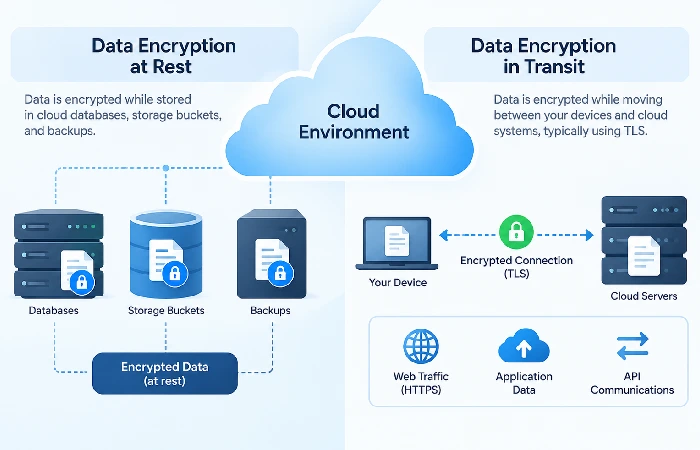
Encryption’s really the main thing standing between your data and unauthorized use in the cloud – that’s encryption at rest and in transit, plus decent key management on top. For data at rest, think databases, backup systems, storage buckets, it gets encrypted right there on disk, so somebody could get to the file without permission and still not be able to read it without the key. Then there’s encryption in transit, which covers data moving between your systems and the cloud provider’s, usually handled through TLS.
Key management is where this gets overlooked. Encrypting data means nothing if the encryption keys are stored alongside the data they protect, or if access to those keys isn’t restricted the same way access to the data itself is. Google Cloud and AWS both offer customer-managed key options specifically so organizations can control key rotation and access independently of the provider’s own systems.
Beyond encryption, data protection also depends on:
- Data loss prevention (DLP) tooling that flags sensitive data leaving approved boundaries
- Regular backup testing, not just backup creation
- Classification policies that determine which data needs the strictest controls in the first place
Cloud Security Best Practices for Businesses
The single highest-leverage practice is enforcing multi-factor authentication everywhere, not just on admin accounts. Microsoft’s own data indicates MFA blocks 99.9% of automated account-compromise attempts, which makes it the cheapest, fastest security improvement most businesses can make and haven’t, according to Petronella Cybersecurity’s cloud security guide.
A practical starting checklist:
- Require phishing-resistant MFA (hardware keys or FIDO2, not SMS codes) especially for anyone with access to admin rights.
- Apply least-privilege access, only grant your users and service accounts the permissions they need for their role and check those permissions periodically and not “never”.
- Turn on audit logging across every cloud service — centralize logs in one place so unusual patterns are visible instead of buried across five dashboards
- Scan for public exposure regularly — an openly accessible storage bucket or shared file is one of the easiest things to fix and one of the most common findings in security audits
- Adopt a Cloud Security Posture Management (CSPM) tool — these continuously check configurations against frameworks like CIS and NIST instead of relying on periodic manual reviews
Who Is Responsible for Security in the Cloud?
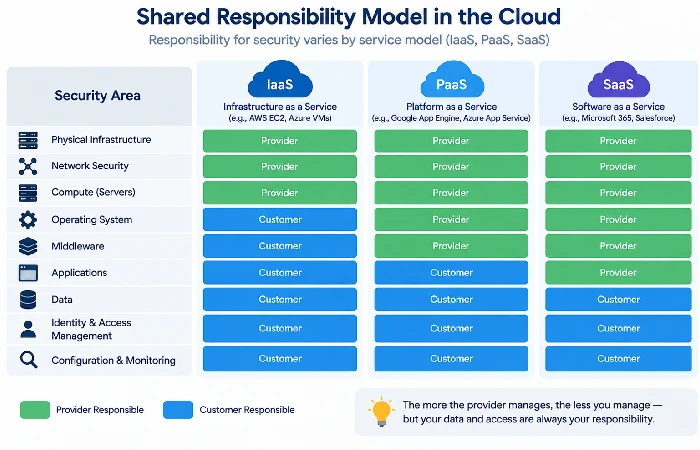
Responsibility splits along a sliding scale that depends on which service model you’re using — IaaS, PaaS, or SaaS — not a fixed 50/50 line. In every model, the provider secures the physical infrastructure, hardware, and network. What you’re responsible for grows or shrinks depending on how much of the stack the provider manages for you.
In the IaaS or ‘raw’ EC2 world, like if you just bought a vanilla EC2 instance, you have to manage everything that runs on it, the OS, apps, data, plus all access controls. In a SaaS service, the provider handles way more of the application layer and it is basically just user access and the data you drop into it. A real example of how these policies go wrong, AWS doesn’t prevent you from exposing an S3 bucket as public, because that is explicitly your configuration to manage, not theirs, whereas Google Cloud Storage by default prevents access at the bucket level so you are less likely to get that specific error.
The point to take from this isn’t which provider is “safer.” It’s that assuming your provider handles more than they’ve agreed to is how most shared-responsibility failures happen. Check your specific provider’s documentation for where their line sits before assuming anything.
For the broader picture of how this fits into your overall cloud strategy, see the cloud computing pillar page.
FAQ
1. Is cloud computing safer than on-premises?
Neither one is inherently safer – most cloud providers just have more resources to throw at physical infrastructure protection than most organizations do, but with on-premises you’re the one in complete control of every layer. It’s really up to your team to properly set up and maintain your pieces of the puzzle, not which environment you choose.
2. What are the 4 areas of cloud security?
Most people split cloud security into a few buckets – identity and access management, data security, network security, monitoring and compliance. Each one sits in a different spot on the shared responsibility split, so they end up needing their own tools and their own policy attention too.
3. What’s the biggest cloud security risk right now?
As of the CSA’s 2026 Top Threats report, inadequate identity and access management ranks first, ahead of misconfiguration and AI-enhanced attacks. That’s a shift from prior years and reflects how much cloud breaches now trace back to credential and permission problems rather than infrastructure flaws.
