Published: August 14, 2026
Last Updated: September 18, 2026
Smart speakers, a bunch of connected bulbs, a thermostat you can adjust from your phone most folks wind up with a bunch of individual smart gadgets long before they ever get them to work together. The gulf, between owning smart gadgets and having a house that runs itself can be measured in ‘routines’ and ‘scenes’. This article discusses the five daily routines that you should set to automation first, how to put them together on Alexa, Google Home or Apple HomeKit, and the hidden pitfalls that will do their best to keep automations from ever becoming reliable.
Definition: A smart home routine is an automated series of device actions activated by voice, time, sensor or location while a scene is a saved ‘snapshot’ of device states you launch at will.
Quick point: Smart home routines activate multiple automation steps; scenes only change device states instantaneously. Blend them on Alexa, Google Home, or HomeKit to farm out mornings, departures, bedTime, and away-mode surveillance in 10min per custom routine no programming involved.
Routine comparison matrix
| Routine type |
Primary trigger |
Key devices |
Alexa support |
Google Home support |
HomeKit support |
Setup time |
Energy/security impact |
| Morning wake-up |
Recurring time (e.g., 6.30 am weekdays) or voice commands (“Good morning”) |
Smart bulbs, thermostat, smart plug (coffee machine), loudspeaker. |
Completely supported by schedule, voice, or sensor trigger. And performs actions including lifting, thermostat, briefing, and playing music. |
Fully supported by time or voice trigger; “Help me get started” AI builder available on Premium plans |
Fully supported time-of-day trigger; runs locally on HomePod or Apple TV |
5–8 mins. for a simple lights-thermostat-speaker setup |
Pre-heats only when necessary instead of running the HVAC all night; circadian change in color temperatures allows for natural waking. |
| Leaving home |
Geofencing (phone breaches individual boundary) or voice command (Goodbye) |
Smart lock, lights, thermostat, security system, robot vacuum |
Works with geofencing and supports voice trigger; can arm Ring security or set Ecobee thermostat |
Provides “When everyone leaves” presence trigger using phone location of all household members. |
Supports “When I leave” location trigger; runs locally on HomeKit/Matter-native devices |
5–10 minutes geofencing needs location permissions in ecosystem app |
Turns off all lights and turns down thermostat to eco mode, saving energy that might otherwise be wasted from lights and heater during breaks in occupancy; automatically secures security system |
| Welcome home |
Geofencing (phone operates in a perimeter), motion sensor, doorbell triggering |
Smart lights (porch + interior), thermostat, speaker, smart lock |
Support for geofencing and Ring doorbell motion trigger; may unlock the appropriate locks, and restore thermostat |
Supports “When the first person arrives” presence trigger; works with Nest doorbell for motion detection |
Supports “When I arrive” location trigger motion sensor used through cameras compatible with HomeKit |
5–8 min. (structured along the lines of the departure routine in reverse) |
Restores climate 10–15 minutes before arrival. No all day HVAC in an empty home. |
| Movie night |
Voice command (“Movie time”) or manual scene activation – (generally a scene, not a routine) |
Smart Lights (Dimming/Color), Smart Blinds, TV/Media System, Soundbar |
Supported using the Alexa app or the Philips Hue skill. May be included within a routine as an action. |
Supported as “Actions” in Automations; also activated on its own over voice. |
Supported native scene tap/voice, can be called by a automation as a sub-action |
3–5 mins mainly for setting back brightness/colour levels and media power states |
Dims lights to low levels, use slightly less electricity than at full brightness |
| Bedtime wind-down |
Time of day set (e.g., 10:30 PM) or voice command (“Goodnight”) |
Smart lights (dimmer gradually), locks, thermostat, white-noise generator, security system. |
Completely supported–supports “wait” action for progressive dimming over 15–30 minutes |
Fully supported(Brightness could be gradually changed up to a certain period, using time or voice trigger) |
Supports “When I arrive” location trigger; adaptive lighting auto-shifts color temperature toward warm tones after sunset |
5–8 minutes; manages to get a “wait” or “transition” action (dim slowly) |
Locks all doors and arms security; lowers thermostat to 60–67 °F (15–19 °C), recommended setting on the Sleep Foundation and ideal for sleeping |
Methodology
The five routine types below were selected based on frequency of appearance across the current top-10 Google results for “smart home routines” (all five appear in 6+ of 10 ranking pages) and alignment with secondary keywords from topic research.
What are smart home routines and scenes — and how are they different?
A routine is a series of commands that are initiated automatically. For instance, when you say a phrase, your lights turn on, your thermostat adjusts, your speaker begins playing the news. Or, they happen at a scheduled time. A scene is a specific set of device states (brightnesses, color temps, on/off) that you can instantly call up.
This makes a difference because routines can be nested; one routine can invoke another as a step. A “Goodnight” routine could send lock commands to the doors, lower the thermostat, then invoke a “Bedtime Lighting” scene that reduces all the lights in the house to 5% warm white. Aqara’s developer docs describe it this way: scenes are baked-in recipes of device states, automations are rule-based triggers, and routines combine both into a single workflow.
These terms are mostly used interchangeably by most guides. They are not. If you are constructing automations from scratch, begin by creating scenes for your desired states (Movie Night, Sleep Mode, Focus) then create routines that call those scenes at appropriate times. For wider context, see our broader home automation guide.
| Concept |
What it does |
Triggered by |
Example |
| Scene |
Instantly set several devices to known states |
A manual tap, voice command, or called by a routine |
“Movie Night” turns the lights down to 20%, closes the blinds, turns on the TV |
| Routine |
Hangs a series of commands, inclusive of scheduled delays and conditional tests |
Schedule, voice, sensor, geofence |
Open blinds at 6:30 am, turn up the thermostat a little, turn on the coffee when “GoodMorning” |
| Automation |
An event-driven rule that is executed without user intervention |
Sensor state change of the device (e.g. on/off).Running state (i.e., location in the PA model) |
Motion detected in hallway after 11 PM turns on path lighting at 10% |
| Script (Home Assistant) |
A continuous sequence of actions set with land logic (if / then). |
Commanded by an automation or by hand |
Gradually dim all lights over 20 minutes, then lock doors |
Which five routines should you set up first?
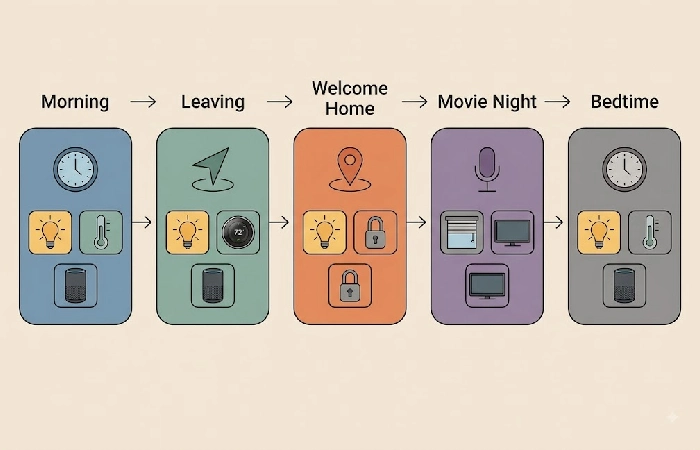
Of those 5 routines, the ones used by the largest number of households are morning, leave, return, entertain and sleep. Each can be developed in less than 10 min on any of the three major platforms, and in combination address the entire daily cycle of lighting, climate, security, and media control.
Morning wake-up routine
Your house wakes before you do. Program a weekday triggered action at your alarm time, 6:30 AM is the most common start, and chain the actions: on a brightening 15–20m dawn cycle using smart lights from warm to cool (2700K to 4000K) color temps, set the thermostat to your preferred daytime temp, turn the smart plug on that turns on the coffee maker, and have your speaker give you a weather report and calendar rundown. Use circadian-appropriate colors and temps through the morning: Cool white (4000K+) helps us feel alert in the morning; avoid using warm white (2700K) until evening.
Leaving-home routine
One single departure trigger is all that is necessary to solve the “did I forget to lock the door?” dilemma. Choose your trigger as geofencing (your routine runs when the phone exits the pre set boundary of home) or a voice command (“Goodbye”). Have the following happen: All interior lighting off, thermostat switches to eco mode (generallybetween8 -10 degrees F below the comfort temperature setting), doors are locked, security system is armed, robot vacuum kicks on.
Welcome-home routine
The other approach. Set off when you hop onto your geofence or a sensor near your front door goes off. Action: porch and entrance lights come on, heat or AC kicks to your desired temp, and your living room speaker starts a relaxing playlist. Got a smart lock? Set it to unlock only once you’re inside the geofence and a second device, a door sensor usually, confirms you’re actually home. That second check is what stops a false unlock just from driving past the house.
Entertainment / movie-night scene
Scene. Not a routine. As opposed to a routine, a scene sets device states instantly. Nighttime Movie begins the TV and sound bar, drops the lights to 15–20% warm white, and closes the blinds immediately. Create it as a scene first, then put that scene into a routine that runs when the TV turns on after sunset (creating a time condition for a foolproof hands-free experience).
Bedtime wind-down routine
The routine with the biggest impact on sleep quality. Trigger it at the same time each night (e.g., 10:30 PM) or by voice command. All exterior doors lock, security cameras go active, non-essential appliances power down at the outlet, and lights dim slowly to a warm 2200K nightlight glow over 15 to 30 minutes. Set the thermostat to 60–67°F (15–19°C) — the range the Sleep Foundation identifies as optimal for sleep, since it supports the body’s natural thermoregulation during the transition into deeper sleep stages.
How do you set up your first routine on Alexa, Google Home, or HomeKit?
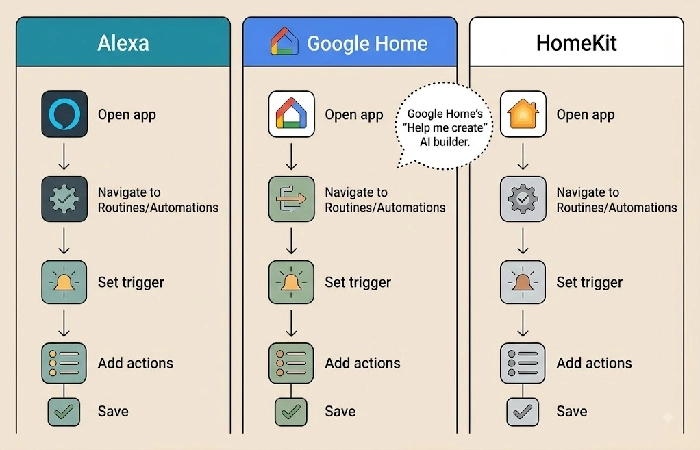
Start the app of your ecosystem, go to Routines or Automations, choose a trigger (voice, time, sensor or location), build the desired pathway by appending actions in a row and tap save. However, something can be a little different, but the logic used is the same in all three:
Amazon Alexa: Access Alexa app -> More -> Routines-> tap + -> When this happens (voice, schedule or smart-home trigger) -> tap Add action (lights, thermostat, music, briefing) -> Save. Accounts support up to 99 routines, triggered by voice, schedule, sensor, or location. Use the “Wait” action to insert delays between steps, handy for gradual dimming sequences.
Google Home: Open the Google Home app → tap Automations → + Add → select Personal or Household → define Starters (time, voice, device event, or presence) → add Actions → Save. Premium plans include a “Help me create” AI builder, where you describe what you want in plain language and Google builds the automation. For complex logic, the Script Editor at home.google.com/scripts supports custom automations using YAML.
Apple HomeKit: Open the Home app -> Automation -> + -> pick a trigger(time, arriving, leaving, sensor, accessory state)->pick actions->Done. The biggest selling point of HomeKit is that it works locally: automations run on a HomePod or Apple TV hub, which means that routines will execute even if you’ve lost internet connection, a reliability advantage that competitors like Alexa and Google Home have yet to attain.
How do you automate your home for when you’re away?
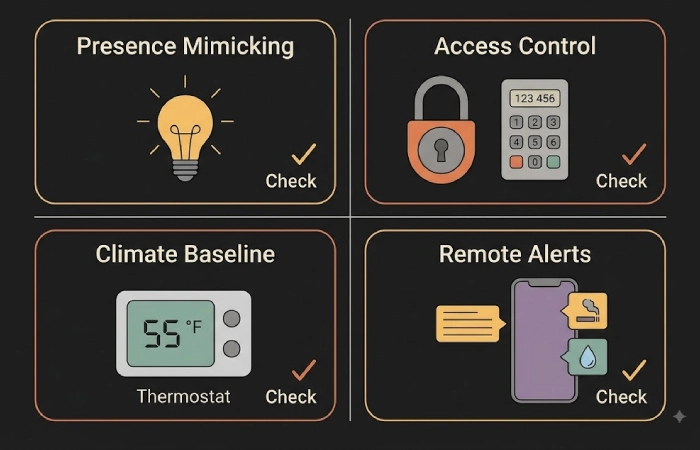
An away-mode routine “randomizes lights, locks doors, turns down climate to an energy-saving set-point, and delivers leak and smoke alerts to your mobile device.” There is no better security and energy-saving automation than an away-mode routine and only 1 of the 10 highest ranked guides to “smart home routines” discusses it substantially.
Presence mimicking: Use a random amount of time for lights, not consistent timers. Set fixed timer (every night at 19:00 living-room light turns on, every night at 23:00 living-room light turns off) trends will become obvious. Use 3–4 scenes that turn on different rooms at slightly different times each day. Several platforms, including Home Assistant and Philips Hue, support “presence mimicking” modes that average out event times for you.
Codes for smart lock: Send a time-sensitive code to a house-sitter or neighbor from your smart lock app. It will be deleted when you are back, so no worry about carrying or giving old keys.
Climate baseline: Set your thermostat to a safe minimum (55°F/13°C in winter to prevent pipe freezing, or a maximum of 85°F/29°C in summer to manage humidity), and enable push notifications on the water-leak sensors and smoke detectors.
What mistakes should you avoid when building routines?
The three most common mistakes are: selecting incompatible ecosystems, deploying too many devices before a test, and taking away the manual override of physical wall switches. Each of these will lead to a fragile system that may not work in the real world.
Mixing incompatible ecosystems without Matter. If you buy a Zigbee light that only pairs with SmartThings and a Wi-Fi plug that only works with Alexa, you can‘t add both in one routine. Once in 2026, look for the Matter logo — the interoperability standard of the Connectivity Standards Alliance — before buying any device because it will probably work with Google Home, Alexa and HomeKit.
Automating it all at once. Set up (say) your first routine morning wake-up is easiest and live with it for a week. You need to have a well-functioning first point of reference to get to the next stage. Know if it‘s the triggers or the device-orchestration that‘s not working, or if the devices just don‘t respond fast enough, before putting in the second routine. Batch-installation of the 30-devices in a weekend doesn‘t make it easy to find the cause.
Disabling manual overrides. Never simply replace a physical light switch with a smart bulb being permanently wired to always-on power without an intelligent switch cover or button. If your Wi-Fi goes down, your network router reboots, or your cloud service crashes, you require a physical fallback.
Networking capacity. If you have 20+ Wi-Fi devices on a consumer router, you‘re going to have dropouts. Use a mesh Wi-Fi system – and maybe offload lower bandwidth IoT devices onto a dedicated 2.4 GHz Wi-Fi network so you can have the 5 GHz band available for phones, laptops and streaming.
FAQ — Smart home routines
1. What is the difference between a scene and a routine?
Scene a snapshot of device states at a point in time (levels, on/off, temps) that occurs (or executes) when summoned with a tap or voice command. Routine a set of steps that executes conditionally, from time, voice, sensor, or location, that can, however, call one or more scenes. The rub: routines can call scenes, never vice versa.
2. Can I use routines across different smart home brands?
Indeed, if your devices are Matter enabled. Matter is an interoperability standard introduced by the Connectivity Standards Alliance (initially launched in 2022, convergence of device groups by 2025–2026) which enables different brand devices (Philips, Aqara, Eve, Nanoleaf, etc.) to participate in a shared routine across Google Home, Apple HomeKit, or Amazon Alexa without the need for individual manufacturers’ dedicated application.
3. Do smart home routines work without internet?
Some do. The Apple HomeKit and Home Assistant platforms run the majority of automations locally on the HomePod, Apple TV, or a Home Assistant hub and thus routines keep triggering during loss of internet service. Alexa and Google Home routines have always relied on a cloud connection and both platforms are working towards the support of local execution of simple device-control actions through 2025 and 2026.
4. How do I automate my home when I‘m on vacation?
Develop an out-of-town procedure that turns some of the interior lights on/off in several rooms at various times (don‘t use timers, since that pattern can be detected), locks every door, makes your thermostat run at an energy-efficient baseline (55 F /13 C if it‘s winter outside), and pushes alerts to your phone if there are smoke, water-leak, or unexpected motion events. Provide house-sitters with time-limited codes for the smart lock instead of physical keys.
