Published: August 14, 2026
Last Updated: August 24, 2026
Smart thermostats have replaced traditional programmable thermostats as the go-to upgrade of choice for eco-minded homeowners. Yet most “best buy” lists claim they “cost less to operate” without having quoted a single proven figure. ENERGY STAR–approved smart thermostats can deliver an independently certified average 8% lower heating and cooling cost, about $50 per year for the average US home, which can grow to as much as 26% in ideal scenarios of adaptive scheduling, geofencing, and participation in the power company‘s demand response program. This report ranks five best-performing models for August 2026 with reported dollars-off figures, hot/warm/cold wiring compatibility, and a simple route to utility rebates.
Definition: A Wi-Fi connected thermostat that manages your heating and cooling via occupancy sensors, learning schedules and geofencing which ENERGY STAR field data shows saves an average of 8%.
Quick answer: Best Choice for 2026. ecobee Premium is the Smartest choice so far this year. This model makes use of ENERGY STAR certified technology to save you 8% on heating or cooling, and up to 26% using the adaptive scheduling.
What makes a smart thermostat worth buying in 2026
We think this is a good reason to buy a smart thermostat: it takes the human out of setting temperature, with Wi-fi, occupancy sensing, and learning algorithms, rather than the human or energy utility having to tell it through the wall display what time to turn on and off, like older programmable thermostats in this price range.
Practical effect: a programmable thermostat runs a fixed schedule you set at the wall, with no remote access. A smart thermostat detects when you leave the house and learns when you sleep, then adjusts on its own.
Three capabilities distinguished the 2026 leaders from entry-level units. First, adaptive scheduling – the Google Nest 4th Gen establishes a custom heating/cooling profile in about one week after installation. Second, room-level sensing – Ecobee’s radar-based occupancy sensors guide heat/cold to occupied rooms, rather than the hallway outside the unit. Third, protocol future-proofing – the Matter/Thread standard guarantees cross-platform interoperability between brands, though as of August 2026 only the Tado X does; none of the five models below have.
For a broader view of how smart thermostats fit alongside smart lighting, automated blinds, and security systems in a connected home, see the full home automation guide.
Which smart thermostats lead in 2026
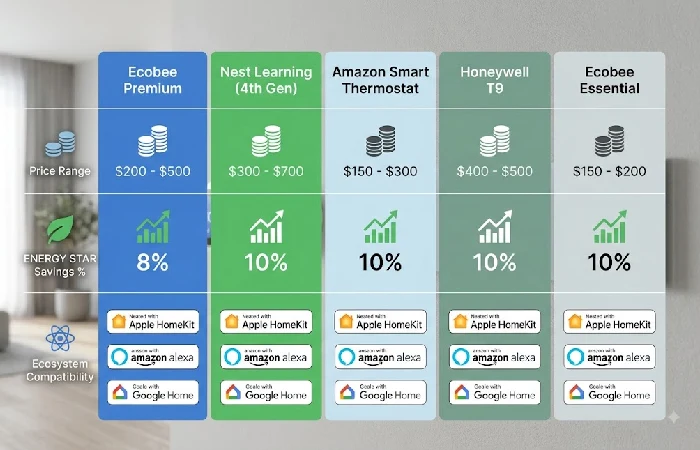
Ecobee Smart Thermostat Premium is the best overall choice in August 2026. Google Nest Learning Thermostat 4 th Gen is best for hands-off AI automation, and Amazon Smart Thermostat is the best deal for Alexa households. All 5 choices are shown in the matrix below, comparing price, savings, room sensors, ecosystem support and C-wire handling.
| Model |
Best for |
4.5.1. Retail price in the United States (Aug 2026) |
Estimated energy savings |
Room sensors |
Ecosystem support |
C-wire handling |
| Ecobee Smart Thermostat Premium |
Multi-room homes, HomeKit users |
$220–$250 |
ENERGY STAR avg. 8%, approx. $50 per year |
Sensor 1, radar occupancy |
HomeKit, Alexa, Google Home, SmartThings |
Need c-wire; PEC included |
| Google Nest Learning Thermostat (4th Gen) |
Hands-off Google Home automation |
$250–$280 |
10% heating, 15% max cooling (Google figures) |
1 sensor, schedule-based and no occupancy. |
Google Home very well-integrated; Alexa somewhat limited; no HomeKit. |
C-wire required; Power Connector sold separately (~$25) |
| Amazon Smart Thermostat |
Budget, single-zone Alexa homes |
$60–$80 |
ENERGY STAR avg. 8% |
None |
Alexa only |
C-wire required; no adapter included |
| Honeywell Home T9 |
Big homes, sensing in several rooms |
$170–$200 |
ENERGY STAR avg. 8% |
As many as 20 sensors, however, sold individually (~$35–$40 each) |
Alexa, Google Home, SmartThings; no HomeKit |
(C-wire needed; adapter for sale separately ~$20–$30) |
| Ecobee Smart Thermostat Essential |
Key features of Ecobee‘s mid-range, core offering. |
$130–$150 |
AVERAGE ENERGY STAR 8% |
1 sensor, basic occupancy |
HomeKit, Alexa, Google Home |
C-wire required; PEK included |
Methodology
This comparison of models relies, in part, on editorial consensus among most of the major tech and review mags, as well as manufacturer specs and online product information. Prices are for U. S. retail listed prices at the time of writing. Energy savings figures are from ENERGY STAR verified averages, where available, or from manufacturer-provided information, where not. No independent hands-on testing was performed for this comparison.
Ecobee Smart Thermostat Premium: best overall
The Ecobee Smart Thermostat Premium earns first place as it is the only smart thermostat to offer radar-based occupancy detection, integrated air quality monitoring, as well as the largest ecosystem connectivity options out of all smart thermostats ranked at the top 10 as of August 2026.
The Ecobee has an edge over competing thermostats that depend on schedule-based adjustments for temperature. Not only can the Ecobee send the air where it is needed with its radar sensor, analyzing whether a room is actually physically occupied, it also includes the sensor and Power Extender Kit in the box. This allows would-be users without a C-wire to avoid the electrician or extra cost of buying and adding a hardware part saving, in this case, $25–$100. The Ecobee Premium also doubles as a built-in smart speaker for Amazon Alexa, and is the only Thermostat in this ranking with native simultaneous support for Apple HomeKit, Google Home, Alexa, and Samsung SmartThings. Finally, the built-in air quality monitor tracks VOCs and CO₂ levels, again, well above and beyond the rest of the competition.
Is the Google Nest Learning Thermostat (4th Gen) still worth buying
Nest 4th Gen is still the best option for users looking for a self-scheduling thermostat. Its advanced predictive AI learns a user’s pattern in about a week and starts controlling the temperature automatically. Heating saves an average of 10%; cooling even more up to 15%, according to Google‘s published product data.
The bezel-less domed glass display and iconic rotatable dial of the 4th Gen truly make it the most aesthetically polished smart thermostat on the market and this is important when the unit is sometimes installed in a corridor or living room. It ships with a Nest Temperature Sensor (2nd Gen) for simple room-level temperature optimization though this sensor relies on schedule-based signals instead of live occupancy detection in Ecobee’s hardware.
Important upgrade note for current owners: Google ended support for the 1st and 2nd generation Nest Learning Thermostats on 25 October 2025, eliminating remote app control and all associated functionality permanently. When replacing one of these old models, be sure to run Google‘s online compatibility checker before purchasing. The 4th Gen feature terminal configurations differ from older models, possibly necessitating rewiring.
Which thermostats work best on a budget or in multi-zone homes
Amazon Smart Thermostat is the most powerful budget choice at 60–60–80, and the Honeywell Home T9 is the top multi-zone selection for larger homes needing sensor coverage in 4+ rooms. Both are ENERGY STAR certified, offering the same 8% average energy savings as the above high-end models.
The Amazon almost works exclusively with Alexa but has no room sensors, no support for Apple HomeKit or Google Home, and no C-wire adapter included making it a single zone Alexa thermostat for already wired C wiring only. If the attractiveness of room by room control at this scale is compelling for you, the Honeywell T9 offers up to 20 wireless sensors (sold separately at about $35–$40 per sensor) and provides ample zone by zone granular temperature control that neither the Amazon nor the Ecobee Essential can match at this scale. The main blemish for the T9 is the lack of Apple HomeKit support which makes it a non-starter for iOS focused automated homes.
How much energy does a smart thermostat actually save
Smart thermostats with the ENERGY STAR label in field trials averaged 8 percent savings on a home’s annual heating and cooling bill, which amounts to roughly $50 in savings per year for the average U. S. Homeowner. The 8 percent value is a conservative estimate and, importantly, is based on actual monitoring data from real houses, instead of theoretical laboratory calculations.
However, the 26%+ upper bound realized in practice depends on the simultaneous application of three conditions: an 8-14 day in-situ adaptive learning system which models your routine, a geofence that instantly switches on an automatic “away” mode when your smartphone crosses the home‘s boundary, and sign-up for your utility’s off-peak or demand-response tariff. Without all three working together, most households land closer to the 8–15% range.
If your utility provides a rebate for purchasing ENERGY STAR–labeled thermostats (saving you 25 25–100 off the purchase price), search for that rebate by entering the ZIP code and your utility provider at the ENERGY STAR rebate finder.
Do you need a C-wire, and can you install a smart thermostat yourself?
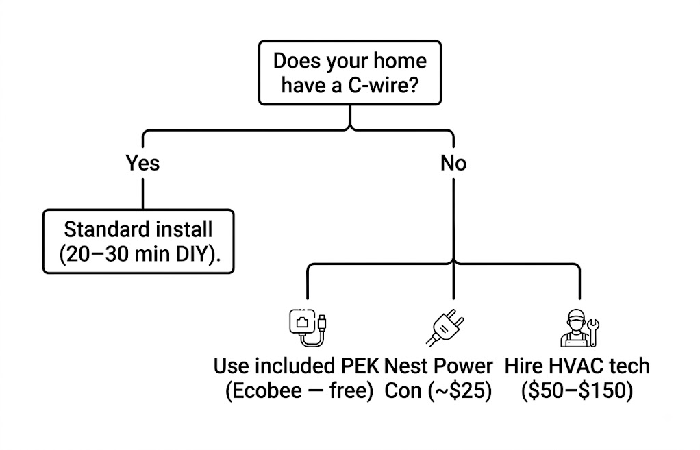
Unfortunately, most smart thermostats need a C-wire (common wire), which provides a continuous 24-volt power source to run Wi-Fi and sensors. Very few homes built before 2000 have one. If yours doesn‘t, however, there are a few options, in order of affordability and complexity:
The first method is to utilize a Power Extender Kit. Both Ecobee models provide a free kit in the box. This kit is installed at the HVAC control board and provides a virtual C-wire connection without the need to run new cables through the walls. Secondly, buy a Nest Power Connector (around 25).
Which does the same thing for the Nest 4th Gen. Third, pay an HVAC technician to install a dedicated C-wire: about $50–$150 depending on wall access, distance from the air handler to the thermostat mount.
If there’s a heat pump in the mix, you’ll have another potential hurdle. Heat pumps utilize a reversing valve which is wired through the O/B terminal. Not all smart thermostats recognize that wiring scheme. The Ecobee Premium, Nest 4th gen and Honeywell T9 all say they are heat-pump ready, but it’s worth running that brand’s online compatibility checker (linked on each brand’s website) before buying.
DIY-installation for a typical forced-air system using current C-wire network takes approximately 20-30 minutes: capture a picture of the current wiring, identify each wire and mark each with its corresponding terminal letter (R, W, Y, G, and C), install the new backplate, connect the wires according to the instructions, and complete the setup (guided by the manufacturer’s app).
Frequently asked questions
1. Do smart thermostats actually save money?
Yes, without ENERGY STAR they certify that smart thermostats can save an average of 8% annual cooling and heating costs, around $50 a year for the average American home. The actual savings range from 5% to 26% depending on former habits and installing the automation that adapts to your lifestyle and your home‘s demands, including geofencing as well as utility demand-response programs.
2. What is the difference between a programmable and a smart thermostat?
Programmable thermostat: just a preset schedule (that you program manually at the wall) of heating and cooling. No Wi-Fi, no app, no remote access. Smart thermostat: learns your patterns by sensing when you‘re home and away and by communicating with your smartphone, even sending and receiving commands over the internet. Searches for occupancy patterns.
3. Can I install a smart thermostat myself?
Yes, for most standard forced-air HVAC systems with an existing C-wire. Just label them by terminal letter, take a photo of the original cable, mount the new backplate and finish setup with the manufacturer‘s app. For heat-pump systems or no C-wire homes, the Power Extender Kit adapter may be needed, or use installation services costing $50–$150.
