Streaming platforms have become the center of modern entertainment, and FuboTV stands out for its strong lineup of live sports, news, and entertainment channels. If you own a Samsung Smart TV, activating FuboTV is quick and simple using the FuboTV/Samsung TV connect code method.
This detailed guide explains the entire process in a smooth, easy-to-follow format—covering what the connect code is, how to use it, and how to fix common issues—so you can start streaming without frustration.
What is the FuboTV/Samsung TV Connect Code?
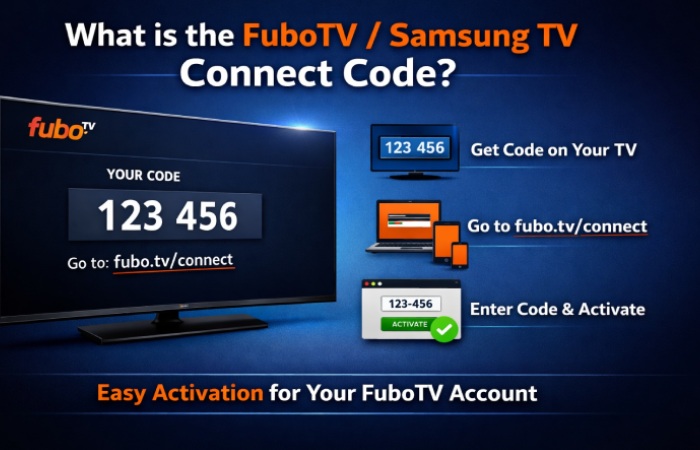
The FuboTV connect code is a temporary activation code displayed on your TV when you open the app and choose the “sign in with code” option. Instead of typing your login credentials using a remote control, you can enter this code on another device like your phone or computer.
This system is designed for convenience and security. Since smart TV remotes are not ideal for typing long email addresses and passwords, the connect code simplifies the process significantly. The code is usually six digits long and expires within a few minutes, ensuring that unauthorized users cannot reuse it.
Basic Requirements for Activation
Before you begin the setup, make sure everything is ready. The process works best when your device and account are properly prepared.
| Requirement |
Explanation |
| Compatible TV |
Samsung Smart TVs (2017 or newer work best) |
| Internet Connection |
Stable Wi-Fi or wired connection |
| FuboTV Account |
Active subscription or trial |
| Installed App |
Downloaded from Samsung App Store |
| Secondary Device |
Phone, tablet, or computer for code entry |
Having these essentials in place ensures a smooth activation without interruptions.
How to Get the Connect Code on Samsung TV
When you open the FuboTV app, the option to sign in using a code appears on the login screen. Once selected, the system automatically generates a unique code for your device.
To access it, turn on your Samsung Smart TV and launch the FuboTV app. From the main screen, choose the sign-in option and then select “Sign in with a code.” Within seconds, a six-digit code will appear on your screen. This is the code you will use to connect your account.
The code remains active for a short time, so it’s important to proceed to the next step without delay.
How to Activate FuboTV Using the Code
After obtaining the code from your TV, the next step is to link your account using a browser. This part of the process is straightforward and usually takes less than a minute.
Open a web browser on your phone or computer and visit the official activation page at fubo.tv/connect. Once there, log in to your FuboTV account using your email and password. After logging in, you will see a field where you can enter the connect code displayed on your TV.
Enter the code carefully and submit it. Within a few seconds, your Samsung TV will refresh automatically, and you will be logged into your account. At this point, you can begin streaming immediately.
Why the Connect Code Method is Preferred
The connect code method is widely used across streaming platforms because it simplifies login while maintaining security. Instead of entering sensitive information directly on the TV, authentication happens through a secure browser session.
| Advantage |
Description |
| Faster Setup |
No need to type credentials with a remote |
| Better Security |
Credentials entered only on trusted device |
| Ease of Use |
Simple process for all users |
| Reduced Errors |
Avoids typing mistakes |
This approach is especially helpful for users who are not comfortable navigating on-screen keyboards.
Installing FuboTV on Samsung Smart TV
If you haven’t installed the app yet, you can do so directly from your TV. Open the Smart Hub, navigate to the Apps section, and search for FuboTV. Once you find it, install the application and launch it.
After installation, the connect code process becomes available immediately, allowing you to sign in without delay.
Common Problems and Solutions
Even though the process is simple, users may occasionally encounter issues. Most problems are easy to fix and require only minor adjustments.
| Problem |
Explanation |
Solution |
| Code not working |
Code expired or entered incorrectly |
Refresh the app and try again |
| No code displayed |
Wrong login option selected |
Choose “Sign in with code” |
| App freezing |
Temporary glitch |
Restart TV or reinstall app |
| Slow response |
Weak internet connection |
Switch to faster Wi-Fi |
These issues are common and usually resolved within minutes.
Alternative Sign-In Options
Although the connect code method is the easiest, FuboTV also offers traditional login options. You can sign in by entering your email and password directly on the TV. However, this method is slower and less convenient due to the limitations of remote controls.
Some newer systems may also support QR code login, which works similarly to the connect code but uses a camera scan instead.
Security Benefits of Using a Connect Code
One of the biggest advantages of the connect code system is enhanced security. Since you are not entering your password on the TV, the risk of exposure is reduced.
| Security Feature |
Benefit |
| Temporary Code |
Expires quickly to prevent misuse |
| Secure Browser Login |
Protects user credentials |
| No Password on TV |
Reduces hacking risks |
This makes the method ideal for shared or public environments.
Supported Devices Beyond Samsung TVs
While this guide focuses on Samsung Smart TVs, the same activation method works across many devices. FuboTV is designed to provide a consistent experience across platforms.
| Device Category |
Examples |
| Smart TVs |
Samsung, LG, Vizio |
| Streaming Devices |
Roku, Fire TV, Apple TV |
| Gaming Consoles |
Xbox |
| Mobile Devices |
Android and iOS |
| Browsers |
Chrome, Safari, Edge |
This flexibility allows users to enjoy FuboTV on multiple screens without complications.
Tips for Smooth Activation
A smooth setup depends on a few simple practices. Keeping your app updated and entering the code quickly are the most important factors. It also helps to use a reliable internet connection and a modern browser.
Avoid delays between generating and entering the code, as it may expire quickly. If it does expire, simply refresh the app to generate a new one.
External High Authority Resource
For official and updated instructions, you can refer to the FuboTV Help Center. It provides step-by-step guidance and troubleshooting directly from the service provider.
Frequently Asked Questions
How long does the connect code last?
The code typically remains valid for a few minutes before expiring.
Can I use FuboTV on multiple devices?
Yes, but the number of simultaneous streams depends on your subscription plan.
Why is the app not available on my TV?
Older Samsung TV models may not support the app.
Is activation free?
Yes, but you need an active subscription to stream content.
Conclusion
The FuboTV/Samsung TV connect code method is one of the easiest ways to activate your streaming service. It removes the hassle of typing login details and replaces it with a fast, secure, and user-friendly process.
By following the steps outlined in this guide, you can connect your account within minutes and start enjoying live sports, movies, and entertainment on your Samsung Smart TV. Whether you are a new user or setting up a device for the first time, the connect code method ensures a smooth and reliable experience every time.
